






★★★★★
실수로 삭제한 회의 자료를 빠르게 찾았습니다. 정말 큰 도움이 됐어요!

Avery
교사
Recover a variety of file types, including documents, images, audio, and videos, to meet diverse user needs.
Utilizes advanced algorithms and cutting-edge data recovery technology to ensure the security and reliability of recovered data, preventing data leaks and further file loss.
무료로 다운로드하여 파일을 스캔, 검색, 미리 볼 수 있습니다. 파일을 실제로 복구하고 저장할 때만 유료 라이선스가 필요합니다.
Choose the disk partition or location where the lost files were originally stored.
For external devices (e.g., external hard drives, SD cards, or USB drives), ensure they are stably connected to the computer.
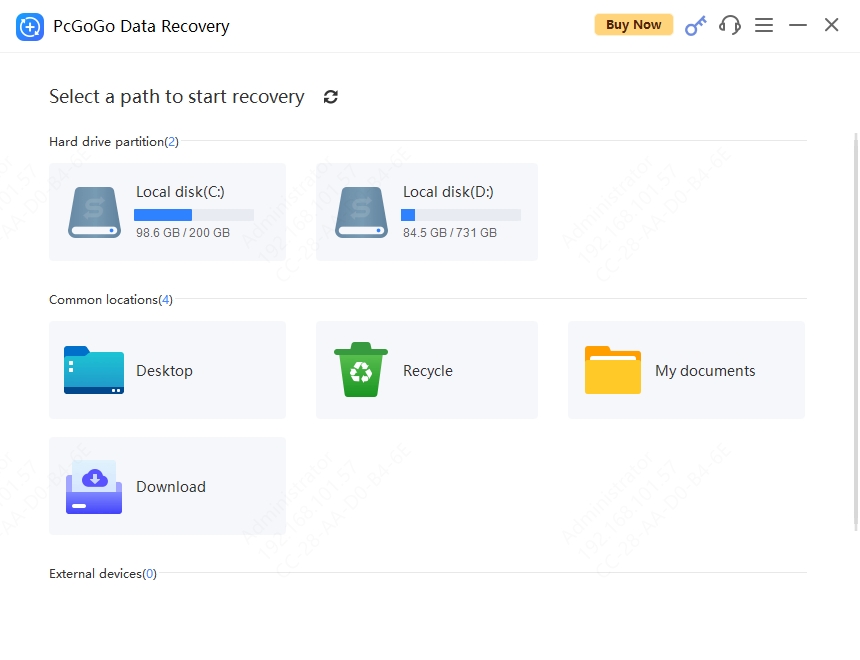
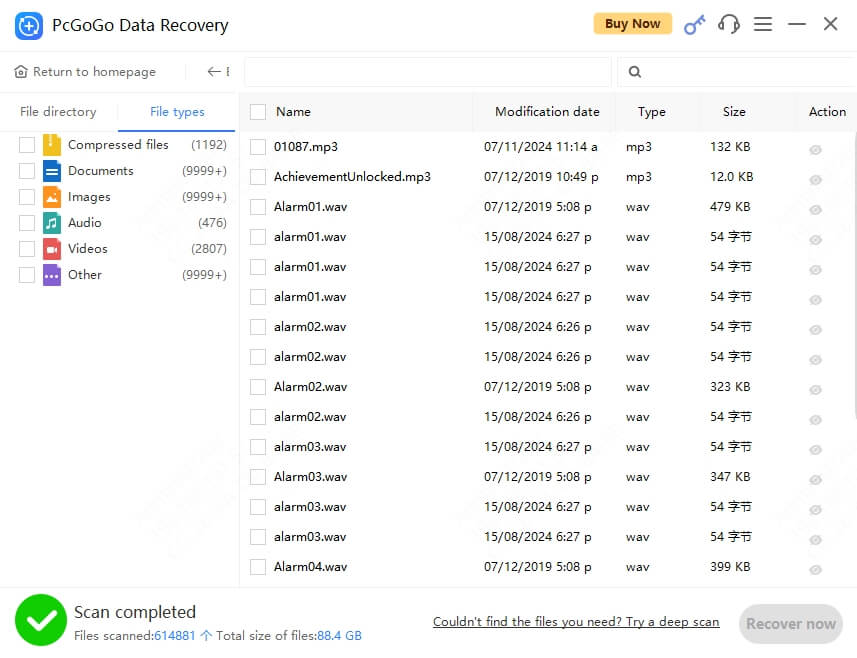
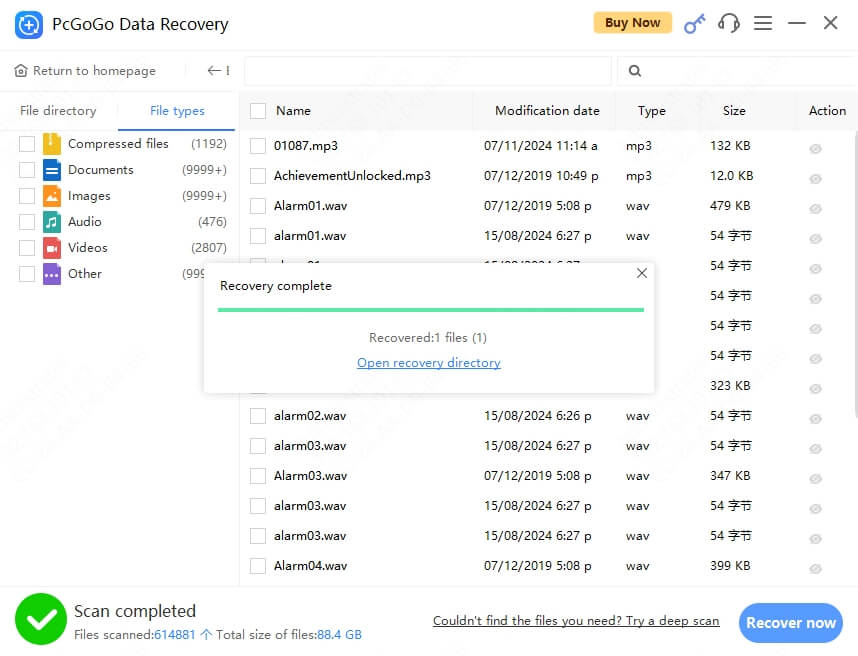
No matter how you lost your files, PcGoGo Data Recovery has you covered.
Recover files removed by mistake, even after emptying the Recycle Bin.
Retrieve data from accidentally or intentionally formatted drives.
Extract files from corrupted or inaccessible hard drives.
Restore files deleted or hidden by malware and ransomware.
Recover data from deleted, lost, or RAW partitions.
Rescue files from damaged or corrupted external storage devices.
Recover files from virtually any Windows-compatible storage media.
JPG, PNG, RAW, TIFF, BMP, GIF, SVG, PSD
MP4, AVI, MOV, MKV, WMV, FLV, M4V
DOCX, PDF, XLSX, PPTX, TXT, HTML
MP3, WAV, FLAC, AAC, WMA, OGG
ZIP, RAR, 7Z, TAR, GZ, ISO
Emails, Databases, and more
Recover lost files with incredibly fast scanning speeds and high success rates.

Quickly identify and repair various types of data corruption with exceptional success rates.
Recover different types of files, including documents, images, audio, and video.

Preview various file formats to quickly confirm lost files and recover important ones.
Secure data recovery algorithms ensure no risk of data leakage or further file loss.
업무 파일, 사진, SD 카드, 실수로 삭제한 데이터 등 다양한 복구 경험을 확인해 보세요.
실수로 삭제한 회의 자료를 빠르게 찾았습니다. 정말 큰 도움이 됐어요!
복구 전에 삭제된 파일을 미리 볼 수 있어 필요한 파일인지 확인하기 편리했습니다.

오래전에 삭제한 파일까지 스캔 결과에서 찾을 수 있었습니다.

지원팀의 도움을 받아 SD 카드의 중요한 데이터를 복구했습니다.

실수로 파일을 삭제해 걱정했지만 필요한 데이터를 다시 찾을 수 있었습니다.

초보자도 쉽게 사용할 수 있을 만큼 과정이 간단하고 이해하기 쉬웠습니다.

무료로 다운로드하여 파일을 스캔, 검색, 미리 볼 수 있습니다. 파일을 실제로 복구하고 저장할 때만 유료 라이선스가 필요합니다.
소프트웨어는 무료로 다운로드할 수 있으며 복구 가능한 파일을 무료로 스캔, 검색, 미리 볼 수 있습니다. 최종 복구 및 저장 단계에는 Pro 라이선스가 필요합니다.
사진, 동영상, 문서, 오디오, 이메일, 압축 파일 등 1,000개 이상의 파일 형식을 지원합니다.
예. 데이터가 덮어쓰이지 않았다면 정밀 스캔 기술로 전체 포맷 후에도 파일을 찾아 복구할 수 있습니다.
예. PcGoGo Data Recovery는 읽기 전용 모드로 작동하며 원본 드라이브에 데이터를 쓰지 않아 추가 데이터 손실 위험을 줄입니다.
빠른 스캔은 몇 초 안에 완료될 수 있습니다. 정밀 스캔은 드라이브 용량과 상태에 따라 몇 분에서 몇 시간이 걸릴 수 있습니다.
예. Windows 11, 10, 8.1, 8 및 7과 호환됩니다.
무료 버전에서는 복구 가능한 파일을 스캔, 검색, 미리 볼 수 있습니다. Pro는 최종 복구 및 저장 기능을 잠금 해제하고 라이선스 유효 기간 동안 업데이트를 제공합니다.
