PcGoGo Data Recovery for Windows

Recover Deleted, Lost, and Formatted Files

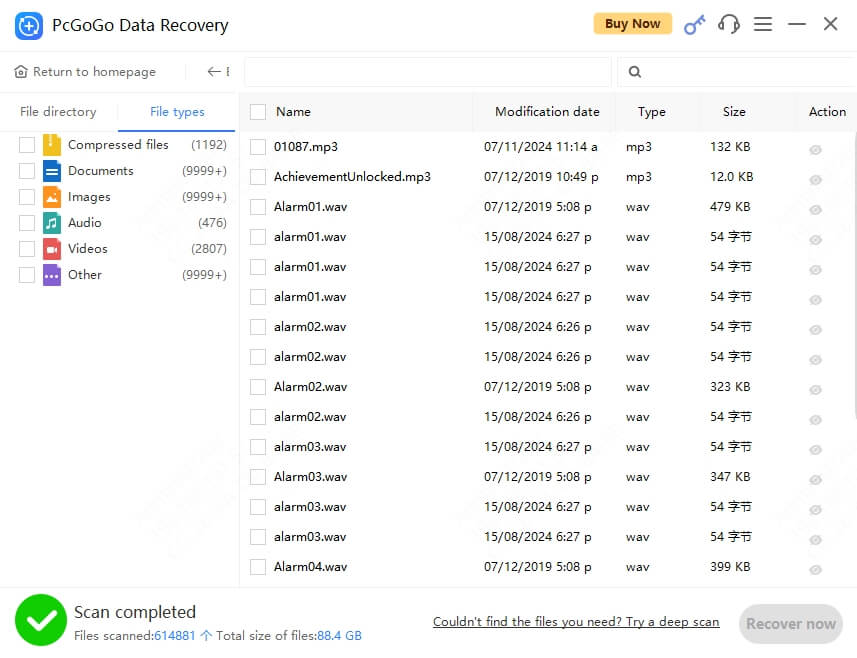
Recover a variety of file types, including documents, images, audio, and videos, to meet diverse user needs.

Utilizes advanced algorithms and cutting-edge data recovery technology to ensure the security and reliability of recovered data, preventing data leaks and further file loss.

1,000+ File Types
2,000+ Devices
99% Recovery Rate
Free Scan & Preview

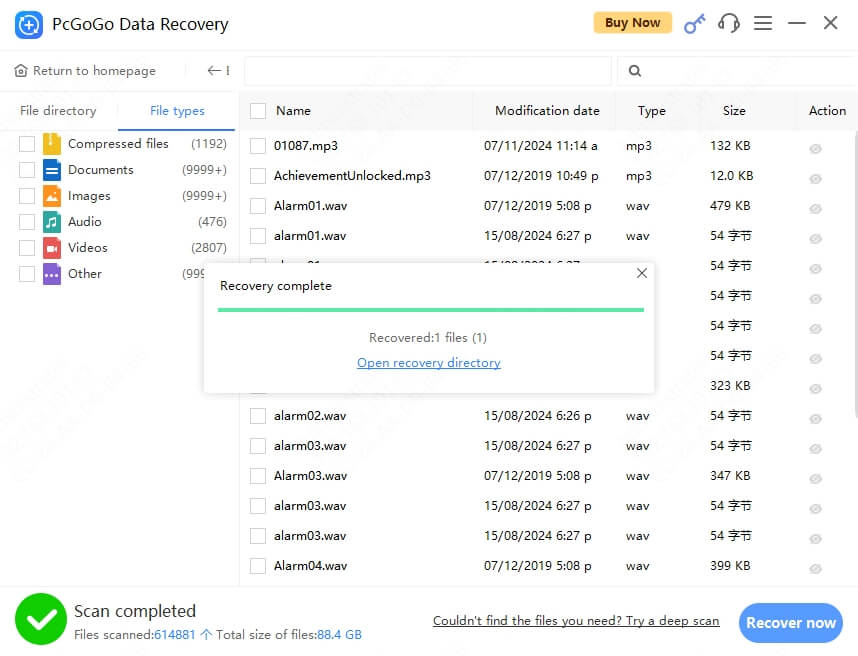
Download, scan, search, and preview files for free. A paid license is required only when you recover and save the files.

★★★★★ 4.8/5 · 12,588 Version: 2.0.1.28 Size: 64.67MB Windows 11 / 10 / 8 / 7

3 Simple Steps to Recover Deleted or Lost Data

1
2
3

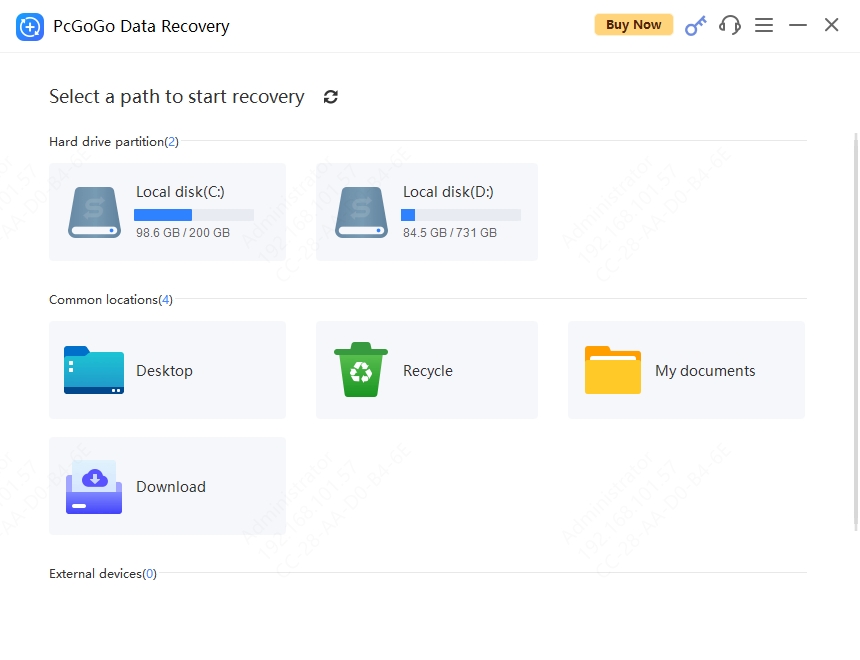
Choose the disk partition or location where the lost files were originally stored.

For external devices (e.g., external hard drives, SD cards, or USB drives), ensure they are stably connected to the computer.

step_1 step_2 step_3

Recover Data in Any Loss Scenario

No matter how you lost your files, PcGoGo Data Recovery has you covered.

Accidentally Deleted

Recover files removed by mistake, even after emptying the Recycle Bin.

Formatted Drive

Retrieve data from accidentally or intentionally formatted drives.

Crashed Disk

Extract files from corrupted or inaccessible hard drives.

Virus Attack

Restore files deleted or hidden by malware and ransomware.

Lost Partition

Recover data from deleted, lost, or RAW partitions.

SD Card / USB

Rescue files from damaged or corrupted external storage devices.

Compatible with All Storage Devices

Recover files from virtually any Windows-compatible storage media.

PC / Laptop
HDD / SSD
USB Flash Drive
SD / CF Card
External Drive
Digital Camera

1,000+ File Formats Supported

Photos

JPG, PNG, RAW, TIFF, BMP, GIF, SVG, PSD

Videos

MP4, AVI, MOV, MKV, WMV, FLV, M4V

Documents

DOCX, PDF, XLSX, PPTX, TXT, HTML

Audio

MP3, WAV, FLAC, AAC, WMA, OGG

Archives

ZIP, RAR, 7Z, TAR, GZ, ISO

Others

Emails, Databases, and more

Advanced Algorithms

Recover lost files with incredibly fast scanning speeds and high success rates.

Efficient Repairs

Efficient Repairs

Quickly identify and repair various types of data corruption with exceptional success rates.

Supports Multiple Formats

Supports Multiple Formats

Recover different types of files, including documents, images, audio, and video.

File Preview

File Preview

Preview various file formats to quickly confirm lost files and recover important ones.

Safe and Reliable

Safe and Reliable

Secure data recovery algorithms ensure no risk of data leakage or further file loss.

What Users Say About Their Recovery

Recovery experiences across work files, photos, SD cards, and everyday accidental deletion.

★★★★★

Recovered my accidentally deleted meeting materials overnight. A lifesaver!

Avery
Teacher
★★★★☆

Previewing deleted files is convenient, but the interface could be more streamlined.

Jordan
Product Manager
★★★★★

Even files deleted ages ago were recovered!

Taylor
Programmer
★★★★★

Amazing! Recovered all my SD card data with the support team's help.

Morgan
Photographer
★★★★★

I was so stressed about accidentally deleting files, but everything was restored.

Alex
Auditor
★★★★★

Super user-friendly for beginners! Easy as pie!

Casey
Intern

Frequently Asked Questions

Download, scan, search, and preview files for free. A paid license is required only when you recover and save the files.

Is PcGoGo Data Recovery free?

The software is free to download and lets you scan, search, and preview recoverable files at no cost. A Pro license is required for the final recovery and saving step.

What file types can be recovered?

PcGoGo Data Recovery supports over 1,000 file formats including photos, videos, documents, audio, emails, archives, and more.

Can I recover files from a formatted drive?

Yes. Our deep scan technology can find and restore files even after a full format, as long as the data has not been overwritten.

Is the recovery process safe for my drive?

Absolutely. PcGoGo Data Recovery operates in read-only mode - it never writes to your source drive, ensuring zero risk of further data loss.

How long does scanning take?

A quick scan takes just seconds. Deep scans vary from minutes to hours depending on drive size and condition.

Does it work on Windows 11?

Yes. PcGoGo Data Recovery is fully compatible with Windows 11, 10, 8.1, 8, and 7.

What is the difference between Free and Pro?

The free version scans, finds, and previews recoverable files. Pro unlocks the final recovery and saving step and includes updates throughout the valid license period.

See Which Files Can Still Be Recovered

Start a free scan and preview the results before deciding whether to activate recovery.

Download, scan, search, and preview files for free. A paid license is required only when you recover and save the files.

This website uses cookies to ensure you get the best experience on our website. Privacy Policy