
If yt-dlp suddenly stops working, fails to download videos, or returns extractor, network, or format-related errors, the problem is often caused by an outdated version, missing FFmpeg components, incorrect command syntax, network restrictions, or changes on YouTube's side. In many cases, the issue can be resolved without reinstalling your entire setup. This guide explains several practical ways to fix yt-dlp not working, including updating the tool, checking FFmpeg, reviewing command syntax, adjusting network settings, changing user-agent or extractor options, and using PcGoGo Video Downloader as a simpler graphical alternative.
Why Is yt-dlp Not Working? (Common Causes)
Before diving into fixes, let's identify why yt-dlp might fail:
Outdated version – YouTube frequently changes its API, breaking older yt-dlp versions.
Network restrictions – Firewalls, VPNs, or ISP blocks can interfere.
Corrupted dependencies – Missing FFmpeg or Python issues.
Incorrect command syntax – Typos or wrong flags in commands.
YouTube's anti-scraping measures – Rate limits or IP bans.
Proven Fixes for yt-dlp Not Working
1. Update yt-dlp to the Latest Version
YouTube frequently updates its structure, so keeping yt-dlp updated is crucial.
How to update: yt-dlp --update
If that fails, manually download the latest version from yt-dlp's GitHub.
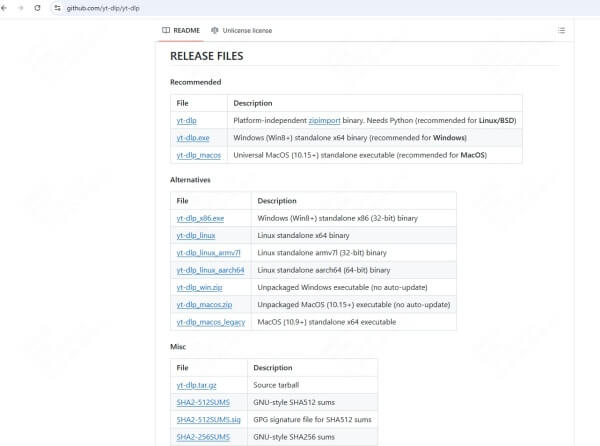
Tip: Set up a scheduled task to auto-update yt-dlp weekly.
2. Check FFmpeg Installation
FFmpeg is required for format conversions (MP4, MP3, etc.).
Verify FFmpeg installation: ffmpeg -version
If missing, install it:
Windows: Download from FFmpeg's site
Linux/macOS: Use sudo apt install ffmpeg or brew install ffmpeg
3. Use a VPN or Proxy (Bypass Geo/IP Blocks)
If YouTube is blocking your IP, switch servers using a VPN or proxy:
yt-dlp --proxy "http://proxy-ip:port" "video-url"
Note: Free proxies may be unreliable—try paid VPNs for better success.
4. Change the Extractor or User Agent
If YouTube detects automation, spoofing a browser user-agent can help:
yt-dlp --user-agent "Mozilla/5.0 (Windows NT 10.0; Win64; x64)" "video-url"
Alternatively, force a different extractor:
yt-dlp --extractor-args "youtube:skip=dash" "video-url"
5. Verify Correct Command Syntax
A simple typo can break the command. Double-check:
✅ Correct:
yt-dlp -f "bestvideo+bestaudio" "https://youtube.com/watch?v=example"
❌ Wrong (missing quotes, wrong flags):
yt-dlp -f best https://youtube.com/watch?v=example
Pro Tip: Use --verbose to debug errors:
yt-dlp --verbose "video-url"
Bonus: Download YouTube Videos with PcGoGo Video Downloader
If yt-dlp keeps failing or you prefer a user-friendly solution, try PcGoGo Video Downloader—a powerful GUI-based tool for downloading YouTube videos offline.
Why Choose PcGoGo Video Downloader?
✔ One-click downloads (no commands needed)
✔ Supports 4K, 8K, 1080p, and MP3
✔ Batch download (multiple videos at once)
✔ Built-in converter (MP4, AVI, MP3, etc.)
✔ Faster & more reliable than CLI tools
How to Use PcGoGo Video Downloader
Download & Install from PcGoGo's official site.
Copy & Paste any YouTube URL.
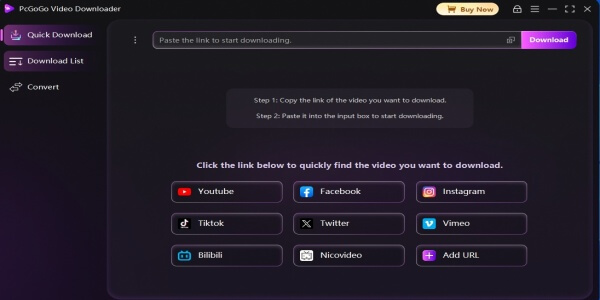
Choose Quality (HD, 4K, MP3).
Click Download—done!
No errors, no coding—just fast YouTube downloads!
FAQs About "yt-dlp Not Working"
1. Why is yt-dlp suddenly not working?
YouTube frequently updates its API, which can break yt-dlp. The most common fix is updating yt-dlp to the latest version using yt-dlp --update.
2. How do I know if FFmpeg is installed correctly?
Run ffmpeg -version in your terminal. If it shows version details, FFmpeg is installed. If not, download it from ffmpeg.org.
3. Does yt-dlp work with private or age-restricted videos?
No, yt-dlp cannot download private or age-restricted videos unless you provide cookies from a logged-in session. Use: yt-dlp --cookies-from-browser BROWSER "video-url"
4. Why does yt-dlp give "Unable to extract video data" errors?
This usually means YouTube has blocked your IP or changed its structure. Try:
Using a VPN
Updating yt-dlp (yt-dlp --update)
Adding --extractor-args "youtube:skip=dash"
5. Is yt-dlp legal to use?
Yes, yt-dlp itself is legal, but downloading copyrighted content without permission may violate YouTube's Terms of Service. Use it responsibly.
Conclusion
If yt-dlp is not working, try updating it, checking FFmpeg, using a VPN, or fixing command syntax. For a hassle-free experience, switch to PcGoGo Video Downloader—it's easier, faster, and error-free.