
Many users want to download interesting Facebook videos to their local devices for convenient offline viewing. However, they may encounter watermark issues that affect video quality and viewing experience. This article introduces several effective methods to help you download high-quality, watermark-free videos.
1. Using a Video Download Tool
The simplest and most efficient way is to use a professional video download tool. These tools not only download Facebook videos but also remove watermarks. It's recommend to use PcGoGo Video Downloader, which supports batch downloads, saving you time and effort.
Steps to Use:
Visit the official website of PcGoGo Video Downloader or click the download button to get the latest installation package. Click "Try it free" to download and install it.
Once installed, open the software to start using it.
Find the video you want to download, click the share button, and select "Copy link".
Click the "Download" button, and the software will analyze the video.
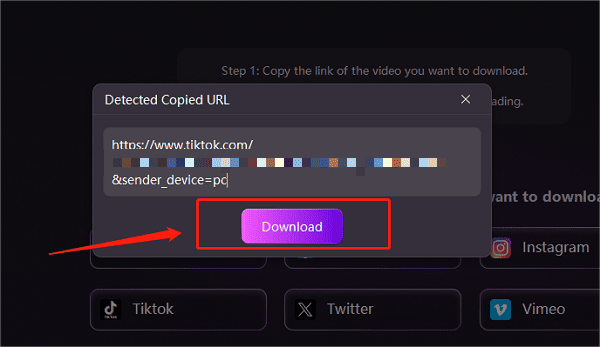
For a single video link:
Open PcGoGo Video Downloader and paste the copied video link into the search box.
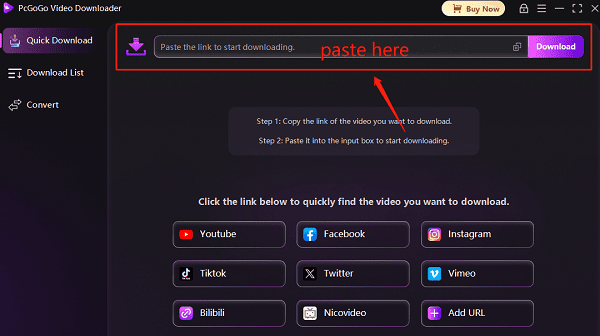
The software will automatically recognize the link and prepare it for download.
Once analyzed, select the storage location, then click "Download" to start downloading.
For multiple video links:
If you need to download multiple videos, paste multiple video links into the text box, pressing Enter after each link.
Select the storage location, video format (such as MP4), and resolution to ensure high-quality downloads.
Click "Download" to start batch downloading.
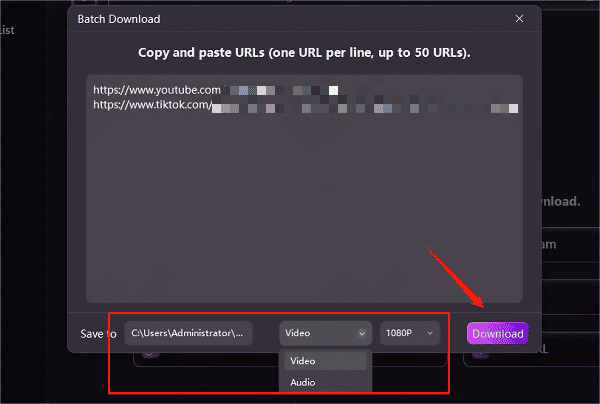
Once the download is complete, you can find the saved videos in the "Downloaded" section. You can also check the video format, size, and duration.
2. Using a Browser Extension
Some browser extensions can also help users download Facebook videos and remove watermarks. However, due to security policies of certain video platforms, some extensions may not work properly. Additionally, some extensions may require access to browser data, so be cautious and ensure your privacy is protected.
Steps to Use:
Open the Chrome or Edge browser and go to the extension store.
Search for a reliable Facebook video downloader extension with high ratings and install it.
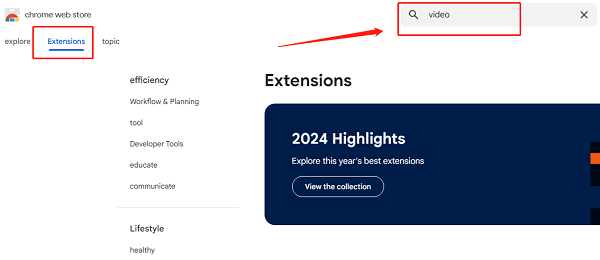
Open Facebook and play the video you want to download. Click the extension icon in the browser toolbar.
Choose the watermark-free download option and save the video.
3. Using Online Video Download Tools
Online video download websites are another common way to save Facebook videos. However, these websites may be unstable, contain ads, or have slower download speeds.
Steps to Use:
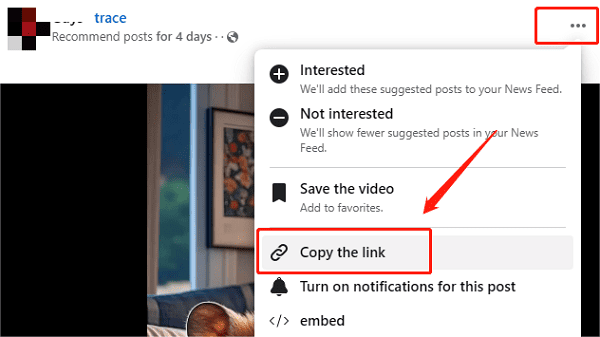
Find the video on Facebook, click "Share", and copy the video link.
(Image source: Facebook)
Visit a trusted online video downloader.
Paste the video link into the input box on the homepage.
Click the "Download" button and choose the "Watermark-Free Download" option.
The video will start downloading and be saved to your device.
Note: Online tools may contain ads, so avoid clicking on unnecessary pop-ups.
4. Important Considerations
Respect Copyrights: When downloading videos, always respect the rights of content creators. Downloaded videos should be for personal use only and not redistributed or used for commercial purposes without permission.
Avoid Illegal Tools: Do not use unreliable or illegal download tools, as they may contain malware or compromise your personal information.
Use Trusted Sources: Always choose reputable tools and websites to ensure safe and watermark-free downloads.
By following these methods, you can easily remove watermarks when downloading Facebook videos and enjoy a clearer, uninterrupted viewing experience. Select the method that best suits your needs to improve video quality and optimize your downloading process, making it easier to save your favorite video content.
See also:
Easy Way to Save YouTube Videos to Your PC
How to Fix YouTube Video Download Failure