
Downloading your TikTok videos individually can be time-consuming, especially when you need to back up an entire profile or manage a large content library. Online downloaders may also introduce watermarks, intrusive ads, limited formats, or reduced video quality. PcGoGo Video Downloader provides a faster solution by allowing you to batch-download your own or authorized TikTok videos in high quality, convert them to MP4 or MP3, and save them without watermarks. This guide explains how to download multiple TikTok videos at once and organize the files for backup, editing, or offline viewing.
Step-by-Step Guide
Install and Launch PcGoGo Video Downloader
Download PcGoGo Video Downloader from the official website
Install the software and open it
The interface is simple and user-friendly, suitable for beginners and advanced users alike
Copy Link
Open TikTok and copy the link of your video
Paste the profile URL into PcGoGo Video Downloader's download bar
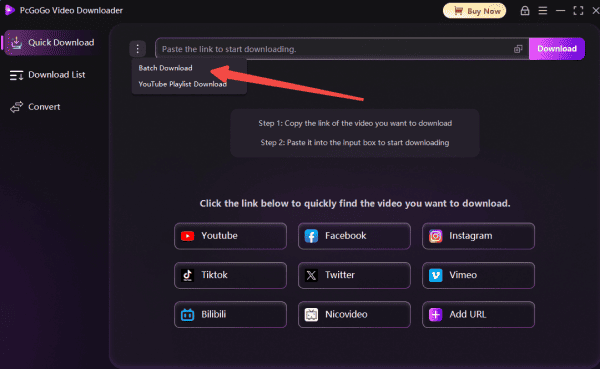
Select All Videos
Choose the "Download All"
PcGoGo Video Downloader will automatically parse the list of videos for batch downloading
Choose Output Format
Select your preferred format: MP4 for video, or MP3 if you want audio only
Adjust resolution settings if needed (HD, 4K, or 8K)
Start the Download
Click the Download button to begin batch processing
You can monitor progress in the download list
PcGoGo Video Downloader will quickly download and convert all selected videos

Access and Manage Your Videos
Once the download is complete, check the download list
Organize your videos or audio files as needed
You can now backup, edit, or share your content offline
Tips for Managing and Organizing Downloaded TikTok Videos
Create a Clear Folder Structure: Set up a simple folder structure so you can quickly locate your downloaded TikTok videos. Organize them by year, content type, or purpose—whichever matches your workflow best—to keep everything easy to browse
Rename Files for Easy Searching: Rename your videos with meaningful titles instead of keeping default filenames. Use dates, topics, or short descriptions to make searching easier, or use batch-renaming tools to speed up the process
Use a Separate "Editing" Folder: Keep your workflow organized by separating downloaded, to-edit, completed, and ready-to-publish videos into different folders. This prevents clutter and helps you manage projects more efficiently
Conclusion
Downloading all your TikTok videos at once doesn't have to be complicated or time-consuming. With PcGoGo Video Downloader, you can save your entire TikTok library in just a few clicks, without dealing with watermarks, slow speeds, or limited formats. Its batch downloading, multi-platform support, high-speed parsing, and flexible format conversion make it an ideal tool for creators, influencers, and anyone who wants to back up or reuse their TikTok content. Whether you need your videos for editing, archiving, or offline viewing, PcGoGo Video Downloader offers a fast, professional, and reliable solution that simplifies the entire process.