
Google Drive is a commonly used cloud storage tool for daily office work, study, and entertainment. Many users upload videos to Google Drive for backup or sharing. This article introduces several simple and practical methods to help you easily download videos from Google Drive.
1. Downloading via Google Drive Web
This method is suitable for downloading individual or small files.
Steps to Use:
Open your browser and visit the Google Drive official website.
Log in to your Google account.
Find the video you want to download.
Right-click the video and select "Download".
Wait for the download to finish, and the file will be saved to your default downloads folder.
✅ Applicable Scenario:
Downloading videos from your own account or videos shared via public links by others.
2. Downloading via Shared Link
If you have received a shared Google Drive video link, you can follow these steps:
Steps to Use:
Click the shared link to open the Google Drive video preview page.
Click the "Download" button (downward arrow) in the top right corner.
The system will automatically download the video file to your computer.
⚠️ Note:
If the link has permission restrictions (e.g., "View only"), you will need to obtain authorization from the owner to download the video.
Some large videos may display a "Preview unavailable" message, but you can still click "Download anyway" to proceed.
3. Using Professional Video Download Tools
The most convenient and efficient method is to use a professional video download tool, such as the PCGoGo Video Downloader. This software is compatible with over 10,000 video platforms and can easily download various HD video content.
Steps to Use:
Click the download button in this article to download and install the software.
Select the video you want to download, click the share button, and select "Copy Link". The link will be saved to your clipboard.
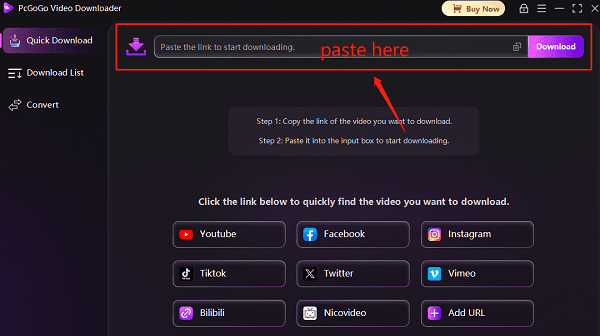
Open the PCGoGo Video Downloader, paste the copied video link into the input box, and click the "Download" button. The software will automatically detect the video and provide download options.
Before downloading, choose the video format (e.g., MP4) and resolution (supports 720p, 1080p, and even 4K). After selecting the desired options, click "Download".
If you have multiple videos to download, you can paste multiple links into the software, which supports batch downloading, saving you time.
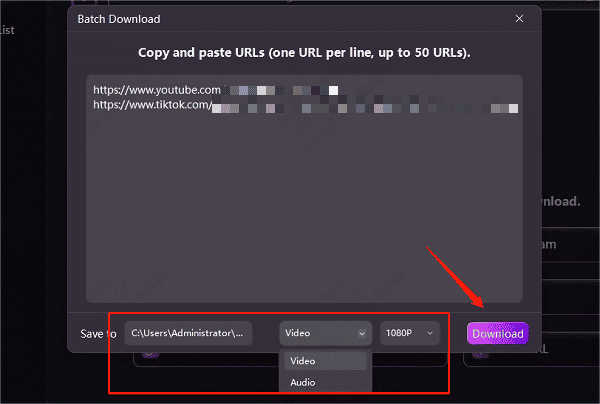
Once downloaded, you can choose to save the video to a specific folder for easy viewing and sharing.
✅ Features:
Supports batch downloads, easy to use, and compatible with mainstream formats.
Ad-free and watermark-free, ensuring video quality.
Built-in format conversion function for exporting to different devices.
4. Downloading Using Mobile Devices
If you want to download Google Drive videos on your phone or tablet, follow these steps:
Steps to Use:
Open the Google Drive app.
Find the video you want to download.
Tap the three dots in the top right corner (more options).
Select "Download" or "Save to device".
Downloading videos from Google Drive is actually quite simple. Whether you're using the web version or the mobile app, you can easily complete the download task. If you often need to download and manage video files, it's recommended to install the PCGoGo Video Downloader to improve your video downloading efficiency.
See also:
6 Fully Working Full HD Movie Download Sites Recommended
Free Web Series: 5 Great Download Sites