The graphics card driver is responsible for communication between the operating system and the graphics card. If there are issues with your graphics card, it may result in game stuttering, image distortion, or screen flickering. Here are some steps to fix graphics card driver issues and help you resolve related problems.
1.Identify the Problem
Before starting the fix, first confirm whether the problem is indeed caused by the graphics card driver. You can check this by:
Checking the Device Manager:
Right-click on "My Computer" or "This PC", select "Manage," and then go to "Device Manager". Under "Display Adapters", check if there is a yellow warning sign next to the graphics card.
Running the game or software:
If the issue occurs only with specific applications, consider whether that software needs an update.
2.Update the Driver
Updating the driver can resolve many issues. You can use a specialized driver management software, such as "Driver Sentry", to perform the update, following these steps:
1). Click the download button to get the latest version of Driver Sentry. After installation, open the software and click "Scan".
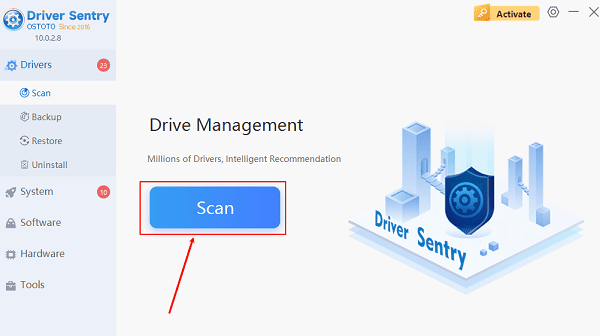
2). Once the scan is complete, it will display any drivers that are not installed or need updating. Find the graphics driver in the results list and click the"Update"button.
3). After the update is complete, it is recommended to restart your computer to ensure the new drivers are properly applied.
3.Rollback the Driver
If you encounter problems after updating the driver, you can try rolling back to the previous version:
Open Device Manager and find your graphics card.
Right-click and select"Properties".
In the "Driver" tab, select "Roll Back Driver".
4.Uninstall and Reinstall the Driver
If updating and rolling back do not resolve the issue, you can try completely uninstalling the driver and then reinstalling it:
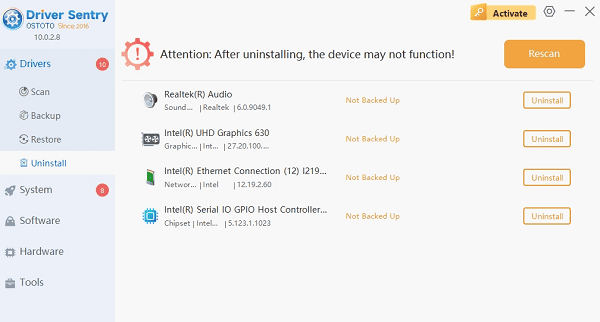
Driver Sentry is a professional computer driver management software that not only allows you to download and install drivers but also supports driver uninstallation and backup. The steps are as follows:
click on the Drivers-Uninstall page and select Graphics Card Drivers to uninstall.
5.Check for Hardware Issues
If the problem persists, it may be a hardware failure with the graphics card. Consider the following actions:
Check the graphics card connection: Ensure that the graphics card is properly connected to the motherboard.
Try different slots: If the motherboard has multiple graphics card slots, try changing to a different slot.
Test on another computer: If possible, insert the graphics card into another computer to check if it works properly.
More information about computer problem solving can be found on the OSTOTO website.
See also:
What is a computer graphics driver?graphics driver Download
How do I update my graphics drivers? Method introduction
How much will the RTX 4090 be? rtx 4090 specs
How do you update graphics card drivers