
Pinterest videos can contain useful tutorials, creative ideas, recipes, and project inspiration that you may want to view without an internet connection. Because Pinterest does not always provide a direct download option, saving permitted content can require a dedicated tool. This guide explains how to download individual or multiple Pinterest videos with PcGoGo Video Downloader, select the preferred format and quality, and organize the saved files efficiently.
Download Pinterest Video Using PcGoGo Video Downloader
Step 1: Install PcGoGo Video Downloader
Download the software from the official PcGoGo Video Downloader website
Install and launch the program
Step 2: Copy the Pinterest Video Link
Open Pinterest and locate the video you want to save
Copy the video link from the address bar or share option
Step 3: Paste the Link Into PcGoGo Video Downloader
Open PcGoGo Video Downloader and paste the URL into the download bar
The software will automatically analyze the video and display available download options
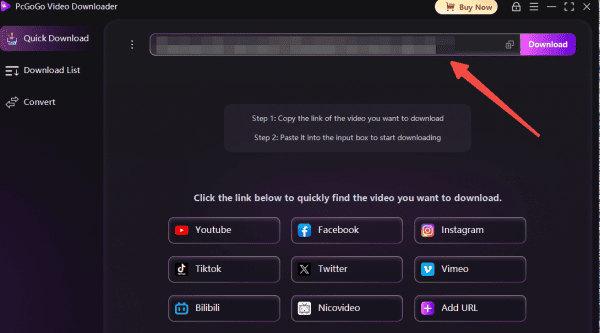
Step 4: Choose Format and Quality
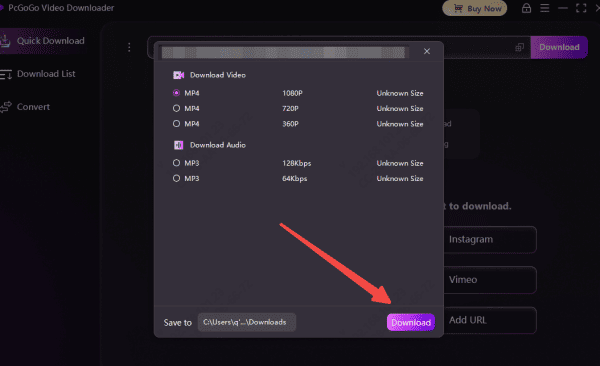
Select MP4 for video or MP3 if you only need the audio
Choose your preferred resolution
Step 5: Start Downloading
Click the Download button to begin the process
Monitor the download progress in the software's download list
Batch Download Pinterest Videos Using PcGoGo Video Downloader
Step 1: Copy the Pinterest Video Links
Open Pinterest and locate the videos you want to save
Copy the video links from the address bar or share option
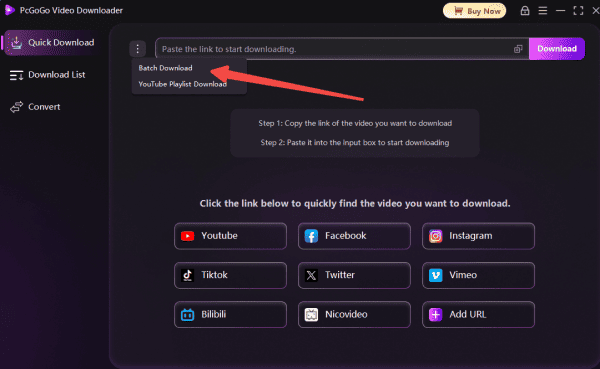
Step 2: Paste all the Link Into PcGoGo Video Downloader
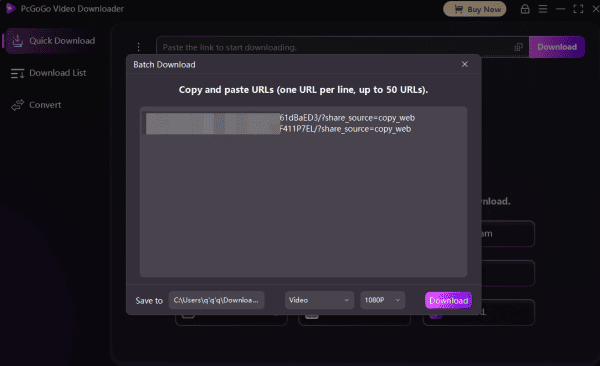
Open PcGoGo Video Downloader and paste all the URL into the download bar
The software will automatically analyze the video and display available download options
Step 3: Choose Format and Quality
Select MP4 for video or MP3
Choose your preferred resolution
Step 4: Start Downloading
Click the Download button to begin the process
Monitor the download progress in the software's download list
Key Features of PcGoGo Video Downloader for Pinterest
Multi-Platform Support: Download videos from Pinterest, Instagram, TikTok, YouTube, X, Facebook, and more—all in one tool
Watermark-Free Downloads: Save clean videos that are ready for editing, sharing, or presentation
Flexible Format Conversion: Convert videos to MP4 or extract audio as MP3
Batch Downloading: Download multiple pins or entire boards at once
High-Speed Parsing: Optimized engine ensures quick downloads without long waits
User-Friendly Interface: Easy for beginners and advanced users alike
Tips for Managing Downloaded Pinterest Videos
Create a Master Folder: Store all downloads in one central location for easy access
Use Subfolders: Organize by topic, board, or project purpose (e.g., Tutorials, DIY, Inspiration)
Rename Files: Use clear, descriptive names such as YYYY-MM-DD_BoardName_VideoTitle.mp4
Backup Content: Use cloud storage or external drives to prevent data loss
Important Notes
Respect Copyright: Only download videos that you have permission to use or that are free to use
Ensure a Stable Internet Connection: Reliable network speeds prevent interruptions and reduce download time
Check Available Storage: High-resolution videos can occupy significant space, so ensure your device has enough storage
Keep PcGoGo Video Downloader Updated: Software updates improve compatibility and performance
Conclusion
Downloading Pinterest videos doesn't have to be slow or complicated. With PcGoGo Video Downloader, you can quickly and reliably save high-quality videos without watermarks. Its batch downloading, flexible format conversion, high-speed parsing, and metadata preservation make it an excellent solution for content creators, hobbyists, and anyone who wants to save videos for offline use, editing, or archiving. By following these steps and organizing your downloads properly, you can enjoy Pinterest videos anytime, anywhere.