
Losing important data from your hard disk is one of the most stressful moments a computer user can face. Whether it happens because of accidental deletion, sudden formatting, a system crash, file system corruption, or a failing drive, the anxiety of thinking your files are gone forever is overwhelming. The good news is that in the majority of cases, your data is still physically present on the disk and can be recovered — as long as you act quickly and stop writing new data to the affected drive. This guide explains how hard disk data recovery works, which situations are recoverable, what mistakes you must avoid, and how to restore your files safely using PcGoGo Data Recovery.
Why Files Can Be Recovered After Deletion or Formatting
When you delete a file or format a partition, your operating system does not immediately erase the actual data stored on the disk Instead, it simply marks the space occupied by that file as "available" in the file system index
The raw data remains physically on the drive until that space is overwritten by new files
Step-by-Step: How to Recover Data from Hard Disk
PcGoGo Data Recovery is designed to handle all the scenarios described above without requiring any technical expertise. The software performs a read-only scan, which means it never modifies, overwrites, or risks your existing data during the process.
Step 1: Download and Install PcGoGo Data Recovery
Visit the official PcGoGo Data Recovery website and download the latest version of the software
Install it on a drive that is different from the one where you lost your files
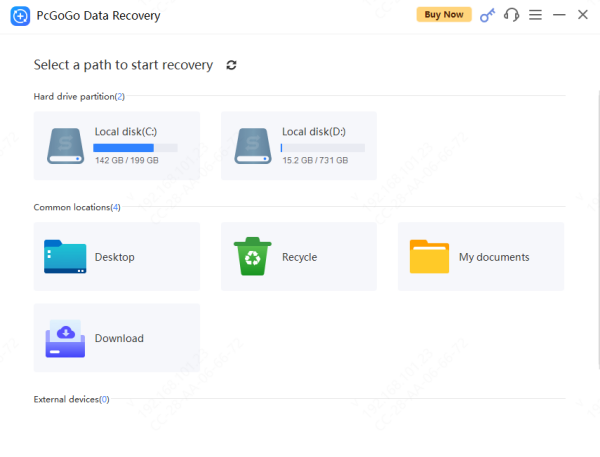
Step 2: Select the Affected Disk or Partition
The main screen will display all drives and partitions currently detected on your system, including internal HDDs, SSDs, external drives, and removable media
Select the disk or partition where your lost files were originally stored
Step 3: Scan for Lost Files
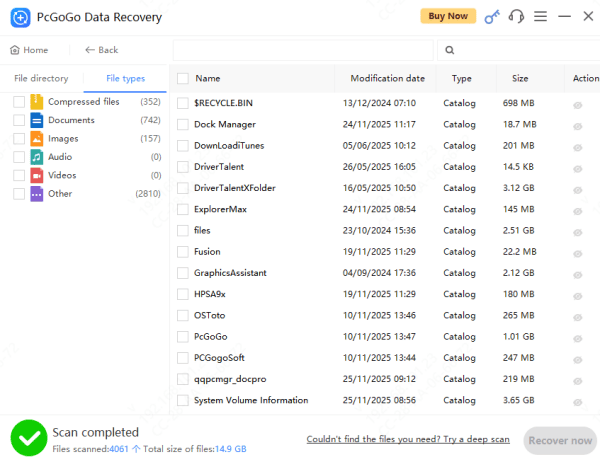
Click Scan to begin the analysis. For recently deleted files, a standard scan is usually fast and sufficient
During the scan, you can use file type filters or keyword search to narrow down results and locate specific files more efficiently
Step 4: Preview the Recovered Files
Before restoring anything, use the built-in preview function to verify the content and condition of individual files
You can preview photos, PDFs, Microsoft Office documents, videos, and audio files directly within the software
Step 5: Recover and Save Your Files to a Safe Location
Select the files you want to restore, then click Recover
Choose a save location that is on a different drive than the one you are recovering from
Critical Mistakes That Kill Your Chances of Recovery
Do not continue using the affected drive
Do not install PcGoGo Data Recovery on the same drive you are trying to recover
Do not run CHKDSK or other disk repair tools before attempting data recovery
Do not defragment the affected drive
Do not format the drive a second time thinking it will help. It will not
Conclusion
Recovering data from a hard disk is achievable in most situations, provided you act quickly, stop using the affected drive, and use the right recovery tool. PcGoGo Data Recovery gives you a safe, non-destructive way to scan your disk, preview your lost files, and restore them without technical expertise. Whether your data was deleted, your partition was formatted, or your drive is corrupted, the step-by-step process outlined in this guide gives you the best possible chance of a full recovery. Once your files are restored, implementing a consistent backup strategy is the most effective way to ensure you never lose important data again.