With the continuous development of social media platforms, Rednote, as an emerging streaming platform, has gained increasing attention from content creators and viewers.
Compared to platforms like TikTok and Instagram, Rednote not only offers a unique way to display content but also focuses on enhancing interactivity and strengthening the connection between creators and their audiences. To help you gain more exposure on the Rednote platform, this article will share some effective video uploading tips that will help you easily increase your video visibility and interaction rates.
1. Understand Rednote's Upload Requirements
Before uploading your video, it's important to familiarize yourself with Rednote's video upload requirements. This will not only help you avoid issues with video formats that are incompatible but also ensure that your video is successfully uploaded and performs well.
1.1 Video Format and Size
Rednote supports common video formats such as MP4 and MOV. To ensure smooth uploading, it is recommended to use MP4 format because it is highly compatible and allows for smaller file sizes, which are ideal for faster uploads.
Additionally, there are file size limitations. Try to keep your video file size within a reasonable range to avoid slow uploads or failures due to oversized files. In general, video file sizes should not exceed 500MB to ensure a smooth upload process.
1.2 Video Resolution
Rednote supports high-definition video uploads. However, to ensure smooth playback and quality, it is recommended to set the video resolution to 720p or 1080p. Higher resolutions may increase file sizes, leading to slower uploads and potentially affecting the viewer's experience.
1.3 Video Length
While Rednote does not impose strict limits on video length, shorter and more concise videos tend to capture the attention of viewers more effectively. It is recommended to keep your video length between 1-3 minutes to ensure the content is refined and easy to watch.
2. Cross-Platform Video Uploading
Some users may prefer to share video content across multiple platforms. For TikTok users, for example:
2.1 Download TikTok Videos for Rednote
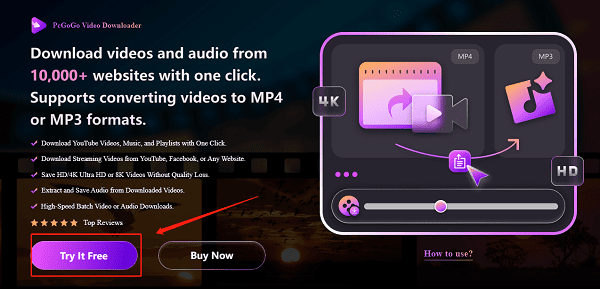
To share TikTok videos on Rednote, you can first download the content using a tool like PcGoGo Video Downloader.
Download PcGoGo Video Downloader: Click the download button or visit the official website to download and install the software.
Copy the video link: Open TikTok, find the video you want to download, click the share button, and copy the video link.
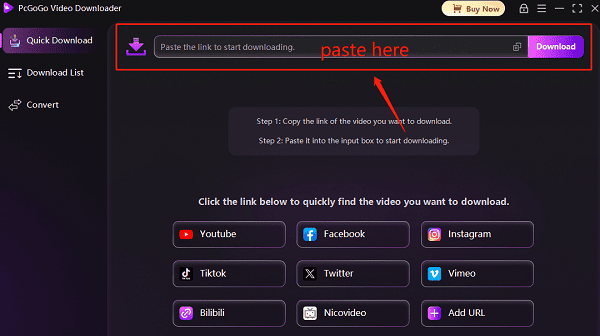
Paste the link and download: Paste the copied link into the download box of PcGoGo Video Downloader (the software will typically recognize the link automatically). Click the "Download" button, select the save format (such as MP4), and begin downloading the watermark-free video. If you want to download multiple videos, you can select batch download to save multiple videos.
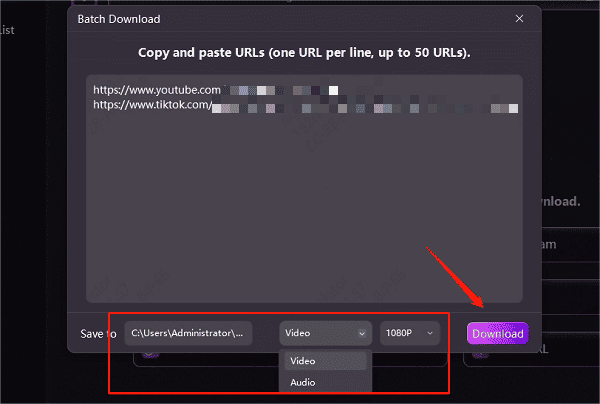
By following these steps, you can easily download high-quality, watermark-free TikTok videos for later uploading to Rednote.
3. Tips for Improving Video Content Quality
On Rednote, the quality of your video content directly impacts its view count and interaction rates. Here are some tips to improve your video quality:
3.1 Creative Content and Clear Themes
Whether short or long, creative content is the key to attracting viewers. Ensure that your video content is unique and interesting enough to spark the viewer's interest. Additionally, make the theme of the video clear so that viewers can quickly understand the main point, improving their overall viewing experience.
3.2 Optimize the Video Introduction
Studies show that the first 5 seconds of a video are crucial for attracting viewers. Ensure that the opening of your video is engaging. You can use attention-grabbing titles, compelling visuals, or humorous elements to catch the viewer's eye.
3.3 Good Editing and Visual Effects
When creating videos, focus on maintaining smooth editing. Avoid long, irrelevant shots and ensure the pacing of the video is appropriate. Moreover, use visual effects like filters, transitions, and subtitles wisely to enhance the video's visual appeal and improve the viewer's experience.
3.4 Add Background Music Appropriately
Background music can elevate the atmosphere of the video and enhance viewer engagement. Choose music that complements the video content and avoid overly monotonous or distracting music. Rednote provides a music library from which you can select suitable background tracks.
Successfully uploading videos on Rednote and increasing their exposure requires attention to both the quality of the video content and optimization of the upload process. By following the above methods, you can easily enhance the visibility and interaction of your videos.
We hope the video uploading tips provided in this article help you manage your content more effectively and attract a wider audience, making your creative journey on Rednote smoother.
See also:
Steps to Download TikTok Videos and Share on Other Platforms