
LinkedIn has become a valuable platform for professionals, businesses, and creators to share insights, tutorials, webinars, product demos, and industry updates. With video content playing an increasingly important role, many users want to save LinkedIn videos for offline viewing, training, presentations, or personal archives. However, LinkedIn does not provide a direct download option for most videos. In this guide, we'll explain how to download LinkedIn videos step by step using PcGoGo Video Downloader, helping you save videos efficiently while maintaining quality.
Rules about LinkedIn Video
LinkedIn places certain restrictions on video downloads to protect content privacy and intellectual property
Most public posts don't offer a download button. Screen recording is an option, but it requires extra steps and often results in reduced quality
Download LinkedIn Videos
Downloading LinkedIn videos with PcGoGo Video Downloader is simple and efficient. Follow these steps:
Step 1: Install PcGoGo Video Downloader
Visit the official PcGoGo Video Downloader website, download the latest version of the software, install it, and launch the program
Step 2: Copy the LinkedIn Video URL
Open LinkedIn, navigate to the post containing the video, and copy the video link from the browser address bar or the Share menu
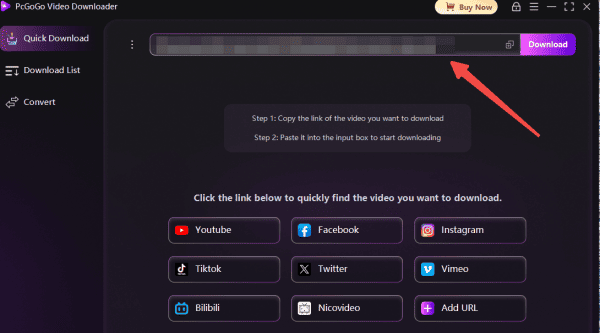
Step 3: Paste the Link Into PcGoGo Video Downloader
Open PcGoGo Video Downloader and paste the copied link into the download bar. The software will automatically analyze the video
Step 4: Choose Format and Quality
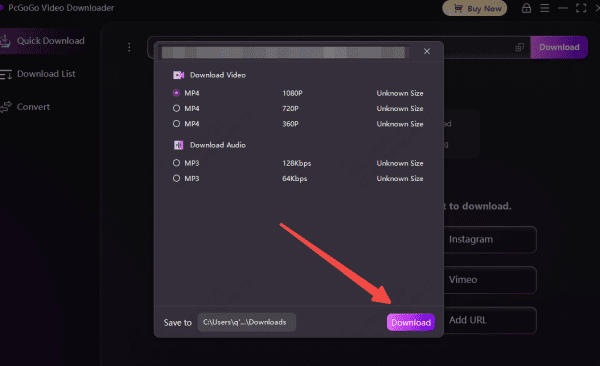
Select MP4 for video or MP3 if you only need the audio
Then choose the available resolution based on the video source
Step 5: Start Downloading
Click the Download button. PcGoGo Video Downloader will begin processing the file, and you can monitor progress in the download list
Step 6: Access and Manage Your Files
Once the download is complete, open your file location to watch, edit, or store the video as needed
Legal and Privacy Considerations
When downloading LinkedIn videos, always respect the platform's guidelines and intellectual property laws
Do not repost, redistribute, or reuse someone else's video without receiving explicit permission from the creator or company Download videos primarily for personal or approved organizational use
Using safe tools ensures you avoid malware, privacy risks, or unauthorized data collection
Conclusion
Downloading LinkedIn videos can be incredibly useful for learning, training, research, and professional development. While LinkedIn's native download options are limited, reliable methods such as PcGoGo Video Downloader make it easy to save high-quality videos quickly and safely. By following the steps outlined in this guide and respecting copyright rules, you can build a valuable offline library of LinkedIn content for both personal and professional use.