Downloading Twitch videos can be useful when you want to watch streams offline, save your own broadcasts, archive clips, or keep important content for later viewing. Twitch provides an official download option for creators saving their own VODs, but viewers have more limited built-in choices. This guide explains how to download Twitch videos using Twitch's official tools and PcGoGo Video Downloader, including how to copy video links, choose MP4 or MP3 formats, select video quality, download individual VODs or clips, and process multiple Twitch links in batches while keeping copyright and usage restrictions in mind.
Official Ways to Download Twitch Videos
Twitch provides a built-in download function, but it is only available for streamers who want to save their own VODs. Viewers cannot directly download videos from the platform.
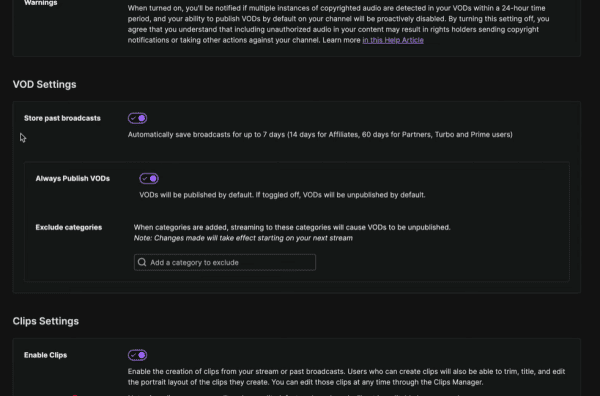
Enable VOD storage in Twitch settings
Go to your Creator Dashboard, open the Content menu, and select Video Producer
Find your past broadcast and click the download option
This method works only for your own content, and VODs expire after a limited time unless you are a Twitch Partner.
Download Twitch Videos Using PcGoGo Video Downloader
Follow these steps to save any Twitch VOD, clip, or broadcast.
Step 1: Install PcGoGo Video Downloader
Download PcGoGo Video Downloader from the official website
Install the program on your computer and open it
Step 2: Copy the Twitch Video Link
Open Twitch in your browser
Visit the VOD or clip page you want to download
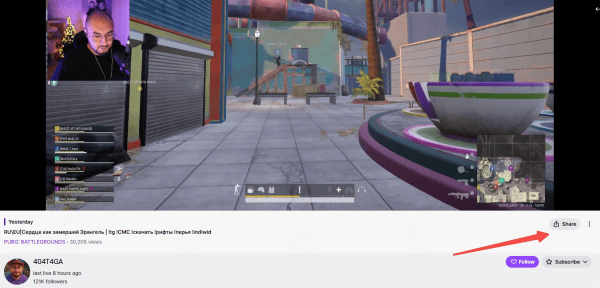
Copy the URL from the address bar or the Share button
Step 3: Paste the Link Into PcGoGo Video Downloader
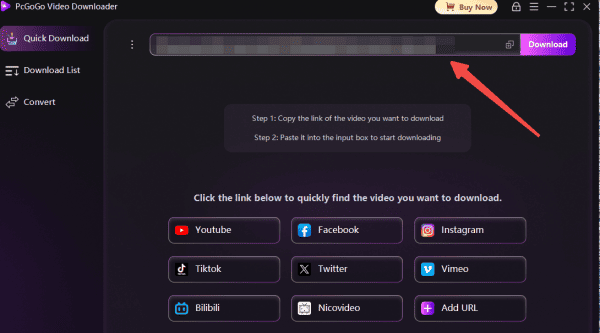
Open PcGoGo Video Downloader and paste the copied Twitch link into the download bar
The software will analyze the link and prepare available download options
Step 4: Choose Format and Quality
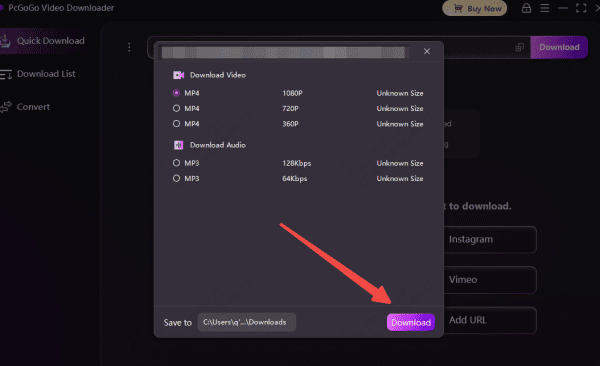
Select MP4 for video or MP3 if you only want audio
Choose available resolutions such as 720p, 1080p, or higher depending on the source stream
Step 5: Start Downloading
Click the download button to begin
PcGoGo Video Downloader will merge audio and video automatically
Monitor the progress in the download list
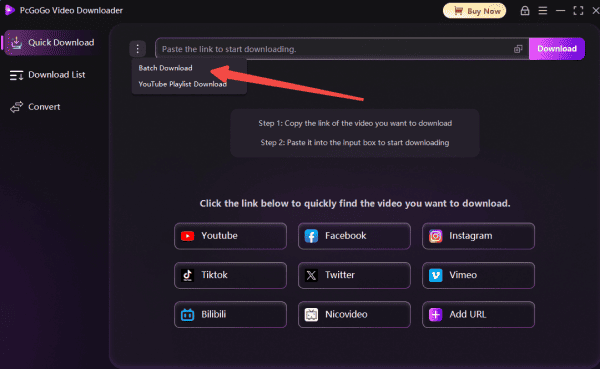
Batch Download Twitch Videos Using PcGoGo Video Downloader
If you have multiple Twitch links, you can download them all at once.
Step 1: Copy Multiple Twitch URLs
Browse Twitch and copy links for all videos or clips you want to save
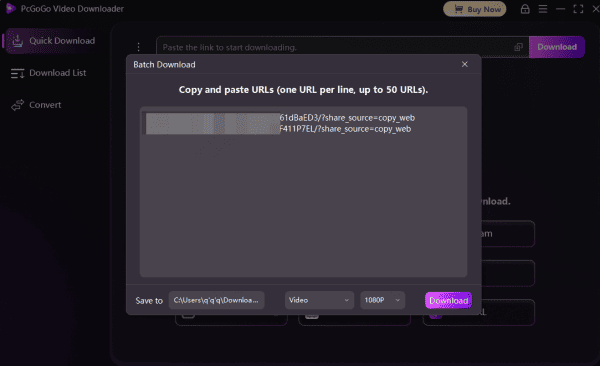
Step 2: Paste All Links Into PcGoGo Video Downloader
Open PcGoGo Video Downloader and paste every link into the download bar together
The tool will analyze each one separately
Step 3: Choose Formats and Resolutions
Select MP4 or MP3
Pick your preferred resolution for each file
Step 4: Start Batch Downloading
Click the download button
PcGoGo Video Downloader will process all videos efficiently and list them as they finish
Important Notes
Downloading others' Twitch content for redistribution or commercial use may require permission
Always follow copyright rules
Avoid downloading or re-uploading restricted or copyrighted media
Ensure you have enough storage space, especially since Twitch VODs can be very large. Use a stable internet connection to avoid interrupted downloads
Downloading videos from Twitch is simple when using the right tools. While Twitch's official option works only for streamers saving their own VODs, PcGoGo Video Downloader provides a fast, clean, and flexible way for anyone to download Twitch videos, clips, and streams in high quality. With features like batch downloading, watermark-free output, high-speed parsing, and multiple format options, PcGoGo Video Downloader makes it easy to save Twitch content for offline viewing, archiving, editing, or personal use.