Hard drive data loss can happen unexpectedly due to accidental deletion, formatting, system crashes, malware, or hardware problems. Fortunately, many lost files can still be recovered if you take the right steps and avoid overwriting the data. This guide explains the common causes of hard drive data loss and shows beginners how to recover deleted or lost files safely using PcGoGo Data Recovery, along with tips to prevent future data loss.
How to Recover Data from a Hard Drive
Step 1: Install PcGoGo Data Recovery
Don't install the software on the same drive from which you're trying to recover data, as this could overwrite the files you want to recover
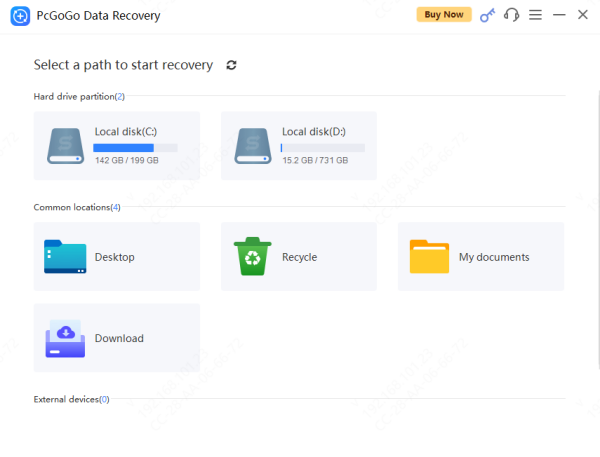
Step 2: Select the affected hard drive
Open the software and select the hard drive where the data was lost
If it's an external drive, make sure it's connected properly
Step 3: Run a scan
Use Scan to find recently deleted files
Step 4: Preview the files
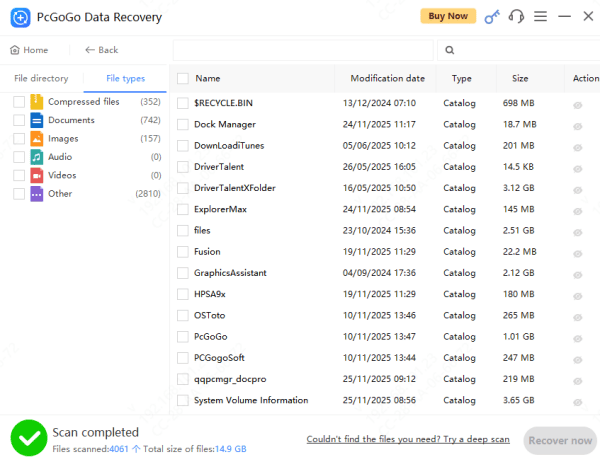
The software will show you a list of recoverable files
Use the preview feature to check if the files are intact before proceeding with the recovery
Step 5: Recover and save files safely
Once you've confirmed the files you want to restore, choose a different location (such as an external drive or a different partition) to save them
Avoid saving the recovered files to the same drive
Common Beginner Mistakes to Avoid
While data recovery is simple, beginners can make some common mistakes that reduce their chances of success:
Continuing to use the drive: The more you use the drive, the more likely you are to overwrite the lost data
Saving recovered files to the same drive: Always save recovered files to a different drive to avoid overwriting remaining recoverable data
Running multiple recovery tools at once: This can cause confusion and might lead to conflicting results
Things to Do After Data Loss (Very Important)
If you've lost data, don't panic. Here's what you should do immediately:
Stop using the hard drive: The more you use the drive after data loss, the more likely it is that new data will overwrite the lost files. If possible, stop using the device right away
Do not install software on the affected drive: Installing recovery software or saving new files on the same drive can overwrite recoverable data
Avoid saving new files: Don't add new documents, photos, or videos to the drive until recovery is complete
Taking these actions significantly increases the likelihood of a successful recovery
Reformatting before recovery: Reformatting the drive before attempting recovery can make it harder (or impossible) to restore files
Common Causes of Hard Drive Data Loss
Data loss can happen for several reasons. Here are the most common causes:
Accidental file deletion: It happens more often than you think—files are mistakenly deleted, even when you intend to keep them
Formatting the hard drive: Whether it's a quick format or a full format, this will erase data stored on the drive
System crashes or OS failures: A sudden system crash can corrupt your data, causing it to be unreadable
Virus or malware attacks: Malicious software can corrupt files, making them inaccessible
File system corruption: Improper shutdowns, power failures, or bad sectors can cause your file system to become corrupt
Hardware aging: Over time, hard drives wear out, and bad sectors or mechanical failures can cause data loss
How to Prevent Future Hard Drive Data Loss
To avoid data loss in the future, implement these preventive measures:
Back up your data regularly: Use cloud storage, external hard drives, or NAS systems to back up your important files
Handle your hard drives carefully: Avoid physical damage by keeping your drives safe from drops, moisture, or extreme temperatures.
Install antivirus software: Protect your data from viruses and malware that can corrupt or delete files
Check hard drive health: Monitor your hard drive's performance regularly to detect any early signs of failure
Conclusion
Data recovery is possible even for beginners, as long as you take the right steps and act quickly. Using reliable recovery software, such as PcGoGo Data Recovery, you can recover deleted or lost files with ease. Remember to back up your data regularly and handle your drives carefully to avoid future data loss.