Losing important files from a hard drive can be alarming, whether the cause is accidental deletion, formatting, partition damage, a system crash, or malware. In many cases, the data may still be recoverable as long as it has not been overwritten and the drive is not severely physically damaged. To improve the chances of successful recovery, stop using the affected drive immediately and avoid installing software or saving new files to it. This guide explains how to identify the type of data loss, assess the condition of the drive, and recover deleted or inaccessible files safely using PcGoGo Data Recovery.
Types of Hard Drive Data Loss
Understanding the type of data loss is the first step in recovery:
Logical data loss: Files accidentally deleted, formatted, or corrupted
System-level data loss: Operating system crashes, lost partitions, or boot failures
Physical data loss: Mechanical failure, water or fire damage, electrical surges
Malware-related data loss: Viruses, ransomware, and spyware that hide or delete files
Different types of loss require different approaches for recovery
Using PcGoGo Data Recovery for Hard Drives
PcGoGo Data Recovery is a reliable tool for most logical data loss situations. Here's how to use it:
Install and Launch the Software
Download the latest version from the official website
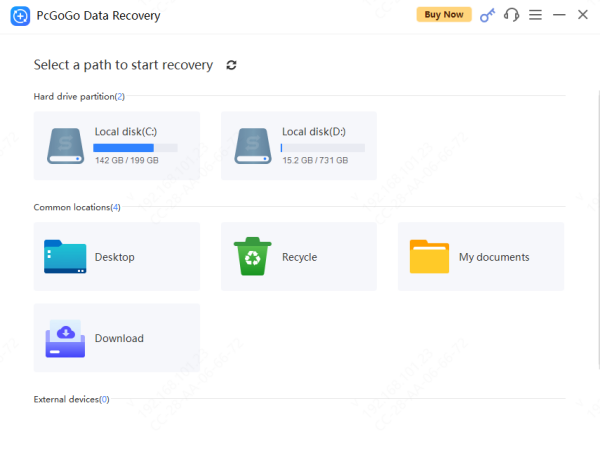
Select the Hard Drive
Choose the affected drive from the list of detected devices
Scan the Drive
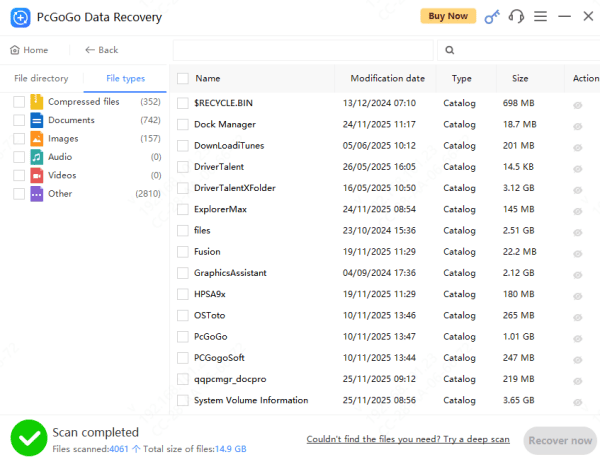
Use Scan for recently deleted files
Preview Recoverable Files
Check photos, videos, documents, and audio files to ensure they are intact
Recover and Save
Save recovered files to a different drive to avoid overwriting remaining data
Troubleshooting Common Recovery Challenges
During recovery, you might face some challenges:
Drive not recognized: Check connections and try a different USB port or SATA cable
Partially corrupted files: Preview before recovery to confirm integrity
Slow scanning: Large drives may take longer; consider scanning in segments
Severe damage: Switch to professional recovery if software cannot retrieve files

Safe Recovery Practices
To maximize your chances of successful recovery:
Stop using the drive immediately. Continued use may overwrite lost data
Do not install software or save new files to the affected drive
If the drive shows signs of physical instability, create a disk image before attempting recovery
Conclusion
Data loss from a hard drive is a common problem, but most lost files are recoverable with proper precautions. Assess the type of data loss, stop using the drive immediately, and choose the right recovery method. PcGoGo Data Recovery is a safe and effective solution for most logical data loss scenarios. By following these steps and maintaining regular backups, you can protect your files and prevent future data loss.