
Downloading Reddit videos can be tricky due to separate video and audio streams or platform restrictions. This guide explains how to save Reddit videos with PcGoGo Video Downloader, including single video downloads, batch downloads, format selection, quality options, automatic audio-video merging, and key tips for maintaining video quality while respecting content ownership and copyright rules.
Using PcGoGo Video Downloader
Install PcGoGo Video Downloader
Download PcGoGo Video Downloader from the official website
Install the program and launch it on your computer
Copy the Reddit Video Link
Open Reddit on your browser or mobile app
Go to the post that contains the video you want to download
Copy the post URL from the address bar or the Share menu
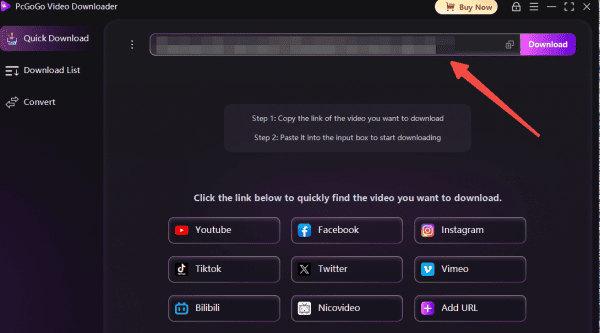
Paste the Link Into PcGoGo Video Downloader
Open PcGoGo Video Downloader
Paste the copied Reddit link into the download bar
The software will automatically analyze the post and merge the video and audio files
Choose Format and Quality
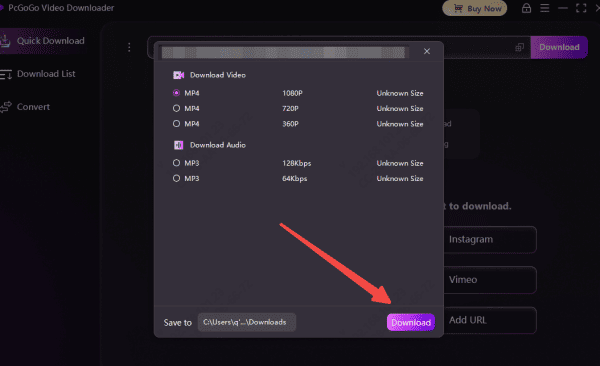
Select the output format (MP4 for video or MP3 for audio-only)
Choose the available resolution
Start Downloading
Click the Download button to begin
Track your download progress in the software's download list
Batch Download Reddit Videos
Copy Multiple Reddit Video Links
Browse Reddit and identify all the videos you want to save
Copy the URLs of each video post you plan to download
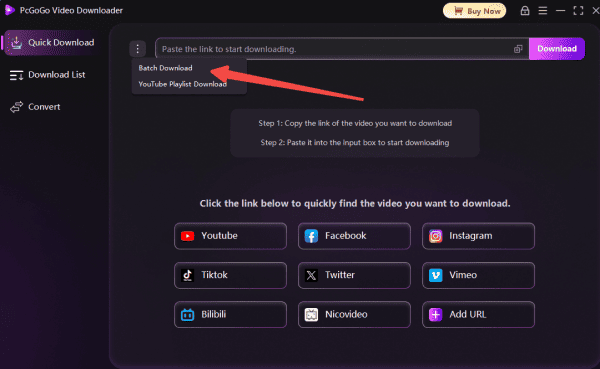
Paste All Links Into PcGoGo Video Downloader
Open PcGoGo Video Downloader and paste all copied Reddit URLs into the download bar at once
The software will automatically analyze each link and prepare the files for download
Choose Format and Quality
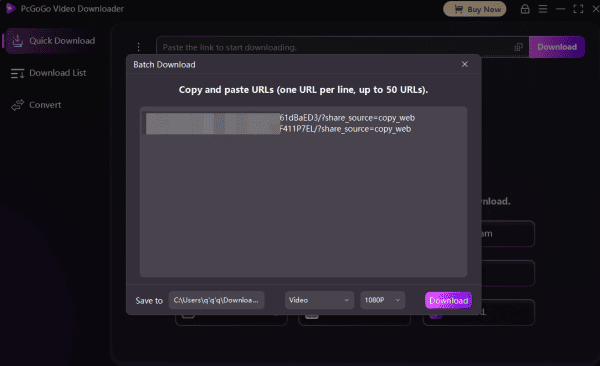
Select MP4 for full video downloads or MP3
Pick your desired resolution from the options available for each video
Start Batch Downloading
Click the Download button to start downloading all added Reddit videos
Monitor the progress in the download list as PcGoGo Video Downloader processes each file
Why Choose PcGoGo Video Downloader
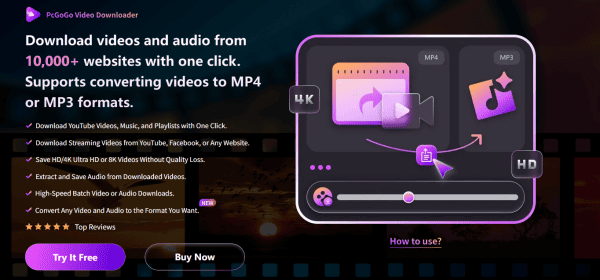
PcGoGo Video Downloader comes with a range of powerful features that make it ideal for saving download Reddit videos:
Wide Platform Compatibility: Save videos not only from Reddit but also from Instagram, TikTok, YouTube, X, Facebook, and many other sites—all within one application
No Watermarks: Download clean, high-quality files that you can immediately use for editing, sharing, or presentations without unwanted markings
Versatile Format Options: Convert your saved content to MP4 for video or extract the audio separately in MP3 format
Batch Download Capability: Download multiple video clips, movies, TV shows, series, animations, games, and music simultaneously
Fast Parsing Performance: The advanced processing engine allows videos to be analyzed and downloaded quickly, eliminating long waiting periods
Simple, Intuitive Interface: Designed to be easy to use for beginners while still offering advanced functions for experienced users
Notes
When downloading Reddit videos, always follow copyright laws and community rules
Do not repost or distribute content without permission, especially if it belongs to another creator
Be cautious when downloading NSFW or copyrighted material, as these can have restrictions
Conclusion
In summary, downloading Reddit videos becomes far simpler and more reliable with PcGoGo Video Downloader. Its fast parsing, automatic audio–video merging, batch downloading, and watermark-free output make it one of the most efficient tools for saving any Reddit content. Whether you're collecting tutorials, archiving memes, or preparing clips for editing, PcGoGo Video Downloader offers a clean and hassle-free experience across all platforms. By following the steps in this guide and respecting copyright guidelines, you can easily manage and enjoy your downloaded Reddit videos anytime, even offline.