
Social media has become a crucial platform for sharing videos, whether it's for entertainment, education, business, or personal expression. As a content creator or editor, you likely need a reliable way to download and manage videos from various platforms such as YouTube, Instagram, TikTok, Facebook, and more. In this guide, we'll explore how PcGoGo Video Downloader is the perfect tool for social media video downloading, offering a variety of features that will help streamline your workflow.
How to Use PcGoGo Video Downloader: Step-by-Step Guide
Step 1: Install PcGoGo Video Downloader
The first step to getting started is to download PcGoGo Video Downloader from the official website
The installation process is quick, and the program has a clean, intuitive interface that's easy to navigate. Once installed, open the software to begin
Step 2: Copy the Video Link
Go to the platform (e.g., YouTube, Instagram, etc.) and copy the URL of the video you want to download
Make sure you're copying the correct video link, whether it's a single video or an entire playlist
Step 3: Paste the Link Into PcGoGo Video Downloader
Open PcGoGo Video Downloader and paste the video link into the download bar
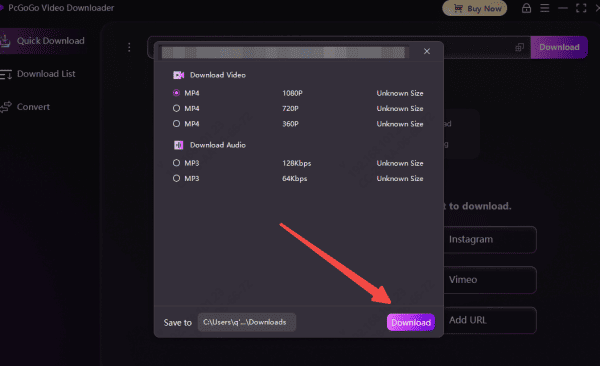
The software will automatically analyze the link and prepare the video for downloading, displaying available formats and resolution options

Step 4: Choose Format and Quality
Once the video link has been parsed, choose your preferred format (MP4 for video, MP3 for audio) and resolution (HD, 4K, etc.)
Select the best option based on your project needs—whether you need crisp visuals for editing or audio for use in a podcast
Step 5: Download the Video
Click the Download button to start the process
PcGoGo Video Downloader will begin fetching and saving the video to your device
You can track the download progress within the software's download list
Why You Should Use PcGoGo Video Downloader
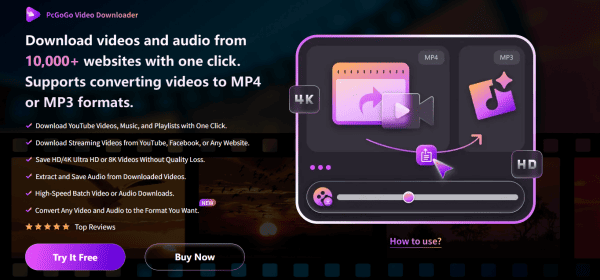
Convenience Across Multiple Platforms: PcGoGo Video Downloader supports downloading videos from a wide range of popular platforms.
Batch Downloading for Efficiency: As a content creator or editor, you often need to download multiple videos at once. PcGoGo Video Downloader allows for batch downloading, meaning you can download entire playlists, series, or multiple videos from a single URL input. This feature saves you time, especially when working with bulk content or a lot of user-generated media
High-Resolution Video Download: One of the standout features of PcGoGo Video Downloader is its ability to download videos in high resolution, including HD, 4K, and even 8K. This ensures that the quality of the content you download is the same as the original, making it perfect for professional video editors who need pristine footage for projects
Watermark-Free Downloads: Watermarks can be a headache when downloading videos for editing or redistribution. PcGoGo Video Downloader guarantees watermark-free downloads, meaning you won't have to worry about cleaning up your footage before using it in your own videos, ads, or social media posts
Flexible Format Conversion: Whether you're working on a video editing project or need to extract audio for a podcast or music project, PcGoGo Video Downloader offers format conversion for your downloaded files. You can download videos in MP4, and extract audio as MP3—great for creators who need content in different formats for varying use cases
Fast and Reliable Performance: With its optimized parsing and downloading engine, PcGoGo Video Downloader delivers fast download speeds, reducing wait times for large files or multiple video downloads. Whether you're working with long videos or bulk downloads, you can trust that PcGoGo Video Downloader will process your downloads without delay
Legal and Ethical Considerations When Using PcGoGo Video Downloader
As a content creator or editor, it's important to respect the copyright and intellectual property rights of others
Before downloading and using videos from platforms like YouTube, TikTok, or Instagram, ensure you have permission to use the content or that it is available under fair use
Always check the terms and conditions of the content you're downloading to avoid legal issues
Conclusion
PcGoGo Video Downloader is an essential tool for content creators and editors who regularly download videos from social media platforms. With its fast, reliable, and watermark-free downloads, this tool simplifies your workflow and enhances your ability to access high-quality content for editing, archiving, or sharing. Whether you're downloading a single video or an entire playlist, PcGoGo Video Downloader ensures you can save videos in the best possible quality—quickly and efficiently. If you're looking for an all-in-one solution for social media video downloads, PcGoGo Video Downloader is the tool for you!