
Watching YouTube in 4K or 8K can deliver impressive detail, but streaming high-resolution video is not always practical when your connection is slow, unstable, or unavailable. Saving videos for permitted offline use can make viewing more convenient while traveling or working without reliable internet access. Depending on your needs, you can use YouTube's official offline features or a desktop downloader such as PcGoGo Video Downloader. This guide compares several approaches and explains how to save supported YouTube videos in high resolution while considering video quality, storage space, and copyright restrictions.
Method 1: YouTube Premium Subscription
The Official (But Limited) Route
YouTube Premium, the platform's monthly subscription service, offers ad-free streaming and offline playback as its key selling points. While convenient, downloaded videos are confined to the YouTube app and cannot be transferred to other devices or editing software. This makes it a solid choice for casual viewers but impractical for users needing flexibility.
Pros:
Hassle-free offline access within the app
Ad-free viewing experience
Cons:
No file export capabilities
Subscription costs add up over time

Method 2: PcGoGo Video Downloader
The Feature-Packed Desktop Solution
For Windows users seeking maximum control, PcGoGo Video Downloader is a desktop tool that downloads videos from YouTube, TikTok, Facebook, Twitch, and other platforms. Its standout features include:
8K resolution support for ultra-sharp quality
Customizable formats (MP4, MKV, etc.) and frame rates
Batch downloading for entire playlists or channels
Watermark-free exports ideal for content creators
Why It Shines:
Unlike web-based tools, PcGoGo Video Downloader eliminates ads, malware risks, and quality restrictions. It's perfect for frequent downloaders, educators archiving tutorials, or anyone needing high-resolution files for editing.
1. Download the Software: Visit PcGoGo Video Downloader official site.
2. Copy the Video Link: Open YouTube, navigate to your desired video, and copy its URL.
3. Paste & Customize: Launch PcGoGo Video Downloader, click Paste Link, then choose resolution (up to 8K), format, and save location.
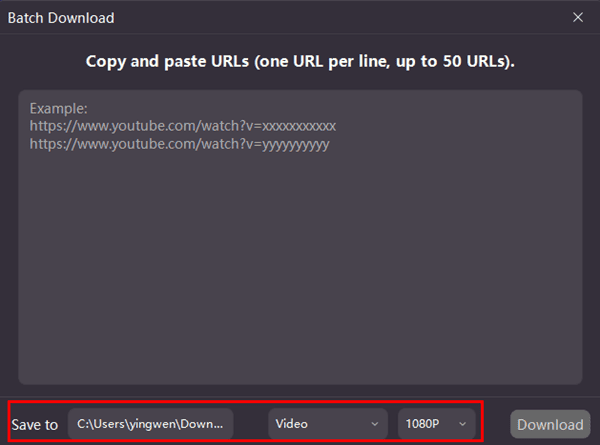
4. Download & Enjoy: Hit Download and let the software handle the rest.
Pro Tip: Enable the Batch Mode to download multiple videos or playlists simultaneously—ideal for binge-watching series offline.
Method 3: Web-Based Download Tools
Many web-based download tools are available that let you easily download videos from YouTube by simply copying and pasting the video link. While these tools are convenient, they often come with misleading ads and could even contain malware. Additionally, most of them have limitations on video quality, encoding formats, and download speed.
Key Considerations for 4K/8K Video Downloads
1. Copyright Compliance:
Downloaded videos should strictly be for personal, non-commercial use. Redistribution or monetization violates YouTube's terms and copyright laws.
2. Avoid Shady Websites:
Stick to trusted tools like PcGoGo Video Downloader. If a site asks for suspicious permissions or payments, close it immediately.
3. Storage Management:
A 10-minute 8K video can consume 5–7GB of space. Ensure your device has ample storage or invest in an external drive.
While YouTube Premium and web tools have their niches, PcGoGo Video Downloader delivers unmatched quality and control for regular users. Its free trial lets you test features risk-free—perfect for students, travelers, or anyone craving buffer-free entertainment.