For FPS enthusiasts, nothing beats the thrill of high-speed gunfights and strategic gameplay. This guide will walk you through the system requirements for FragPunk and provide optimization tips to ensure you get the best performance possible.
1. About FragPunk
FragPunk is an adrenaline-fueled multiplayer first-person shooter set in a neon-lit cyberpunk universe. The game emphasizes fast-paced action, requiring players to master precise aiming and strategic positioning.
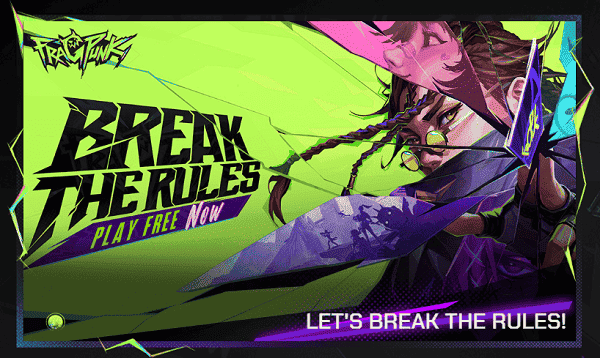
(Image source: fragpunk)
With a dynamic 5v5 battle format, each player can utilize unique character abilities and a revolutionary card-based system that alters the battlefield in real time. Whether you're executing high-speed tactical maneuvers or unleashing powerful abilities, every match in FragPunk promises intense combat and unpredictable gameplay.
2. System Requirements
Before diving into FragPunk, ensuring that your PC meets the necessary hardware specifications is crucial. Here are the official system requirements:
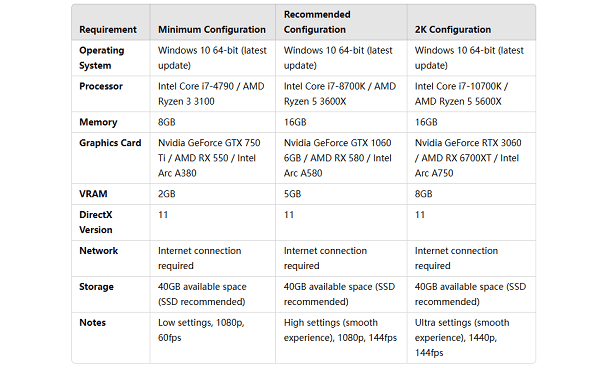
(1) Minimum Requirements
OS: Windows 10 (64-bit, latest updates)
Processor: Intel Core i7-4790 / AMD Ryzen 3 3100
Memory: 8GB RAM
Graphics Card: Nvidia GeForce GTX 750 Ti / AMD RX 550 / Intel Arc A380
VRAM: 2GB
DirectX: Version 11
Storage: 40GB available space
Performance Expectation: 1080p, 60 FPS (Low Settings)
(2) Recommended Requirements
OS: Windows 10 (64-bit, latest updates)
Processor: Intel Core i7-8700K / AMD Ryzen 5 5600X
Memory: 16GB RAM
Graphics Card: Nvidia GeForce GTX 1060 6GB / AMD RX 580 / Intel Arc A750
VRAM: 5GB
DirectX: Version 11
Storage: 40GB available space
Performance Expectation: 1080p, 144 FPS (High Settings)
(3) 2K (1440p) Requirements
OS: Windows 10 (64-bit, latest updates)
Processor: Intel Core i7-10700K / AMD Ryzen 5 5600X
Memory: 16GB RAM
Graphics Card: Nvidia GeForce RTX 3060 / AMD RX 6700 XT / Intel Arc A770
VRAM: 8GB
DirectX: Version 11
Storage: 40GB available space
Performance Expectation: 1440p, 144 FPS (Ultra Settings)
3. Optimizing Performance for FragPunk
Even with powerful hardware, optimizing your settings can further enhance your gameplay experience. Here are some key steps:
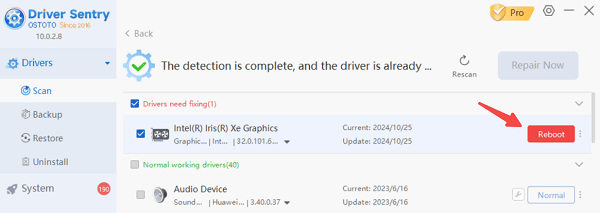
(1) Update Your GPU Drivers with Driver Sentry
Outdated GPU drivers may lead to stuttering, frame drops, or crashes. Regular updates ensure smoother performance and better compatibility.
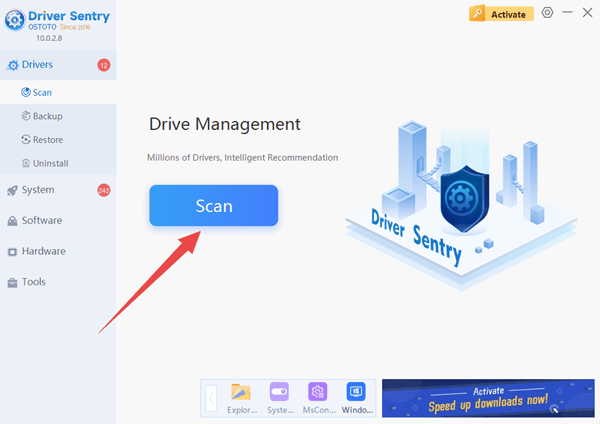
Download and install Driver Sentry.
Scan for outdated GPU drivers.
Upgrade your Nvidia, AMD, or Intel drivers.
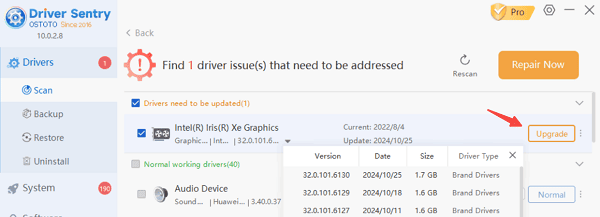
Reboot your PC and relaunch FragPunk.
(2) Adjust In-Game Graphics Settings
Tuning graphics settings can balance performance and visual quality.
Recommended Settings:
Resolution: 1920x1080 (or 1440p for high-end PCs)
Texture Quality: Medium
Shadow Quality: Low
Anti-Aliasing: FXAA or TAA (instead of MSAA)
V-Sync: Off (if experiencing input lag)
DLSS or FSR: Enabled (if supported by GPU)
(3) Close Background Applications
Heavy background applications can reduce available resources for gaming.
Press Ctrl + Shift + Esc to open Task Manager.
Navigate to the Processes tab and look for high CPU/RAM usage applications.
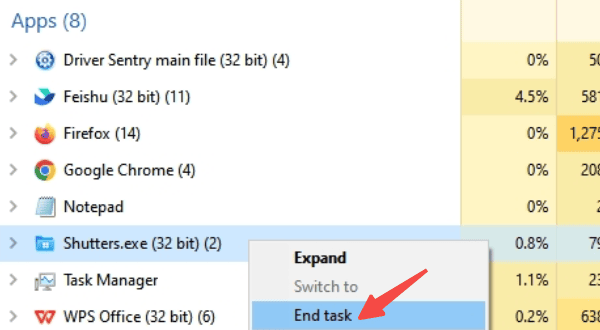
Right-click and End Task for unnecessary applications.
Relaunch FragPunk to check improvements.
(4) Enable Windows Game Mode
Windows Game Mode helps allocate system resources to prioritize gaming performance.
Press Win + I to open Windows Settings.
Go to Gaming > Game Mode.
Toggle Game Mode ON.
Restart your PC and launch FragPunk.
FragPunk delivers intense FPS battles, but optimizing performance is crucial for the best gaming experience. It is recommended to use Driver Sentry to update graphics drivers, optimize system resources, and adjust game settings to ensure your PC meets the recommended requirements.
See also:
6 Ways to Fix Wireless Headphones Connected but No Sound
Fix Printer Offline Issue on Windows 10