
Facebook offers a huge collection of videos, including tutorials, entertainment clips, livestreams, educational content, and personal memories. However, the platform does not provide a direct download option for most videos, making it difficult for users who want to save content for offline viewing or future reference. Whether you want to keep your own uploaded videos or save publicly available videos, choosing the right method is important to maintain video quality and avoid unsafe tools. This guide explains how to save Facebook videos, including Facebook's built-in download options and a simple solution using PcGoGo Video Downloader for high-quality video downloads.
Save Your Own Facebook Videos
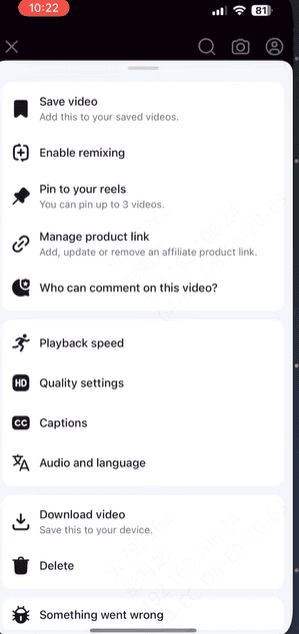
If you uploaded the video yourself, Facebook provides download options.
Go to your profile and open the video you poste
Click the menu icon and select Download
The file will be saved to your device, usually in SD quality
For HD or original quality, you may need a professional downloader
How to Save Facebook Videos with PcGoGo Video Downloader
You can download Facebook videos easily by following these steps:
Install PcGoGo Video Downloader
Download PcGoGo Video Downloader from the official website and install it on your computer
Launch the software once the installation is complete
Copy the Facebook Video Link
Open Facebook in your browser and find the video you want to save
Click the Share or menu button and select Copy link
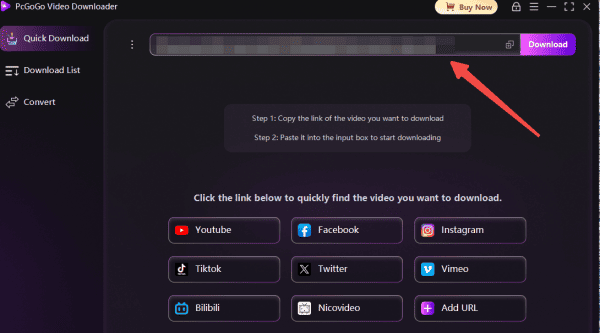
Paste the Link into PcGoGo Video Downloader
Open PcGoGo Video Downloader and paste the copied link into the search bar
The tool will automatically detect and analyze the video
Choose Video Quality and Format
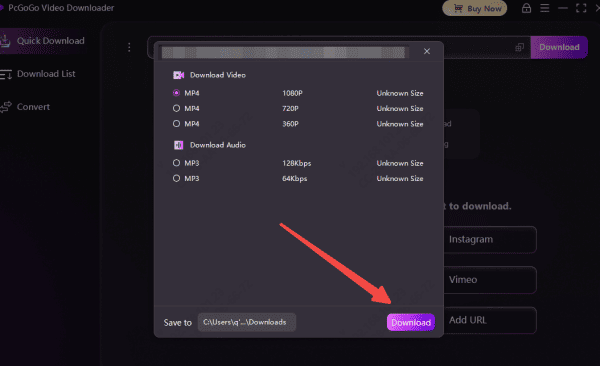
Select MP4 for video or MP3 if you need only the audio
Choose the quality you want, such as HD or 4K
Download Your Facebook Video
Click Download
The video will be saved to your chosen folder, and you can manage or view downloads directly in the software
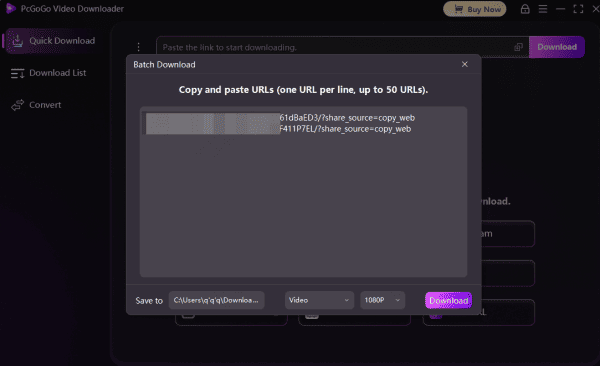
Batch Save Facebook Videos
Copy URLs
Collect multiple Facebook video links
Copy the URL of every Facebook video you want to save — whether they're from your Feed, Groups, Pages, Reels, or Watch
Paste All URLs
Open PcGoGo Video Downloader and paste all copied Facebook video links into the download bar at the same time
The software will automatically detect each link, analyze the videos, and prepare them for downloading
Choose Format and Quality
For each video, select your preferred output type — MP4 for full videos or MP3 if you only need the audio
Then choose the resolution available for the file, such as 720p, 1080p, or higher depending on the original upload
Start Batch Downloading
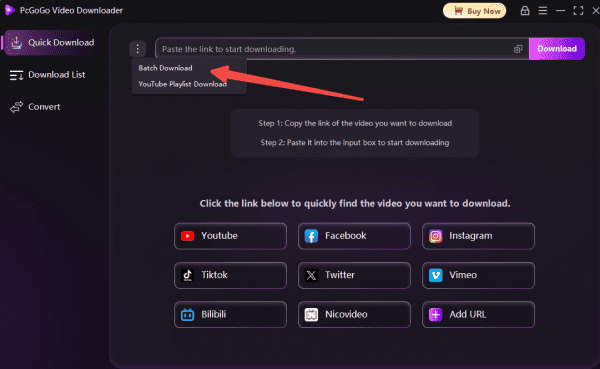
Click the Batch Download button to begin saving all selected Facebook videos at once
You can monitor the progress in the download panel as PcGoGo Video Downloader processes and completes each file efficiently
Key Features of PcGoGo Video Downloader
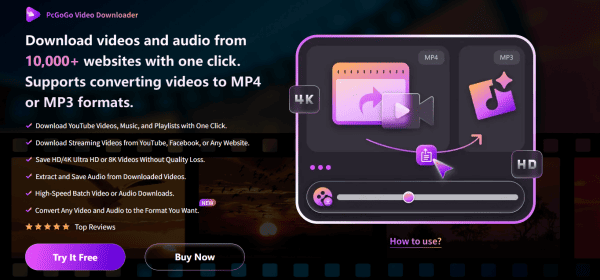
PcGoGo Video Downloader offers a quick, high-quality, and secure way to save Facebook videos without ads or complicated steps. It is ideal for users who frequently download videos from social media platforms.
High-resolution output: Save videos in HD, Full HD, 4K, or the original uploaded quality
No watermarks: Clean video files, perfect for editing or presentations
Batch downloading: Save multiple videos at once
Audio-only extraction: Download only the audio from a Facebook video if needed
Support for multiple platforms: Download from Facebook, Instagram, TikTok, X, YouTube, and more
Fast and secure: No ads, no slow speeds, no risk of malware
Because of these features, PcGoGo Video Downloader is suitable for personal users, content creators, educators, and businesses.
Legal and Privacy Considerations
When downloading Facebook videos, it is important to follow ethical and legal guidelines:
Always respect the creator's rights and privacy
Do not repost or redistribute copyrighted content without permission
Download videos only for personal or educational use unless you have explicit authorization
Use secure tools to avoid privacy risks or malware
Conclusion
Saving Facebook videos can be challenging due to platform limitations, but with the right tools, the process becomes fast, safe, and simple. PcGoGo Video Downloader provides a reliable way to download videos in high quality, whether for offline viewing, presentations, archiving, or content creation. As long as you respect copyright and privacy rules, downloading Facebook videos can be an efficient way to store and manage valuable content. If you want the easiest method with the best video quality, PcGoGo Video Downloader is the top choice.