Instagram audio has become an essential part of Reels, videos, and creative content, but the platform does not provide a direct way to save audio files separately. Whether you want to keep trending sounds, extract background music, save voice recordings, or use audio for personal projects, a dedicated downloader can make the process easier. This guide explains why users download Instagram audio, the available options, and how to use PcGoGo Video Downloader to extract and save Instagram audio in high quality.
Common Reasons to Download Instagram Audio
People save audio from Instagram for different purposes:
Saving trending sounds for future Reel creation
Extracting background music from a video
Saving speeches, interviews, or educational clips
Using audio in personal projects or offline listening
Archiving important sound content before it disappears
Regardless of the purpose, it's important to use safe tools and respect copyright when reusing audio.
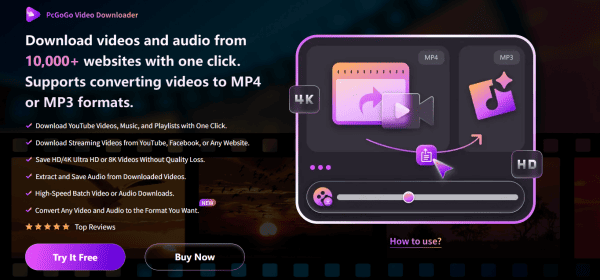
Key Features of PcGoGo Video Downloader
PcGoGo Video Downloader is a simple and reliable tool designed to extract audio from Instagram videos, Reels, and Stories. It focuses on clean, high-quality downloads and supports multiple platforms. Its major benefits include:
High-quality MP3 extraction without distortion
Ability to download audio or full video
Fast, accurate link parsing for Reels, Stories, IGTV, and posts
Batch downloading multiple Instagram URLs at once
Watermark-free output suitable for editing and personal use
Support for Instagram, TikTok, Threads, YouTube, Facebook, Pinterest, Reddit, and more
These features make PcGoGo Video Downloader ideal for creators, editors, and daily Instagram users.
How to Download Instagram Audio Using PcGoGo Video Downloader
Follow these steps to save Instagram audio quickly and efficiently:
Install PcGoGo Video Downloader
Download the program from the official website and install it on your computer
Open the software when installation is complete
Copy the Instagram Link
Open Instagram and find the post containing the audio you want to save
Tap the Share button and copy the link to the video or Reel
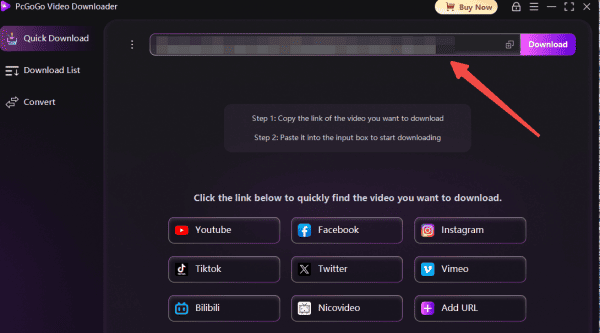
Paste the Link into PcGoGo Video Downloader
Open PcGoGo Video Downloader and paste the link into the download bar
The software will automatically analyze the content and display available download options
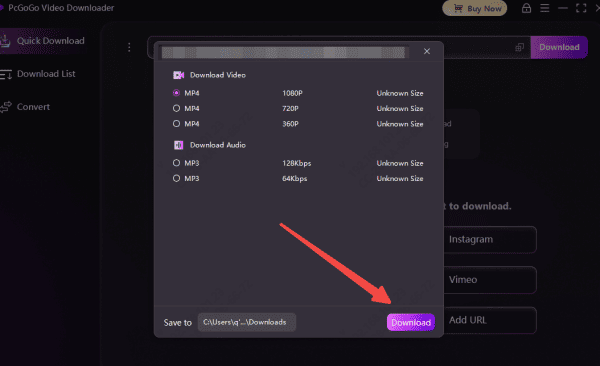
Select Audio Format
Choose MP3 if you want only the audio
You can also select MP4 if you prefer downloading the full video
Download the Audio
Click the Download button and wait for the file to save to your device
All downloaded audio files will be available in your chosen folder and displayed in the software's download list
Batch Download Instagram Audio
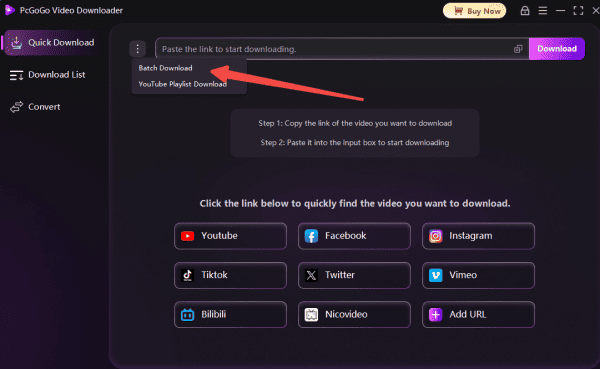
If you want to extract audio from multiple Instagram posts at once, PcGoGo Video Downloader supports batch downloading
Copy the Instagram Video or Reel Link
Copy all the Instagram links you want to save
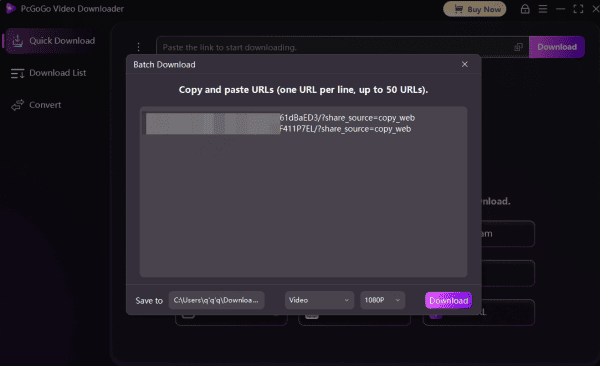
Paste the Link into PcGoGo Video Downloader
Paste them into the software together
Select Audio Format
Select MP3 for audio extraction
Download
Start the batch download and monitor progress inside the program
Legal and Ethical Considerations
Before downloading audio from Instagram, keep these rules in mind:
Only download audio for personal use
Do not repost, reuse, or commercialize content without the creator's permission
Be cautious with copyrighted music—Instagram often uses licensed tracks that cannot be redistributed legally
Always respect the privacy and ownership of content creators
Conclusion
Downloading audio from Instagram can be extremely useful—whether you're saving music from Reels, extracting sound from a video for editing, collecting voiceovers, or archiving audio you want to reuse later. While Instagram doesn't offer a built-in option to download audio directly, safe and reliable tools like PcGoGo Video Downloader make the process simple, fast, and high-quality. By allowing you to extract audio in MP3, batch-download multiple links, and save videos without watermarks or compression, PcGoGo Video Downloader ensures you get the best possible output every time.