
Downloading a video from a link is a convenient way to save online content for offline viewing, archiving, or editing. However, not every platform provides a built-in download option, and supported formats or video quality can vary. PcGoGo Video Downloader simplifies the process by letting you paste a video URL, choose the desired format and resolution, and download the file directly to your computer. This guide explains how to download videos from links step by step while keeping quality, compatibility, and basic copyright considerations in mind.r.
Download a Video from a Link Using PcGoGo Video Downloader
With PcGoGo Video Downloader, the process is incredibly straightforward. Just follow these steps:
Step 1: Install PcGoGo Video Downloader
Visit the Official Website: Head to the PcGoGo Video Downloader website to download the software
Download and Install: Follow the installation prompts to get PcGoGo Video Downloader up and running on your computer
Launch the Program: Once installed, open the software to begin the video downloading process
Step 2: Copy the Video Link
Navigate to the Video: Go to the platform where the video is located—YouTube, Instagram, X (formerly Twitter), TikTok, or any other supported site
Copy the Link: Copy the URL of the video from the address bar of your browser or use the share button to obtain the video link
Step 3: Paste the Link into PcGoGo Video Downloader
Open PcGoGo Video Downloader: Launch the software on your computer
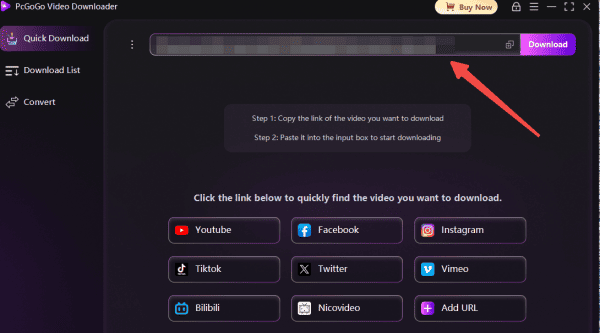
Paste the Link: In the program's main interface, you will see a URL input field. Paste the copied video link here
Once the URL is pasted, PcGoGo Video Downloader will automatically analyze the video and retrieve details such as the video title, duration, and available resolutions
Step 4: Choose the Format and Quality
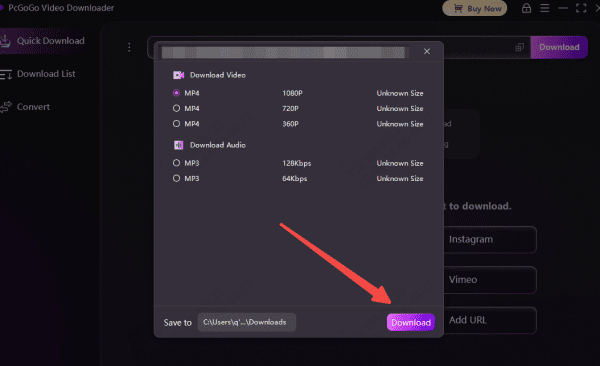
Select Format: You will have the option to choose your preferred download format, such as MP4 (video), MP3 (audio), or others
Pick the Resolution: Choose the resolution you want, whether it's 720p, 1080p, 4K, or the highest available quality
PcGoGo Video Downloader ensures that you can download videos in their original quality
Step 5: Start the Download
Click the Download Button: After selecting the format and resolution, simply hit the "Download" button
Monitor Progress: The software will start downloading the video. You can track the progress in the download list, and once it's completed, the video will be saved in your chosen folder
Why PcGoGo Video Downloader is the Best Video Download Tool
There are many video downloaders out there, but PcGoGo Video Downloader stands out for several reasons:
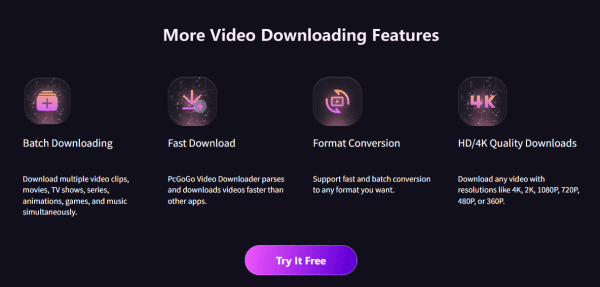
Fast and Efficient: Download videos quickly without long waits
Supports Multiple Platforms: Download videos from YouTube, Instagram, X (Twitter), TikTok, and more
High-Quality Downloads: Get the highest quality video, including 4K and HD resolutions
Watermark-Free: PcGoGo Video Downloader ensures that videos are downloaded without watermarks, perfect for editing or sharing
Legal Considerations
Before downloading videos from any platform, it's important to keep these considerations in mind:
Respect Copyright: Always make sure you have the permission to download and use the content, especially if it's copyrighted
Use for Personal or Educational Purposes: You can download videos for personal use or educational purposes, but avoid distributing or reposting someone else's content without permission
Follow Platform Guidelines: Ensure that downloading videos from a given platform is within its terms of service
Conclusion
Downloading videos from a link has never been easier, especially when using PcGoGo Video Downloader. Whether you want to save videos for offline viewing, archiving, or creative editing, PcGoGo Video Downloader ensures fast, high-quality downloads from virtually any platform. With a few simple steps, you can enjoy your favorite content offline whenever you like. Try PcGoGo Video Downloader today and experience a smooth, reliable video downloading process!