
Pinterest is a popular platform for discovering creative ideas, DIY projects, tutorials, and more. With its vast collection of inspiring videos, many users want to download Pinterest videos for offline viewing, saving inspiration, or using content in personal projects. However, Pinterest does not offer a built-in option to download videos directly. Fortunately, there is an easy way to download Pinterest videos using the video URL.
Download Pinterest Videos Using URL (Step-by-Step Guide)
Step 1: Find the Pinterest Video You Want to Download
Open Pinterest in your browser or mobile app
Navigate to the pin containing the video you want to download
Copy the URL of the video. You can do this by clicking the three dots in the top-right corner of the pin and selecting the "Copy Link" option
Step 2: Open PcGoGo Video Downloader
Download and install PcGoGo Video Downloader from the official website
Launch the program on your computer
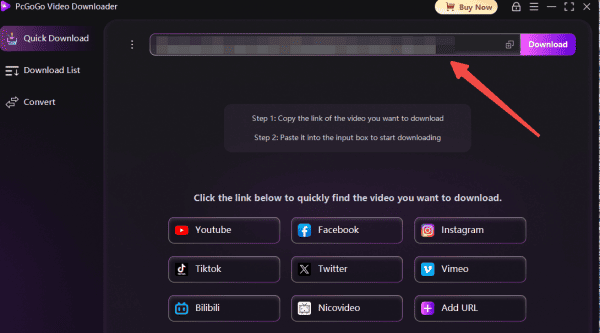
Step 3: Paste the Pinterest Video URL
In PcGoGo Video Downloader, paste the copied Pinterest video URL into the download bar
The software will automatically analyze the video and prepare it for download
Step 4: Select Video Quality and Format
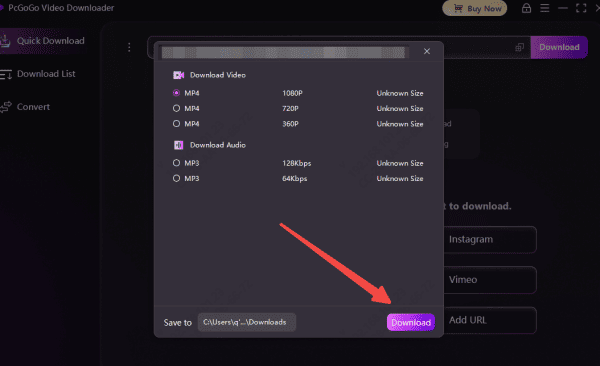
After the video is analyzed, you'll be prompted to select the video format and resolution
Choose MP4 for video format, and select the resolution you prefer (e.g., HD, 4K)
The available resolutions depend on the quality of the original video
Step 5: Start the Download Process
Click the Download button to begin the download process
You'll see a progress bar showing the status of your download
Once completed, the video will be saved to your computer
Step 6: Access and Organize Downloaded Video
After the download is complete, open the folder where the video is saved
You can now enjoy watching the Pinterest video offline
For easier access in the future, you can organize your downloaded videos into specific folders
Best Practices for Downloading Pinterest Videos
To ensure smooth downloading and maintain the quality of your videos, follow these best practices:
Ensure a stable internet connection: A reliable internet connection will prevent interruptions and speed up the download process
Regularly update the software: Keeping PcGoGo Video Downloader updated ensures it works efficiently with the latest features and bug fixes
Backup your videos: Consider uploading your downloaded videos to cloud storage or external drives to ensure you don't lose your data
Legal and Ethical Considerations
When downloading videos from Pinterest, always be mindful of copyright and intellectual property rights:
Personal use only: Download videos only for personal use unless the video is in the public domain or the creator has explicitly given permission for reuse
Respect copyright: If you plan to share or repurpose the content, ensure that you have the necessary permissions from the creator
Conclusion
Downloading Pinterest videos is easy and quick with PcGoGo Video Downloader. By following the simple steps outlined in this guide, you can save your favorite Pinterest videos for offline viewing, archiving, or creative projects. PcGoGo Video Downloader ensures you get high-quality, watermark-free videos with full control over the format and resolution. Whether you're saving videos for personal use or content creation, this tool makes the process seamless and reliable. Now you can enjoy Pinterest videos without worrying about watermarks, low-quality downloads, or slow speeds!