
RedNote videos often include watermarks that can affect viewing, editing, and content organization. This guide explains how to download RedNote videos without watermarks while maintaining high quality, including step-by-step instructions for saving videos, batch downloading, and managing downloaded content safely with PcGoGo Video Downloader.
Why RedNote Videos Have Watermarks
RedNote adds watermarks to downloaded videos to protect creators' content and encourage sharing within the platform. While this helps with copyright protection, it can be inconvenient if you want clean videos for personal use, learning, or editing. Common challenges include:
Watermarks covering important parts of the video
No option to disable watermarks in the app
Limited video quality when saving directly
Some videos cannot be downloaded at all
Because of these limitations, many users look for a professional video downloader that can save RedNote videos without altering quality
How to Download RedNote Videos Without Watermark
Step 1: Install PcGoGo Video Downloader
Download PcGoGo Video Downloader from the official website, install it on your computer, and launch the program
Step 2: Copy the RedNote Video Link
Open RedNote in your browser or app
Find the video you want to download and copy its share link
Step 3: Paste the Link into PcGoGo Video Downloader
Paste the copied RedNote video URL into PcGoGo Video Downloader's download bar
The software will automatically analyze the video
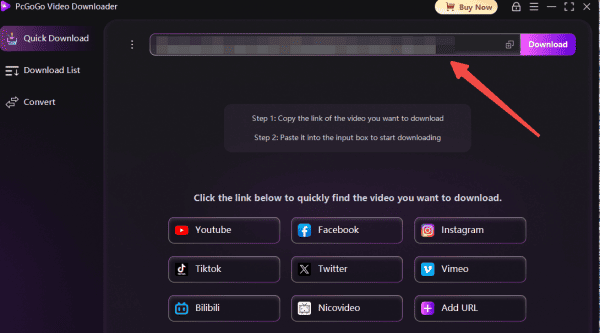
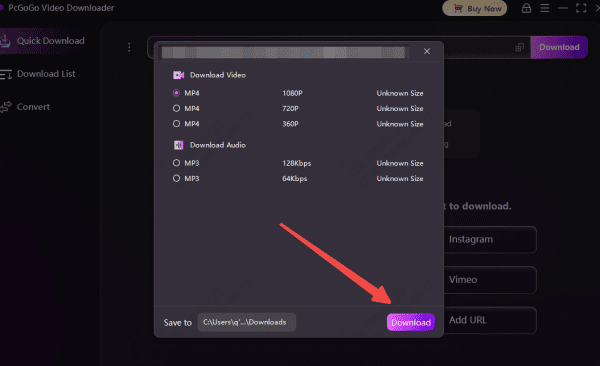
Step 4: Choose Format and Quality
Select MP4 for video or MP3 if you only need audio
Choose the best available resolution to maintain original quality
Step 5: Start Downloading
Click the Download button
PcGoGo Video Downloader will process and save the video without a watermark
Batch Download RedNote Videos Without Watermarks
If you want to download multiple RedNote videos at once:
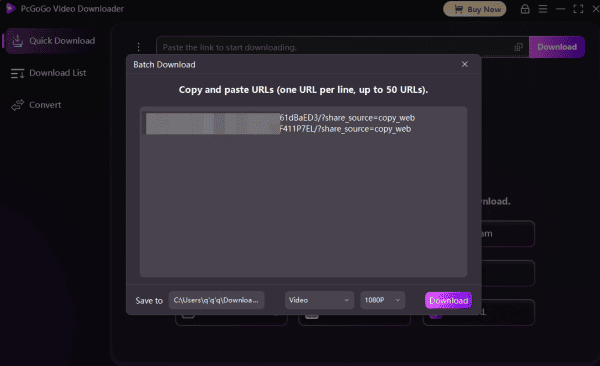
Step 1: Copy all the RedNote Video Link
Copy multiple RedNote video links
Step 2: Paste all the Link
Paste all links into PcGoGo Video Downloader simultaneously

Step 3: Choose Format and Quality
Choose format and quality for each video
Step 4: Start Downloading
Click Download to start batch processing
Why Use PcGoGo Video Downloader for RedNote Videos
PcGoGo Video Downloader is a fast, secure, and easy-to-use solution for downloading RedNote videos without watermarks. It is designed to handle modern video platforms efficiently while preserving original quality.
Key advantages include:
Watermark-free RedNote video downloads
Support for HD, 4K, and original resolutions
Batch downloading for multiple videos
MP4 video and MP3 audio format support
High-speed parsing and stable downloads
Clean interface suitable for beginners
It also supports many other platforms, making it a versatile tool for content creators and everyday users

Tips for Managing Downloaded RedNote Videos
Create folders based on categories such as Tutorials, Travel, or Reviews
Rename files with clear titles and dates
Back up important videos to cloud storage or an external drive
Keep only what you need to save storage space
Legal and Ethical Considerations
Notes
Use videos for personal reference or learning
Do not repost or redistribute without creator permission
Respect copyright and platform policies
Avoid downloading private or restricted content
Responsible use protects both you and the original creators
Conclusion
Downloading RedNote videos without watermarks doesn't have to be complicated. With PcGoGo Video Downloader, you can save clean, high-quality RedNote videos quickly and safely—without ads, watermarks, or quality loss. Whether you're archiving content, learning from tutorials, or collecting inspiration, PcGoGo Video Downloader provides a reliable and professional solution that makes RedNote video downloading simple and efficient.