
Facebook is home to millions of videos, including tutorials, entertainment, news, and memorable moments that many users want to save for offline viewing, editing, or personal backup. However, Facebook does not provide a built-in download option for most videos. Fortunately, you can easily save Facebook videos using their links with the right tool. In this guide, we'll show you how to download Facebook videos quickly and easily using PcGoGo Video Downloader, along with tips for saving videos in high quality.
Download Facebook Videos Using a Link
Step 1: Copy the Video Link
Open Facebook and find the video you want to download
Click on the Share button below the video
Select Copy Link to copy the URL of the video to your clipboard
Alternatively, if you're on a desktop, you can copy the video URL directly from the browser's address bar
Step 2: Open PcGoGo Video Downloader
Launch PcGoGo Video Downloader on your computer
If you don't have it installed, download and install it from the official website
Once the software is open, you'll see a simple interface with a download bar where you can paste the video URL
Step 3: Paste the Link into the Download Bar
Paste the copied video URL into the input field at the top of the PcGoGo Video Downloader window
The tool will automatically analyze the link and pull the available video options for you to choose from
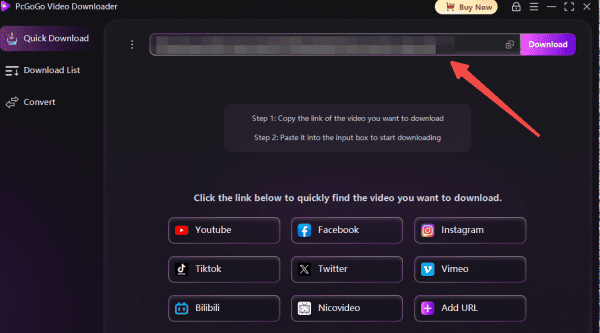
Step 4: Choose Video Format and Quality
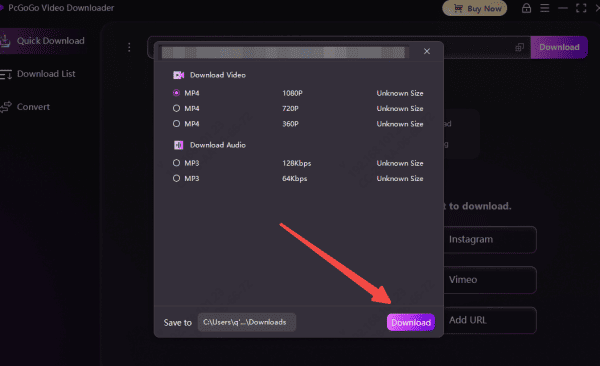
Once the link is analyzed, select the video format you prefer (MP4 is most common, but MKV or other formats may be available depending on the video)
Choose the resolution: You can pick from options like 720p, 1080p, or 4K, depending on the original video quality
PcGoGo Video Downloader gives you the freedom to download videos in high-quality formats without reducing the clarity of the video
Step 5: Download the Video
After selecting the format and resolution, click the Download button to start the process
The video will begin downloading without any watermarks, logos, or branding
Once the download is complete, you can access the video from your specified folder
Troubleshooting Common Issues
Invalid Link: Double-check that you've copied the correct URL. Some Facebook videos may have restricted access or privacy settings
Slow Download Speeds: If your download speed is slow, check your internet connection. You can also lower the resolution to improve speed
Video Not Available: Some Facebook videos are private or region-locked, which may prevent them from being downloaded