
Downloading YouTube videos to a computer allows users to watch content offline, save educational materials, or manage personal video collections more conveniently. However, many online download tools come with limitations such as ads, slow speeds, and poor quality output. This guide explains how to download YouTube videos on a computer using PcGoGo Video Downloader, including single video downloads, batch downloads, format selection, and quality settings for a smoother experience.
Download YouTube Videos on Computer
Install PcGoGo Video Downloader
Download PcGoGo Video Downloader from the official website
Install the program on your computer and launch it
Copy the YouTube Video Link
Open YouTube in your browser and locate the video you want to download
Copy the URL from the address bar
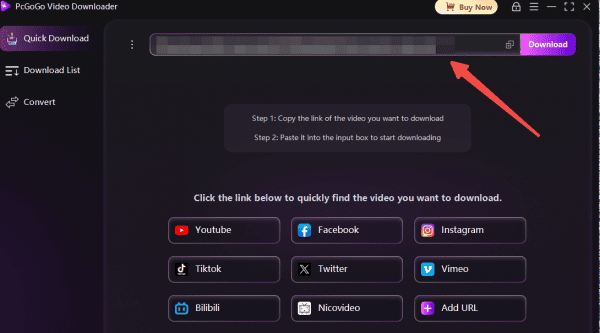
Paste the Link into PcGoGo Video Downloader
Open PcGoGo Video Downloader and paste the copied link into the download bar
The software will automatically analyze the video and display available download options
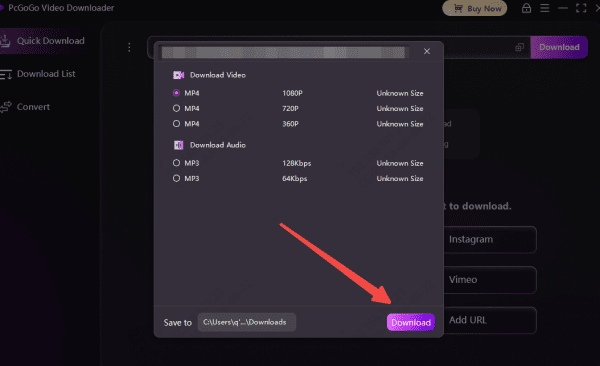
Select Format and Quality
Choose your preferred format: MP4 for video or MP3 for audio-only
Adjust the resolution according to your needs, including HD, 4K, or 8K if available
Start Downloading
Click the Download button to begin
You can monitor the download progress in the software's download list
PcGoGo Video Downloader ensures high-speed processing so your videos are ready in no time
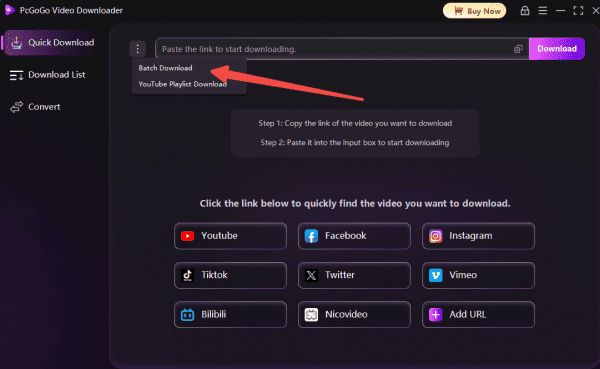
Batch Download YouTube Videos
If you want to download multiple videos or an entire playlist:
Copy the YouTube Video Links
Copy the URLs of all videos or the playlist link
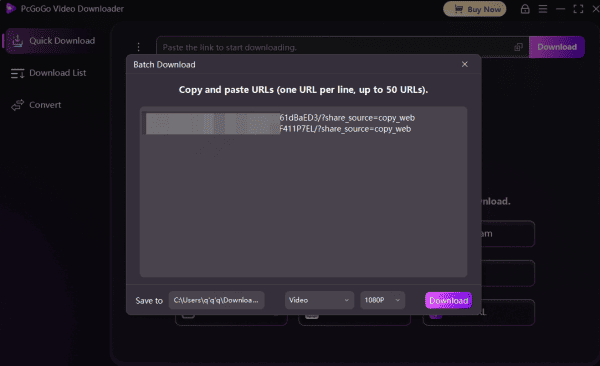
Paste the Links
Paste all links into PcGoGo Video Downloader
Select Format and Quality
Choose the format and resolution for each video
Start Downloading
Click Download to start batch downloading
Track progress in the download list
Key Features of PcGoGo Video Downloader
Multi-Platform Support: PcGoGo Video Downloader allows you to download videos not only from YouTube but also from TikTok, Instagram, X (formerly Twitter), Facebook, and more, making it a versatile tool for content creators and social media enthusiasts
Watermark-Free Downloads: Enjoy clean, professional-quality videos without watermarks, ideal for editing, sharing, or personal archiving
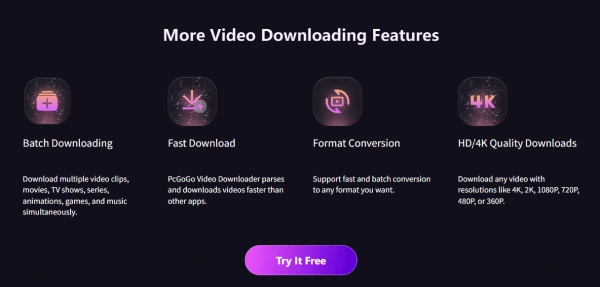
Format Conversion: Convert downloaded content into MP4 for video or MP3 for audio-only files. You can select the format that best suits your device or project
Batch Downloading: Save time by downloading multiple videos or entire playlists at once, including HD, 4K, or 8K content
High-Speed Parsing: PcGoGo Video Downloader's optimized engine ensures fast, smooth downloads without long wait times
User-Friendly Interface: Designed for both beginners and experienced users, the intuitive layout makes downloading videos simple and efficient

Tips for Managing Downloaded YouTube Videos
Create a dedicated folder for YouTube downloads to keep all videos organized
Sort files by topic, date, or project to make them easy to locate
Rename videos with clear, descriptive titles for easier searching
Backup important videos to cloud storage or an external drive to prevent data loss
Important Notes
Respect copyright laws: Download only videos you have permission to use
Ensure a stable internet connection for smooth and uninterrupted downloads
Verify available storage, especially when downloading HD or 4K videos
Conclusion
Downloading YouTube videos to your computer is simple and efficient with PcGoGo Video Downloader. Its fast processing, batch download capability, high-quality output, and watermark-free downloads make it the ideal tool for creators, students, or casual viewers. By following these steps, you can easily save, manage, and enjoy YouTube content offline for any purpose.