Seeing the error message like steam_api64.dll missing (sometimes shown with typos such as steam_apirajas x64 missing) can be frustrating when a game refuses to launch. This usually means a required Steam component is missing or corrupted. In most cases, the problem comes from incomplete game installation, corrupted game files, antivirus interference, or missing runtime dependencies rather than a serious system issue. This guide explains the common causes and the most effective ways to fix the error and get your game working again.
Check Steam
If you own the game on Steam, the official and safest way to fix this issue is by using Steam's built-in file verification tool.
Warning: This method will only work for games purchased on Steam. If you are using a pirated game, this will not work and may even break the game further.
Verify Integrity of Game Files
Open your Steam client and go to your "Library".
In your list of games, right-click on the game that is giving you the error.
Select "Properties" from the context menu.
In the Properties window, click on the "Local Files" tab.
Click the "Verify integrity of game files..." button.
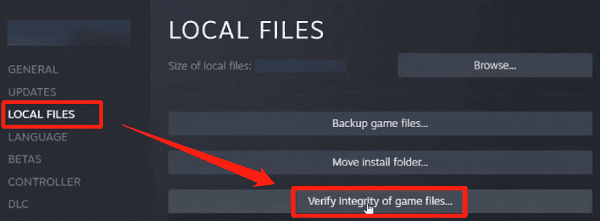
Steam will then scan all of the game's files. If it finds that the steam_api64.dll file is missing or corrupted, it will automatically download a clean, new copy and replace the file for you.
Reinstall the Game
If the file verification method doesn't work, a full reinstallation of the game is the next logical step. This is a drastic but highly effective solution for deeply corrupted game files.
Open your Steam client and go to your "Library".
Right-click on the game and select "Uninstall".
After the game is uninstalled, navigate to your game's installation folder (usually C:\Program Files (x86)\Steam\steamapps\common) and delete any leftover files.
Restart your PC.
Open Steam again, go to your library, and click "Install" to download a fresh copy of the game.
Fix with PcGoGo DLL Fixer
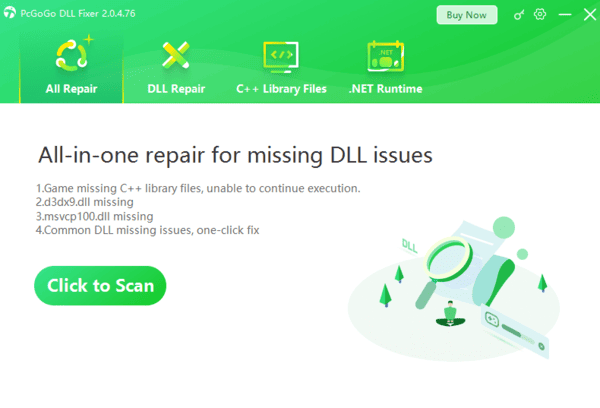
For a quick, hassle-free solution that automatically finds and fixes DLL problems, PcGoGo DLL Fixer is an excellent choice.
This professional tool is designed to scan your system for corrupted or missing DLL files and replace them with correct, stable versions, ensuring your applications and games can run smoothly.

Q&A
Q: What is a DLL file?
A: A DLL (Dynamic Link Library) file is a library of code and data that multiple programs can use simultaneously. When a program needs a specific function, it can call on a DLL file instead of having the code built into the program itself.
Q: Why does this error happen with pirated games?
A: Pirated games often use modified DLL files to bypass security checks. These files can be flagged and deleted by antivirus software, or they may be poorly made and simply fail, leading to this error.
Q: Is it safe to download DLL files from unofficial websites?
A: No, you should never download DLL files from unofficial, third-party websites. These files can be outdated, incompatible, or, most dangerously, infected with malware or viruses.
Conclusion
The "steam_apirajas x64 missing" error is a clear sign that a key DLL file is either missing or corrupted. While the official method of verifying your game files on Steam is a good first step for legitimate games, using PcGoGo DLL Fixer provides a safe and easy solution for this and any other DLL-related issues on your system.