
The d3dx9_43.dll missing error usually appears when a game or application cannot find the required DirectX 9 component. This guide explains how to fix the issue by installing the DirectX End-User Runtime, repairing missing DLL files with PcGoGo DLL Fixer, running the game's built-in DirectX installer, checking antivirus quarantine, and repairing corrupted Windows system files with SFC and DISM. These methods can restore DirectX components and help affected programs launch normally on Windows 10 and Windows 11.
Install the DirectX End-User Runtime Web Installer
Go to the Microsoft Download Center and search for DirectX End-User Runtime Web Installer, or search for dxwebsetup.exe. Download the installer directly from microsoft.com
Run the installer and follow the on-screen prompts. The tool checks your system and downloads only the DirectX components that are missing, including d3dx9_43.dll. After installation completes, restart your computer and try launching the affected program again

Use PcGoGo DLL Fixer to Repair Automatically
Download and install PcGoGo DLL Fixer from the official website. Open the program and click Scan. The tool will identify all missing or mismatched DLL files across your installed applications. When the scan finishes, locate d3dx9_43.dll in the results and click Repair Now The file will be downloaded and placed in the correct location. Restart your computer after the repair and test the application again

Run the DirectX Installer Bundled with the Game
Open the game's installation directory. Look for a folder named DirectX, _CommonRedist, or Redist. Inside you should find a file called DXSETUP.exe. Run it and follow the prompts. After installation, restart your computer and launch the game
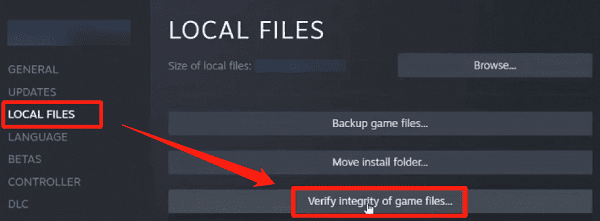
If you installed the game through Steam, right-click the game in your Library, select Properties, go to Local Files, and click Verify integrity of game files. Steam will restore the installer if it is missing. Then navigate to the installation folder and run DXSETUP.exe manually
Check Your Antivirus Quarantine
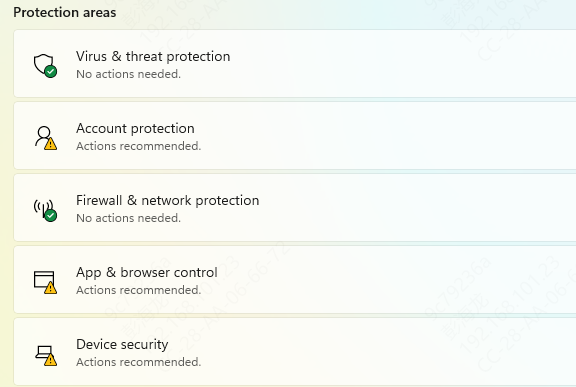
If the error appeared suddenly on a game or program that was previously working, antivirus quarantine is the most likely cause. Open your security software and navigate to the quarantine or virus chest section. Search for d3dx9_43.dll and restore it if found
Add the game's installation folder to your exclusions list to prevent the file from being removed again. After restoring and adding the exclusion, reinstall the DirectX runtime using Method 1 to ensure the file is clean and correctly placed
Run SFC and DISM to Repair Windows System Files
If the above methods do not resolve the error, corrupted Windows system files may be preventing the DLL from loading correctly
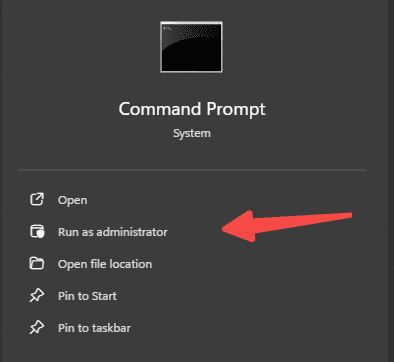
Open Command Prompt as administrator by pressing Windows and S, typing cmd, right-clicking Command Prompt, and selecting Run as administrator. Type sfc /scannow and press Enter. Wait for the scan to complete, then restart your PC
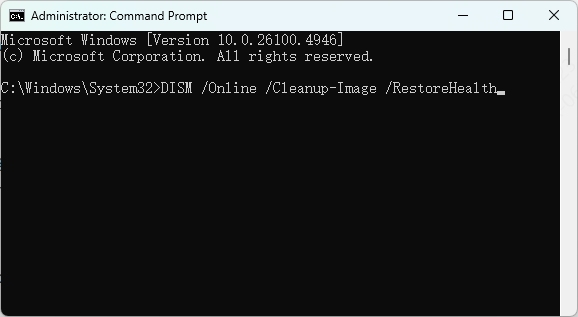
If SFC reports errors it could not repair, run DISM next. In an elevated Command Prompt, enter DISM /Online /Cleanup-Image /RestoreHealth and press Enter
This command downloads replacement files from Windows Update and can take 20 to 45 minutes. Restart after it finishes, then run sfc /scannow once more to confirm the repairs. After completing both scans, reinstall the DirectX runtime and test the application
Frequently Asked Questions
Does this error occur on Windows 11 as well?
Yes. Windows 11 does not include DirectX 9 legacy components any more than Windows 10 does. The DirectX End-User Runtime Web Installer is the correct fix regardless of which version of Windows you are running.
Why does a modern game trigger this error?
Some modern games still use DirectX 9 rendering paths or include older engine components that require legacy DirectX libraries. The age of the game is not always an indicator of which DirectX version it uses internally.
Is it safe to download d3dx9_43.dll from a third-party DLL site?
No. Files from unofficial DLL hosting sites cannot be verified and may carry malware or be the wrong version. The DirectX Runtime Web Installer from Microsoft and tools like PcGoGo DLL Fixer are the safe and reliable alternatives.
Will reinstalling the game fix the error?
Sometimes, especially if the game ships its own DirectX installer in the installation package. However, reinstalling the DirectX runtime directly is faster and more reliable than a full game reinstall.
Conclusion
The d3dx9_43.dll not found error is almost always caused by a missing DirectX 9 runtime rather than a damaged system. Installing the DirectX End-User Runtime Web Installer from Microsoft is the fastest and most reliable fix for most users. If the error persists, PcGoGo DLL Fixer automates the repair process, and running the DirectX installer bundled inside the game folder is worth checking for older titles. Avoid downloading the file from unofficial sources. The methods above are sufficient to resolve the error safely without introducing new risks to your system.