
In today's digital world, videos are one of the most engaging forms of content shared across multiple platforms. Whether it's a YouTube tutorial, a TikTok dance, or an Instagram story, there are countless reasons to save videos for offline viewing, content creation, or personal use. The easiest way to download a video is by using its direct URL. In this guide, we will walk you through the steps of downloading videos from links using PcGoGo Video Downloader, a fast, reliable, and easy-to-use tool.
How to Download Videos from Links
Follow these simple steps to download videos from a link using PcGoGo Video Downloader:
Install PcGoGo Video Downloader
To get started, first download and install PcGoGo Video Downloader from the official website
The installation is quick, and the software has an intuitive, user-friendly interface that makes the process seamless
Copy the Video URL
Once you've found the video you want to download, simply copy its URL:
For YouTube: Click on the "Share" button below the video, and copy the URL
For Instagram/TikTok/Facebook: Tap the "Share" icon and select "Copy Link"
For Other Platforms: The process is similar—just look for the "Share" or "Copy Link" option
Paste the Link into PcGoGo Video Downloader
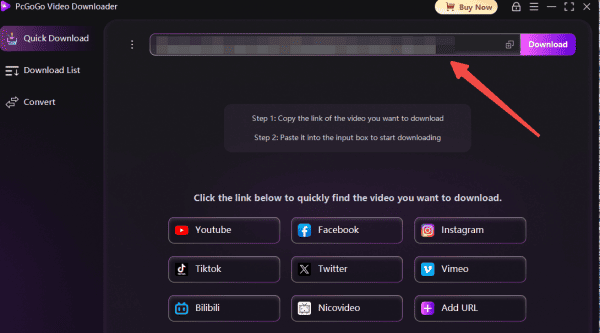
Open PcGoGo Video Downloader and paste the copied URL into the provided download bar
The software will automatically parse the video and extract all the necessary details
Select the Format and Resolution
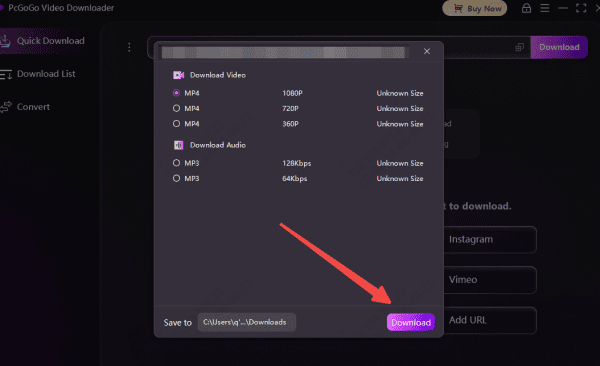
After the link has been analyzed, you'll be prompted to choose the format (MP4 for video, MP3 for audio) and the resolution (e.g., 720p, 1080p, or 4K, depending on the availability)
PcGoGo Video Downloader gives you full control over the download settings
Download the Video
Once you've made your selections, click the "Download" button
The software will process the video, and you can track the progress in the download list. You video will be saved to your chosen location on your device, ready for offline viewing, editing, or archiving
How to Batch Download Videos
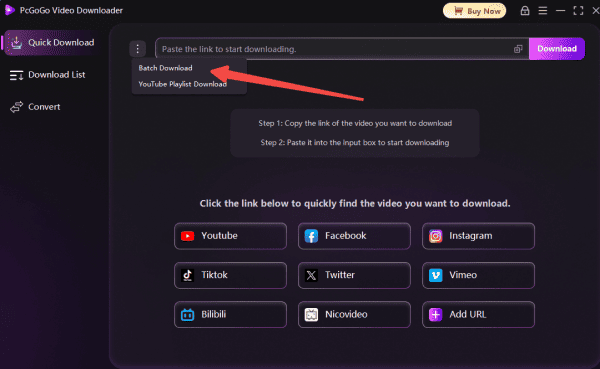
PcGoGo Video Downloader also allows you to download multiple videos simultaneously, making it easy to save content in bulk from supported sites.
Collect Multiple Video Links
Gather and copy all the video URLs you wish to download from compatible platforms (such as YouTube, Facebook, Instagram, TikTok, and thousands more)
Paste the Links into PcGoGo Video Downloader
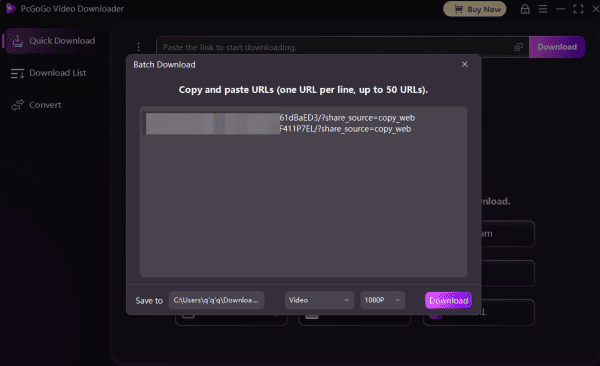
Open the software and paste all the copied URLs directly into the input field or download bar at once
The tool will automatically detect and analyze each link for you
Choose Formats and Quality
Select your preferred video format (e.g., MP4, MKV) and resolution (up to 8K where available) for individual videos, or apply uniform settings to the entire batch
Initiate the Batch Download
Click the "Download" button to start the process
PcGoGo Video Downloader will handle all videos efficiently at high speeds, saving them to your chosen folder
Benefits of Using PcGoGo Video Downloader
Fast Download Speed: PcGoGo Video Downloader ensures rapid video downloading without the long waits typically seen with online converters
Multiple Platform Support:Download videos from popular platforms like YouTube, Instagram, TikTok, Facebook, X (formerly Twitter), and more
Batch Downloading: Save time by downloading multiple videos at once. PcGoGo Video Downloader supports batch downloading, so you can queue up several video URLs and let the software download them simultaneously
Flexible Format Options: Choose from various formats like MP4 (video), MP3 (audio), or WAV for audio-only downloads
No Ads, No Watermarks: Unlike many free online converters, PcGoGo Video Downloader offers clean, watermark-free downloads
Conclusion
Downloading videos from links is an essential tool for content creators, editors, and anyone who enjoys watching videos offline. With PcGoGo Video Downloader, you get a fast, reliable, and high-quality solution to download videos from a variety of platforms. By following the simple steps outlined in this guide, you'll be able to download and manage videos efficiently, keeping your content organized and accessible. Whether you're saving videos for entertainment, learning, or editing, PcGoGo Video Downloader ensures that you have everything you need for a seamless downloading experience.