
Saving Snapchat videos can be challenging because the platform is designed around temporary content that disappears after a short time. Whether you want to preserve your own Snaps, keep important memories, save creative tutorials, or archive videos for personal use, finding a reliable way to store Snapchat content is not always easy. While Snapchat provides built-in options for saving your own videos, saving other accessible video content may require additional tools or methods. This guide explains different ways to save Snapchat videos.
Why Saving Snapchat Videos Can Be Difficult
Unlike other social media platforms, Snapchat is designed around temporary content. Videos often disappear after viewing, and Stories last only 24 hours unless saved by the creator. Here's why saving videos can be tricky:
Videos you receive are often view-once and cannot be redownloaded
Snapchat does not offer an option to save someone else's Story or Snap
Online downloaders often reduce video quality or add watermarks
Many third-party tools are unsafe and filled with ads or malware
Because of these limitations, users typically rely on safe, trusted methods or professional video downloaders to keep Snapchat content.
Save Your Own Snapchat Videos
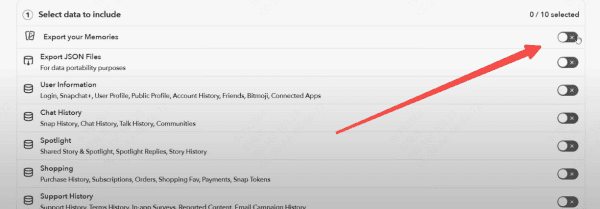
Use Snapchat's Built-In Save Options
Snapchat allows you to save your own content easily
Save Snaps to Memories before sending them
Download your own Story or video directly to your camera roll
This method works only for content you created.
Save Snapchat Videos with PcGoGo Video Downloader
Follow these steps to download Snapchat videos quickly and securely:
Step 1: Install PcGoGo Video Downloader
Download the program from the official website, install it, and launch it on your computer
Step 2: Get the Snapchat Video Link
Open Snapchat in your browser or use a web viewer that provides a link to the video or Story you want to save
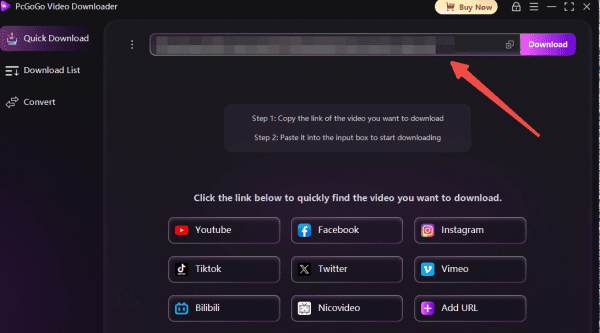
Step 3: Paste the Link into PcGoGo Video Downloader
Copy the video link and paste it into the download bar
PcGoGo Video Downloader will automatically recognize and analyze the content
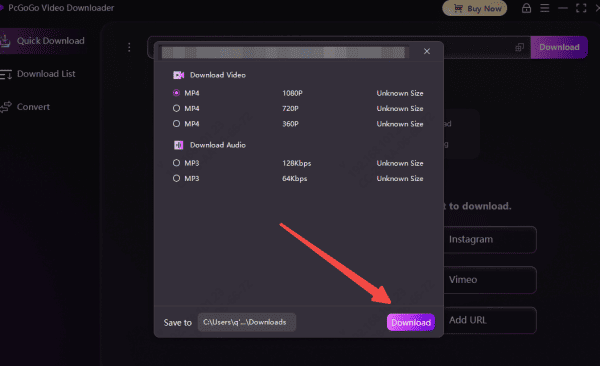
Step 4: Select Video Format and Quality
Choose whether you want MP4 or MP3 (audio only)
Select the resolution available for the video
Step 5: Download Your Snapchat Video
Click Download, and PcGoGo Video Downloader will save the video to your chosen folder
You can track all downloads inside the software
Why PcGoGo Video Downloader Is Ideal for Saving Snapchat Videos
PcGoGo Video Downloader offers a reliable, fast, and user-friendly experience, especially for users who frequently save videos across different platforms.
Key advantages include:
Batch download multiple Snaps or Stories: Save many videos at once without manual copying
High-resolution output: Preserve the original quality, including HD or 4K if available
Watermark-free files: Perfect for editing, reposting (with permission), or archiving
Audio extraction: Convert videos to MP3 if you only need the audio
Supports many platforms: Download from Snapchat, TikTok, Instagram, Threads, YouTube, Facebook, and more
PcGoGo Video Downloader is suitable for creators, editors, and anyone needing clean, high-quality video downloads.

Legal and Privacy Considerations
Before saving any Snapchat content, keep these rules in mind:
Respect privacy: Never share or repost someone's video without their permission
Avoid distributing copyrighted content
Use safe tools to prevent account risk, data leaks, or malware
Save videos only for personal use unless the creator has given explicit permission
Downloading content responsibly protects both you and the original creator
Conclusion
Saving Snapchat videos can be challenging due to the platform's focus on temporary content, but with the right methods, it's completely possible to preserve your favorite moments or back up important clips. Whether you're using Snapchat's built-in save tools for your own Snaps or relying on a professional downloader like PcGoGo Video Downloader for high-quality, watermark-free files, you have several safe and effective options. Always remember to respect privacy, follow copyright rules, and use downloaded content responsibly. With these steps and tools, you can easily save Snapchat videos and build a secure collection of memories, tutorials, or creative clips whenever you need them.