
If Windows shows an "MSVCR100.dll is missing" or "MSVCR100.dll not found" error, the affected game or application may be unable to start because the Microsoft Visual C++ 2010 runtime is missing, damaged, or not loading correctly. This issue is especially common with older software that still depends on Visual C++ 2010 components. This guide explains several practical ways to fix MSVCR100.dll errors, including reinstalling the official Visual C++ 2010 Redistributables, running SFC and DISM, scanning for malware, installing Windows updates, and using PcGoGo DLL Fixer to check for broader DLL-related problems without relying on unsafe standalone DLL download sites.
Reinstall Microsoft Visual C++ 2010 Redistributable
Download the official Microsoft Visual C++ 2010 Redistributable from Microsoft and install it again. On many systems, it is best to install both the x86 and x64 versions, because some 64-bit versions of Windows still run 32-bit programs that need the x86 package
After installation, restart your computer and test the program again

Run System File Checker
Open Command Prompt as administrator and run this command:
sfc /scannow
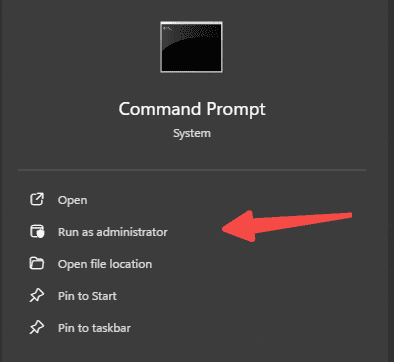
This tool scans protected Windows files and replaces corrupted versions where possible. Wait for the scan to finish completely, restart your PC, and then test the program again.
Use DISM for Deeper Repair
Open Command Prompt as administrator and run:
DISM /Online /Cleanup-Image /RestoreHealth
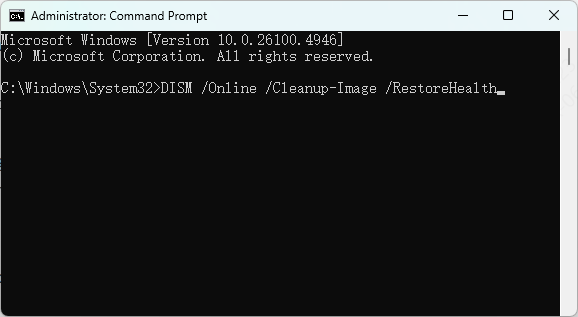
DISM repairs the Windows image that SFC depends on when replacing damaged files. After DISM finishes, restart the computer and run sfc /scannow again. Then try launching the affected program once more.
Scan for Malware
Malware can delete, replace, or corrupt DLL files, including Microsoft runtime libraries. If the error appeared together with pop-ups, unusual slowdowns, crashes, or other missing-file messages, run a full system scan immediately
Use Windows Security or another trusted antivirus solution to scan the entire computer. Remove any threats that are found. After cleanup, run SFC and DISM again to repair system damage left behind by the infection

Update Windows
Installing Windows updates can help fix compatibility issues, replace damaged components, and improve runtime support for older programs. If your system is behind on updates, install all important updates and restart the computer
Windows Update may not always restore MSVCR100.dll directly, but it can fix related system problems that interfere with Microsoft Visual C++ packages and shared libraries. This step is especially useful if the error began after a failed update or after restoring an older system backup

PcGoGo DLL Fixer
If none of these above methods work for the dll issue, try PcGoGo DLL Fixer. PcGoGo DLL Fixer can help scan the system for missing or corrupted DLL components and repair them automatically.

Frequently Asked Questions
Do I need the x86 or x64 Visual C++ 2010 Redistributable?
Install the version that matches the affected application: x86 for a 32-bit app and x64 for a 64-bit app. On 64-bit Windows, installing both can help if you're unsure which the app uses.
Will installing the latest Visual C++ Redistributable fix MSVCR100.dll?
Not necessarily. MSVCR100.dll belongs to the Visual C++ 2010 runtime; newer redistributables do not replace an application’s requirement for that version.
Can SFC or DISM restore MSVCR100.dll?
Usually not. They repair Windows components, while MSVCR100.dll is normally installed by a Visual C++ Redistributable. Reinstalling the official 2010 package is the more direct fix.
Conclusion
MSVCR100.dll missing issues are usually caused by a damaged Microsoft Visual C++ 2010 Redistributable package, a broken app installation, corrupted Windows files, antivirus interference, or malware. If the issue affects only one program, a clean reinstall may be enough. If several apps show DLL errors, Windows itself may need deeper repair. In either case, avoid downloading random DLL files from unofficial sites. Fixing the root cause is safer, more stable, and far more likely to solve the problem permanently.