
X (formerly Twitter) is one of the most active platforms for sharing short videos, breaking news clips, viral moments, interviews, and creative content. Many Windows users want a reliable way to download X videos for offline viewing, editing, archiving, or content reuse. If you are looking for a powerful X video downloader for Windows, PcGoGo Video Downloader is a professional and efficient solution. It allows you to download X videos in high quality, without watermarks, and with full control over format and resolution.
How to Download X Videos on Windows Using PcGoGo Video Downloader
Step 1: Install PcGoGo Video Downloader
Download PcGoGo Video Downloader from the official website and install it on your Windows PC
Launch the software after installation
Step 2: Copy the X Video Link
Open X in your browser, find the post containing the video you want, click the Share button, and copy the video link
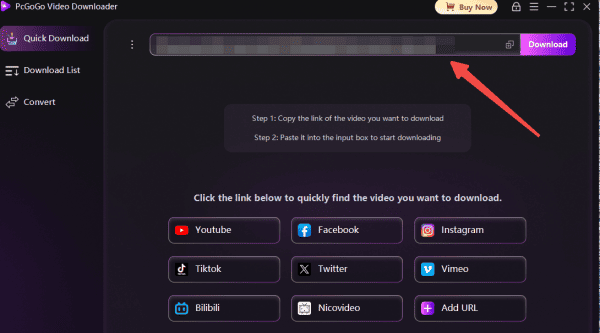
Step 3: Paste the Link into PcGoGo Video Downloader
Paste the copied URL into PcGoGo Video Downloader's download bar
The software will automatically analyze the video
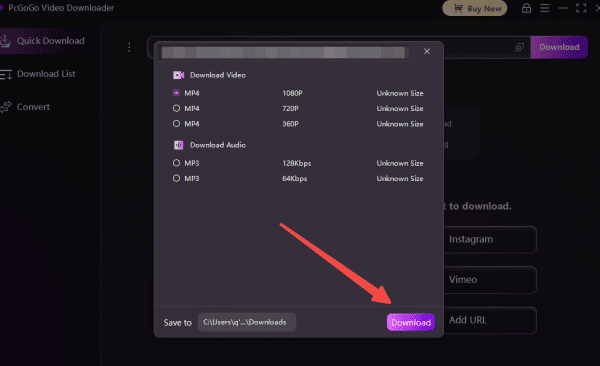
Step 4: Choose Format and Quality
Select MP4 for video or MP3 for audio only
Choose your preferred resolution, such as 1080p or 4K, if available
Step 5: Start Downloading
Click the Download button
PcGoGo Video Downloader will save the X video to your computer quickly and securely
You can monitor progress in the download list
PcGoGo Video Downloader is Ideal for Who
PcGoGo Video Downloader is ideal for:
Content creators saving reference clips
Editors collecting footage for projects
Journalists archiving news videos
Social media managers organizing content
Casual users who want offline access to X videos
Why You Need an X Video Downloader on Windows
Downloading X videos directly on Windows can be challenging because:
X does not provide a built-in video download feature
Online download sites often add watermarks or limit resolution
Browser extensions may stop working or raise security concerns
Many tools fail to download videos with audio correctly
A dedicated Windows application like PcGoGo Video Downloader solves these issues by offering stable performance, high-quality output, and advanced download features.
Key Features of PcGoGo Video Downloader for X Videos
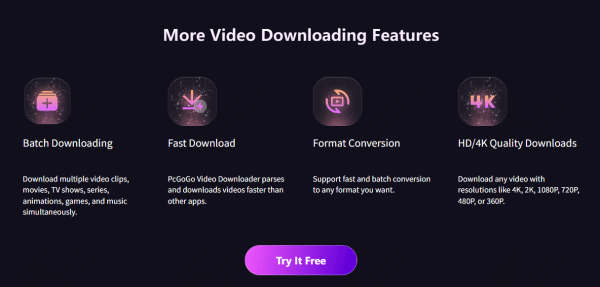
High-Quality X Video Downloads: PcGoGo Video Downloader supports downloading X videos in HD, Full HD, 4K, and even 8K (when available), ensuring no quality loss compared to the original upload
Watermark-Free Output: Unlike many free online tools, PcGoGo Video Downloader saves clean X videos without watermarks, making them suitable for editing, presentations, or personal archives
Flexible Format Options: You can download X videos as: MP4 video files or MP3 (audio-only extraction). This flexibility is ideal for editors, podcasters, and content creators
Batch Downloading Support: PcGoGo Video Downloader allows you to download multiple X video links at once. Whether you're saving an entire thread, bookmarked posts, or multiple clips, batch downloading saves time and effort
Fast and Stable Performance on Windows: With its optimized parsing engine, PcGoGo Video Downloader processes X video links quickly and reliably, avoiding the slow speeds and failures common with browser-based tools
Multi-Platform Video Downloader: In addition to X, PcGoGo Video Downloader also supports: YouTube, TikTok, Instagram, Facebook, Threads, Pinterest and more

Conclusion
If you're searching for a reliable X video downloader for Windows, PcGoGo Video Downloader is a powerful and professional choice. With watermark-free downloads, high-resolution support, batch processing, fast speeds, and multi-platform compatibility, it offers everything Windows users need to download X videos safely and efficiently. Whether you're saving a single clip or managing large amounts of content, PcGoGo Video Downloader makes the entire process simple, fast, and high quality.