
Downloading videos from a direct URL is one of the simplest and most efficient ways to save online content for offline viewing, editing, or archiving. Whether the video comes from popular platforms like YouTube, Instagram, Facebook, X (formerly Twitter), TikTok, or Reddit, having the right tool can make the process fast, safe, and high-quality. In this guide, we will explain how downloading videos from a URL works, common limitations of free tools, and how to do it reliably using PcGoGo Video Downloader.
Common Challenges with Video Downloading from URLs
Slow Speeds & Ads: Free downloaders often have slow speeds and intrusive ads that make the process cumbersome
Watermarked Downloads: Many free tools add watermarks to the downloaded videos, which can be frustrating if you need clean content
Limited Formats: Some tools don't support all video formats or offer low-quality downloads
Risk of Malware: Some free tools may contain malware or lead you to unsafe websites that compromise your privacy
For these reasons, choosing a reliable and safe downloader like PcGoGo Video Downloader is essential for hassle-free video downloading
Why PcGoGo Video Downloader is the Best Solution
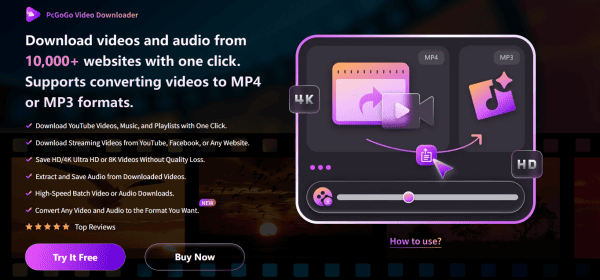
PcGoGo Video Downloader is designed to offer a fast, reliable, and user-friendly solution for downloading videos from URLs. Here's why it's the best choice:
Fast and Reliable Download Speeds: PcGoGo Video Downloader ensures quick downloads, even for long videos or multiple files.
Watermark-Free Videos: Enjoy clean, professional-quality videos without any unwanted watermarks
Supports High-Quality Downloads: You can download videos in HD, 4K, or 8K, depending on the availability of the original video
Multi-Platform Support: Download from YouTube, Instagram, TikTok, Facebook, X, Reddit, and other popular platforms with a single tool
User-Friendly Interface: Whether you are a beginner or an advanced user, the interface is simple and intuitive to navigate
How to Download Videos from a URL Using PcGoGo Video Downloader
Step 1: Install and Launch PcGoGo Video Downloader
Go to the official PcGoGo Video Downloader website
Download and install the software on your PC
Open the program after installation
Step 2: Copy the Video URL
Open your browser and navigate to the platform (YouTube, Instagram, Facebook, etc.) where the video is located
Find the video you want to download
Copy the URL of the video from the browser's address bar
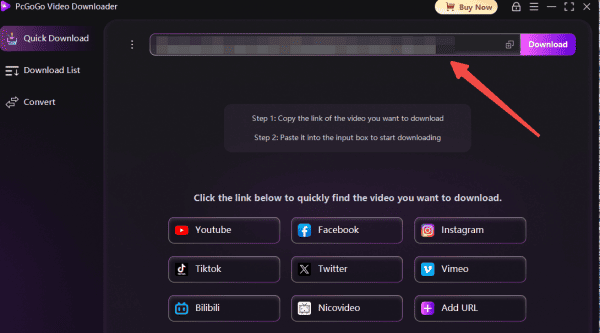
Step 3: Paste the URL into PcGoGo Video Downloader
Open PcGoGo Video Downloader
Paste the copied video URL into the download bar at the top of the software window
The program will automatically analyze the video and display available download options, such as formats and resolutions
Step 4: Choose Video Format and Quality
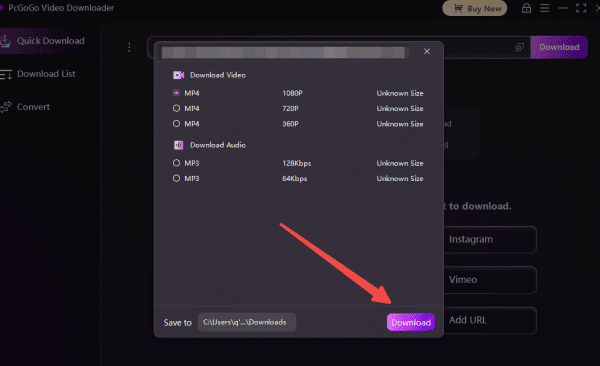
Select your desired video format (MP4, MP3, etc.)
Choose the quality you want, depending on what is available
Options like 720p, 1080p, 4K, or even 8K may be available for download
Step 5: Start the Download
Click the "Download" button to begin the download process
Wait as PcGoGo Video Downloader fetches and saves the video to your designated folder
You can track the progress of your download in the software's download list
Tips for Managing Downloaded Videos
Once your videos are downloaded, here are some tips to keep your collection organized:
Create Organized Folders: Create folders for different types of content (e.g., Music, Tutorials, Memes, etc.) to make it easier to find videos later
Rename Files: Use descriptive filenames that include the date and topic, such as "2025-01-25_Travel_Vlog.mp4" to make searching easier
Backup Your Videos: Store your downloaded videos in cloud storage or an external drive to avoid losing them
Legal Considerations and Best Practices
When downloading videos from the internet, it's important to respect copyright and usage rights:
Always Respect Privacy: Never download someone else's content without permission, especially if you plan to share it
Avoid Distributing Copyrighted Content: Download content only for personal use unless explicit permission is granted for redistribution
Conclusion
Downloading videos from URLs has never been easier, and with PcGoGo Video Downloader, you can enjoy a smooth, high-quality, and secure experience. Whether you're saving content for offline viewing, archiving, or editing, this tool makes it simple and efficient. By following the steps outlined in this guide, you can start downloading your favorite videos with just a URL today. Download PcGoGo Video Downloader and unlock a world of content at your fingertips!