
X (formerly Twitter) has become a hub for sharing short videos, breaking news clips, viral moments, and creative content. As users share more and more engaging videos, the need to download these videos for offline viewing, archiving, editing, or sharing grows. Unfortunately, X does not offer a built-in option to download videos directly. Fortunately, you can easily download videos from X using a simple method that involves copying the URL and using a powerful video downloader tool. In this guide, we'll walk you through the easiest way to download X videos using a URL with PcGoGo Video Downloader.
Legal Considerations
Before downloading and using X videos, keep in mind the following legal considerations:
Respect Copyright: Always ensure that you are not violating any copyright laws when downloading and using videos. Don't download or distribute videos without permission, especially those owned by other creators
Fair Use: Make sure your use of downloaded content is legal and falls under fair use, such as for personal, educational, or research purposes
Avoid NSFW Content: Be cautious when downloading adult content or videos that violate platform guidelines.
By using PcGoGo Video Downloader responsibly and following these guidelines, you can enjoy downloaded X videos for offline viewing or creative use without any issues
Steps to Download X (Twitter) Video Using PcGoGo Video Downloader
Launch PcGoGo Video Downloader
If you haven't installed PcGoGo Video Downloader, visit the official website and download the software
Install and launch the program on your computer
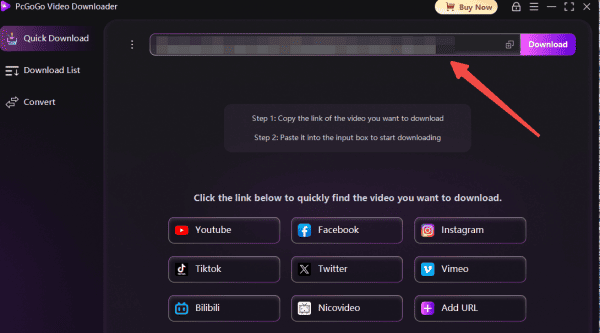
Paste the URL into PcGoGo Video Downloader
Open PcGoGo Video Downloader
Paste the copied X video URL into the download bar
The software will automatically analyze the video and retrieve the download options
Choose the Video Format and Resolution
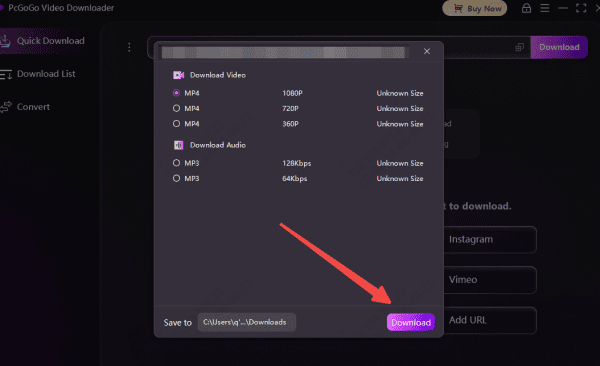
Once the video is analyzed, you'll be able to choose the format and resolution you prefer
Select MP4 for video format
Choose the available resolution, such as 720p, 1080p, or higher (if available)
Click Download
After selecting your preferred settings, click the Download button
PcGoGo Video Downloader will begin downloading the video to your selected folder
You can monitor the progress of the download in the download list
Benefits of Using PcGoGo Video Downloader
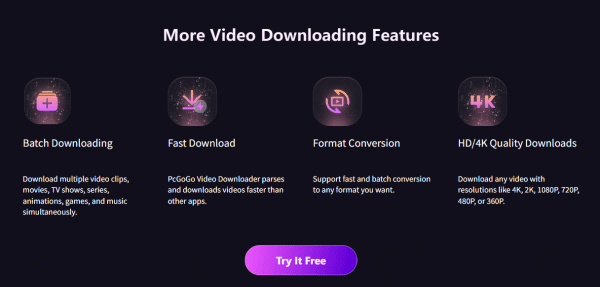
PcGoGo Video Downloader provides a variety of advantages that make it the go-to tool for downloading X (Twitter) videos:
High-Quality Downloads: Download videos in their original quality, including HD and 4K resolution
Watermark-Free: Save clean, watermark-free videos for professional use or sharing
Batch Downloading: Download multiple X videos at once to save time and effort
Fast Download Speed: Experience quick downloads without unnecessary waiting times
User-Friendly Interface: PcGoGo Video Downloader is simple to use, even for beginners
Tips for Managing Downloaded X (Twitter) Videos
Once you've downloaded your favorite X videos, it's important to stay organized. Here are a few tips to help you manage your downloaded content:
Organize Files: Create a dedicated folder on your computer for X videos. For example, you can name it "X_Videos" or use subfolders for different types of content like News, Memes, and Tutorials
Batch Rename Files: To make it easier to find videos later, rename files using a consistent naming system, such as Date_VideoTitle.mp4
Backup Your Videos: Consider backing up your downloaded videos to cloud storage or an external hard drive to ensure they're safe from data loss
Conclusion
Downloading videos from X (formerly) Twitter doesn't have to be complicated or frustrating. With PcGoGo Video Downloader, you can easily download X videos by URL, ensuring high quality and watermark-free downloads. The tool offers fast speeds, batch downloading, and an intuitive interface, making it the perfect solution for anyone looking to save and manage X (Twitter) videos. Whether you're a creator, editor, or casual user, PcGoGo Video Downloader will help you access your favorite videos whenever you want.