





PC Help & How-To Articles

Fix SteelSeries Wireless Headset No Audio
Wireless headsets offer gamers and professionals the ultimate combination of freedom, premium sound, and immersive experiences. But when your SteelSeries wireless headset goes silent, frustration is inevitable. The problem is often software or firmware-related: outdated drivers, corrupted SteelSeries GG software, misconfigured audio settings, or connectivity issues. This guide provides step-by-step solutions to get your audio back and prevent future issues, including how Driver Talent X can make driver updates quick and effortless.

Hermes Agent vs. Claude Code
By 2026, AI agents have evolved beyond simple coding assistants into versatile partners capable of long-term automation, cross-session memory, and specialized development support. Leading the pack are Hermes Agent and Claude Code, each serving distinct purposes: Hermes delivers persistent, always-on assistance across diverse workflows, while Claude Code focuses on high-performance, coding-specific tasks within development environments. Understanding their strengths and differences helps developers choose the right agent for their workflow, whether the goal is broad automation, continuous learning, or rapid code iteration.

Codex vs. Claude Code
By 2026, AI coding agents have become indispensable for developers, revolutionizing how software is created, tested, and maintained. Among the leading options, Codex and Claude Code stand out, yet they follow fundamentally different approaches. Codex specializes in autonomous, parallel task execution, enabling developers to delegate work efficiently, while Claude Code excels at interactive, real-time collaboration, offering immediate feedback and hands-on guidance. Selecting the right agent depends on your workflow, the complexity of your projects, and whether you favor hands-off automation or active, collaborative development. Grasping these differences is crucial for boosting productivity and achieving smoother project outcomes.

AI Agent Security: Risks and Essential Protection Strategies
AI agents are no longer just tools — in 2026, they act autonomously, accessing data, systems, and services on your behalf. But with this power comes serious security risks: malicious prompts, data leaks, over-permissioned access, and unsafe automated actions. Securing these agents requires more than software updates — it demands careful configuration, human oversight, and strict access control. This guide breaks down the biggest threats and provides practical strategies to keep your AI agents safe, whether you run them locally or in the cloud.
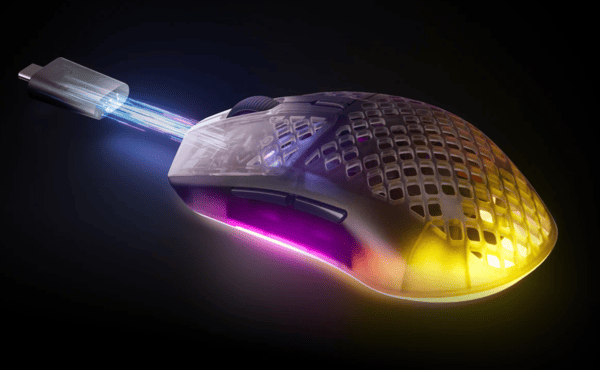
SteelSeries Aerox 3 Wireless Gen 2 Review
The SteelSeries Aerox 3 Wireless Gen 2, released in 2026, builds on its predecessor's ultra-lightweight, honeycomb design and strong wireless performance. Weighing just 68 grams, it keeps the IP54 AquaBarrier protection while adding meaningful upgrades: a TrueMove 26K sensor, 4000 Hz wireless polling, better battery management, and adjustable lift-off distance. With tri-mode connectivity (2.4 GHz, Bluetooth, wired) and up to 120 hours of battery life on 2.4 GHz, it's aimed at competitive FPS players, hybrid gamers, and anyone who values portability and durability at around $100/£100. This review examines whether these improvements make the Gen 2 a compelling upgrade.

OpenClaw vs Hermes Agent
As AI agents become more sophisticated, users are increasingly moving beyond simple chatbots toward persistent, task-oriented assistants that can manage complex workflows. Among the many options available, OpenClaw and Hermes Agent often come up for comparison. Both aim to enhance productivity and automation, but they take fundamentally different approaches: OpenClaw emphasizes user control, flexibility, and integration, while Hermes Agent focuses on adaptive, self-improving behavior. This guide breaks down their strengths, weaknesses, and ideal use cases, helping you decide which agent aligns best with your priorities — whether you value structured control, evolving intelligence, or a combination of both.
Claw Code vs Claude Code
In 2026, developers looking to leverage AI coding agents face a choice between two distinct approaches: Claw Code and Claude Code. While both tools aim to assist with coding tasks, they serve very different priorities. Claw Code embraces an open, experimental, and community-driven approach, appealing to those who enjoy learning, customizing, and exploring AI behavior. Claude Code, on the other hand, offers a polished, reliable, and production-ready experience, making it ideal for professional development workflows and complex projects. Understanding the differences between these agents — from openness and flexibility to stability and real-world performance — is essential for selecting the right tool to match your coding goals.

Best OpenClaw Agents in 2026: Practical Use Cases and How to Get Started
By 2026, OpenClaw agents are revolutionizing how individuals and teams manage daily tasks, conduct research, and handle business workflows. Unlike conventional chatbots, these advanced AI assistants can follow multi-step procedures, access files, and integrate with various tools to accomplish real work. Their rising popularity is driven by their ability to enhance productivity, simplify customer support, assist with content creation, and manage technical workflows effectively. This guide highlights the most practical OpenClaw agents, provides setup instructions, and shares tips for leveraging them to maximize efficiency in both personal and professional settings.

OpenClaw vs NemoClaw
Choosing the right AI agent platform in 2026 means balancing speed, flexibility, and security. OpenClaw delivers fast, adaptable workflows for experimentation and smaller teams, while NemoClaw builds on it with stronger controls, isolation, and enterprise-ready governance. This comparison helps you decide which platform fits your needs—agility or security.
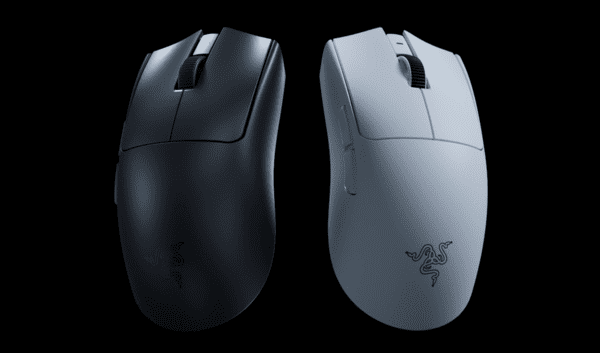
Razer Viper V4 Pro Review
The Razer Viper V4 Pro, priced around $159.99, is the latest in Razer's ultra-lightweight wireless esports mouse lineup, succeeding the popular Viper V3 Pro. It features a lighter shell, upgraded Focus Pro 50K Gen-3 optical sensor, Gen-4 optical switches, an optical scroll wheel, and improved battery life. Weighing just 49g (black) or 50g (white), it supports HyperSpeed Wireless Gen-2 with true 8000 Hz polling and up to 180 hours of battery life at 1000 Hz. Designed for competitive FPS players, the V4 Pro aims to deliver minimal weight, low latency, and precise control. In this review, I evaluate whether it's a meaningful upgrade or a refinement of its predecessor.