





Peripheral

Fix Bluetooth Mouse Not Working After Pairing on Windows
Fix Bluetooth mouse paired but not connected on Windows with battery checks, Bluetooth service restart, re-pairing, driver updates, and system update troubleshooting.

Resolve Mouse Wheel Issues and Restore Smooth Scrolling
To fix a mouse scroll wheel that is not working, first rule out hardware issues by cleaning the wheel and testing another mouse, then update the mouse driver, check Windows mouse settings, install system updates, try System Restore if the issue started recently, switch USB ports or receivers, and confirm whether the problem only happens in a specific browser or app.
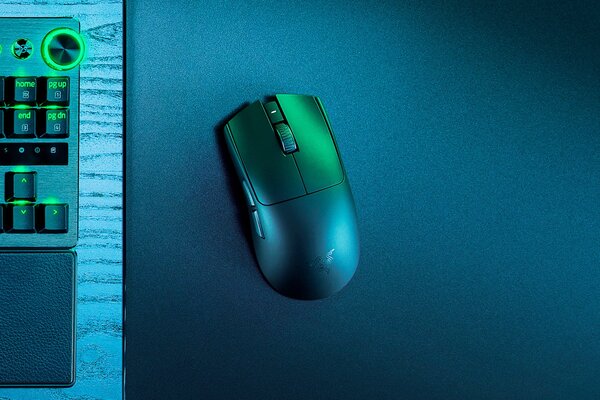
Razer Viper V3 Pro vs Razer Viper V3 Pro SE
The Razer Viper V3 Pro lineup stands as the ultimate in esports gaming mice, celebrated for their featherlight construction, pinpoint accuracy, and lightning-fast responsiveness optimized for intense competitive gaming. Ever since its debut, the Viper series has been a go-to for elite players, featuring ergonomic symmetrical designs perfect for claw or fingertip grips. In this comparison, we'll explore the standard Razer Viper V3 Pro alongside its SE edition (branded as a streamlined "no-frills, pure-performance" option), underscoring their commonalities and distinctions to assist you in selecting the ideal match for your setup.
How To Connect Bluetooth Headphones To PC
With the continuous development of wireless technology, Bluetooth headset has become the preferred audio device for many people. So, how to connect Bluetooth headset to PC? This article will provide you with detailed steps and solutions to some common problems.

Resolve Wireless Mouse Pairing and Connection Issues
To fix a wireless mouse connection failure, update the mouse and USB drivers, check the receiver and USB port, replace or charge the battery, re-enter pairing mode, restart the PC, reduce wireless interference, and test the mouse on another device to confirm whether the problem is with the mouse or the computer.

How to Recover Data from Solid State Hard Drive
Losing valuable files from a solid state drive (SSD) can be alarming, particularly when it occurs unexpectedly due to accidental deletion, formatting, system errors, or firmware issues. Unlike traditional hard drives, SSDs use TRIM technology, which can permanently erase deleted data and make recovery more difficult. Nevertheless, most lost SSD files can still be recovered if you act promptly and follow the correct recovery procedures. This guide explores the common reasons for SSD data loss and explains how to safely retrieve your files using PcGoGo Data Recovery.
How to Update Bluetooth Driver for USB Dongle on Windows?
Need to update bluetooth driver for your USB Bluetooth dongle on Windows? This blog shares steps to download and update drivers, ensuring smooth Bluetooth connection on your Windows device.

Recover Lost Documents from Kingston USB Thumb Drive Safely
To recover lost documents from a Kingston USB drive, stop using the drive immediately, scan it with a reliable recovery tool, save recovered files to a different location, and check backups or previous versions, since deleted, formatted, corrupted, or malware-hidden files are often still recoverable if they have not been overwritten.

Unlocking Your iPad Without Passcode
If you forget your iPad passcode and see iPad Unavailable or Security Lockout, you can regain access by erasing and restoring the device through Apple recovery mode or a screen unlock tool, but either way the device must be reset and any data not backed up will be lost.

Resolve Windows Shift + S Issues
If Windows Shift S is not working, the problem is usually caused by shortcut conflicts, Snip & Sketch glitches, outdated Windows updates, or faulty keyboard and display drivers, and it can usually be fixed by closing conflicting apps, restarting or resetting Snip & Sketch, updating Windows, repairing drivers, and scanning for malware.