





Peripheral
Keyboard Not Typing? Here Are 4 Ways to Fix It
Is your keyboard not typing? This blog offers solutions like checking ports, updating drivers, and more. Fix USB keyboard recognition issues and get back to typing smoothly.

Fast and Effective Data Recovery for Portable Hard Drives
Portable external hard drives are crucial for saving and transferring important data, whether it's cherished personal photos, essential work files, or extensive backups. They offer easy access and ample storage space, making them indispensable. However, data loss can occur unexpectedly due to various factors like accidental deletion, formatting mistakes, system crashes, malware attacks, or even physical damage. The good news is that, in many cases, lost data can be recovered if you act promptly and follow the right recovery procedures.

Keyboard LED Lights Not Working: Complete Guide
Fix keyboard indicator lights not working by checking the keyboard connection or receiver, updating the keyboard driver, reviewing Windows keyboard settings, uninstalling and reinstalling the keyboard device in Device Manager, and testing the keyboard on another USB port or another computer to rule out hardware failure.
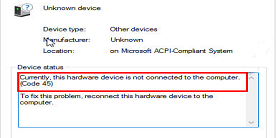
Printer Code 45 Error – Causes and How to Fix Quickly
Printer error "Code 45" usually means a connection or driver issue. Luckily, it's often easy to fix. This guide covers the common causes and steps to get your printer working again.
Xbox Controller Keeps Disconnecting – How to Fix Quickly
Fix an Xbox controller that keeps disconnecting on PC by updating Bluetooth/USB/chipset drivers, disabling USB power-saving, updating the controller firmware through Xbox Accessories, reducing wireless interference, and checking batteries, cable quality, and USB port stability.

9 Ways to Fix Logitech Keyboard Not Working
Users may encounter issues with their Logitech keyboard not working. This article offers effective solutions to fix the problem and restore functionality.

Solutions to Fix Mouse Scroll Wheel Not Working
Some Windows users may encounter issues with the mouse wheel, such as unresponsiveness, erratic scrolling, or complete failure. This can make browsing web pages or documents inconvenient. This article provides several effective solutions to help you quickly restore your mouse wheel functionality.

How to Fix Wireless Keyboard Touchpad Not Working Issues
Fix wireless keyboard touchpad issues by updating the keyboard driver, replacing or charging the battery, reconnecting the USB receiver or Bluetooth pairing, using the touchpad Fn shortcut, checking touchpad settings, testing the keyboard on another device, and resetting it to factory settings if needed.

Guide to Fixing a Non-Working Mouse
A malfunctioning mouse can greatly impact productivity. This guide helps you quickly troubleshoot and fix mouse issues.

How to Quickly Resolve Logitech Keyboard Lag Issues
Logitech keyboards are known for their quality and design, but they can sometimes have latency issues that affect work and gaming. This article provides quick and effective solutions to fix these issues for smoother use.