





PC Help & How-To Articles
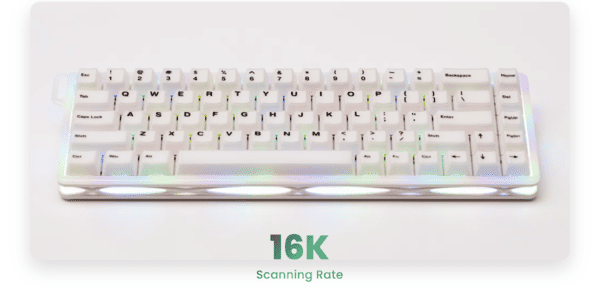
Verve68 HE Review: Eye-Popping Budget HE 2026
MonsGeek launched a true game-changer for budget magnetic keyboard enthusiasts in March 2026: the Verve68 HE — their first hollow-case 65% (68-key layout with dedicated arrow keys) Hall Effect keyboard. Unlike the premium aluminum builds like the Magger60, this one is designed as a fun, vibrant, and ultra-affordable gateway for gamers, RGB lovers, and first-time magnetic switch users who want eye-catching style and blazing-fast performance without spending over $100.

Complete Guide to Updating AMD Ryzen Chipset Drivers
Keeping your AMD Ryzen chipset drivers up to date is crucial for system stability, optimal performance, and smooth communication between your CPU, motherboard, and peripheral devices. Outdated or corrupted drivers can lead to system crashes, malfunctioning USB or PCIe devices, and overall performance issues. This guide offers a complete, step-by-step approach to updating AMD Ryzen chipset drivers, including diagnostics, alternative update methods, optimization tips, and troubleshooting strategies.

Pulsar X2N CrazyLight Review: Narrow Shape Meets Extreme Ultralight Performance
Pulsar's X2 series has long been a favorite among ultralight enthusiasts. The CrazyLight lineup pushes the limit even lower in weight while retaining high-end features. Available as Mini (~40–41 g) and Medium (~43–46 g), the X2N targets claw and relaxed-claw players who prefer extreme lightness and a finger-focused, narrow shape over palm-friendly designs. It includes the in-house XS-1 sensor, native 8K polling, optical switches, and Pulsar's signature grippy finish—at a competitive price point. This review examines both sizes and assesses whether the narrow redesign brings real benefits or caters to too specific an audience.
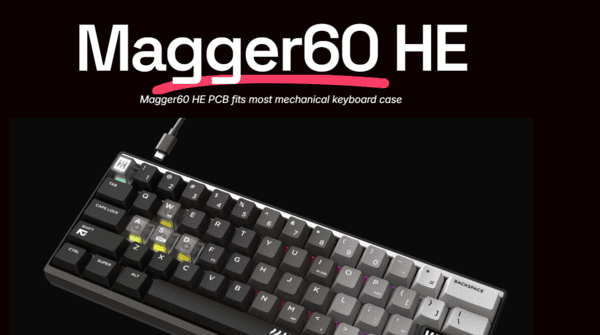
Magger60 HE: The Premium 60% Hall Effect Contender in 2026?
In 2026, the Hall Effect (magnetic) keyboard market is led by rapid-trigger giants, with Wooting maintaining its lead—but competitors are quickly catching up. Enter the LUMINKEY Magger60 HE, a premium 60% magnetic gaming keyboard featuring a full CNC aluminum build, ultra-low latency (around 0.08ms), true 8000Hz polling, 0.005mm Rapid Trigger precision, and unexpectedly impressive typing and sound qualities, all tailored for enthusiast users.

Logitech G325 LIGHTSPEED Gaming Headset Review
The Logitech G325 LIGHTSPEED is the newest addition to Logitech's G3 series, launched on February 3, 2026. With a price tag of $79.99, it's designed for gamers on a budget who want the freedom of wireless connectivity, cross-platform compatibility, and a sleek, lifestyle-friendly design without the high cost of premium features. Key features include Logitech's trusted LIGHTSPEED wireless technology, Bluetooth 5.2 dual connectivity, over 24 hours of battery life, 24-bit game-ready audio, and a boomless beamforming microphone with AI noise reduction—making it perfect for players who alternate between gaming sessions, casual listening, and phone calls.

XENNS Mangird Tea Pro SE vs XENNS Mangird Top Pro
XENNS Mangird (commonly stylized as Xenns/Mangird) has solidified its position as a leading brand in the hybrid IEM market, consistently offering outstanding technical prowess, natural timbre, and refinement that often outperforms expectations in the mid-to-high mid-fi category. The Tea Pro SE (Special/Limited Edition, released late 2025) evolves the popular Tea Pro series at around $449 (with prices ranging $449–$516 depending on retailer and promotions), incorporating upgrades such as Knowles SWFK 31736 dual ultra-treble tweeters and a sharper, more reference-tuned profile for cleaner lows and enhanced extension. The Top Pro (current flagship, launched mid-2025) is priced at ~$499 (frequently dropping to $449 during sales), featuring a 10-driver hybrid array (2DD + 8BA) with premium execution and greater overall polish for a truly comprehensive all-rounder. In the highly competitive $400–$550 range, the decision hinges on whether the Top Pro's extra drivers, refined technicalities, and subtle enhancements m
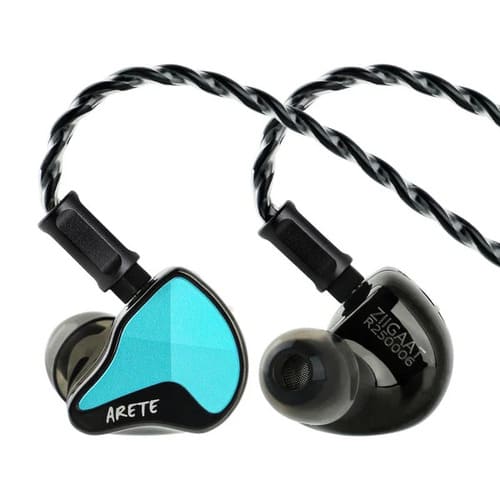
ZIIGAAT X FRESH REVIEWS ARETE II
The ZiiGaat x Fresh Reviews Arete II marks the eagerly awaited sequel in the successful partnership between ZiiGaat and renowned audio/gaming reviewer Fresh Reviews, building directly on the original Arete's runaway popularity (tens of thousands sold globally thanks to its well-balanced, gaming-optimized sound). Released in late 2025, this evolved model upgrades to a 1DD + 4BA hybrid setup featuring a newly developed 2nd-generation 10mm liquid-silicone suspension composite dynamic driver that delivers true subwoofer-like depth and punch in the low end, enhanced Knowles balanced armatures (likely ED29689 mids and SWFK 31736 treble), an optimized crossover, noticeably airier and more extended highs, plus a useful bass tuning switch. At $279 USD, it's aimed squarely at competitive FPS gamers and music enthusiasts who want an energetic, fun signature paired with impressive technical performance—resolution, precise imaging, and expansive soundstage.

XENNS Mangird Tea Pro SE Review
The XENNS Mangird Tea Pro SE is the latest limited-edition upgrade in the acclaimed Tea series from XENNS Mangird, a brand renowned for exceptional value in hybrid IEMs. Building on the original Tea Pro's success—a 2DD + 6BA model praised for its balanced tuning and technical performance—the SE, launched late 2025, features upgraded Knowles SWFK 31736 dual super tweeters for superior treble extension, punchier sub-bass, tighter control, and enhanced clarity in a more reference-oriented sound. Priced at around $449 USD, it targets audiophiles and professionals seeking neutral-leaning playback with improved resolution, soundstage, and imaging. This review compiles insights from Head-Fi, Reddit, Prime Audio, and YouTube channels such as Joyce's Review and Gizaudio to evaluate whether the SE delivers on its promises and how it compares to its predecessor.
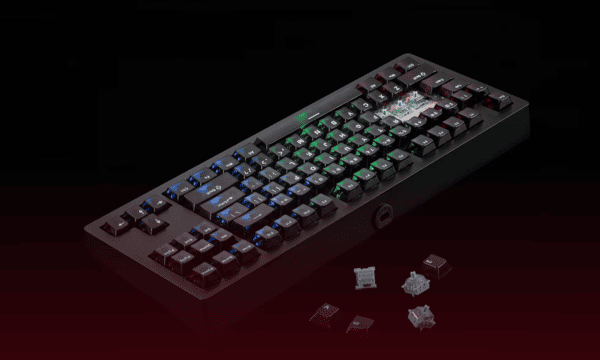
MonsGeek M3 V5 HE Keyboard Review: A Competitive Gamer's Dream
The MonsGeek M3 V5 HE is a high-end TKL (tenkeyless) keyboard featuring magnetic Hall effect switches, building on MonsGeek's recent focus on advanced magnetic switch technology. It stands out with enhancements like ultra-fast scanning rates, precise actuation, and a strong emphasis on competitive gaming, all while offering excellent build quality at an accessible price.

Sabre V2 Pro Wireless Magnesium Alloy Review: A Lightweight Champion for Competitive Gamers
The Corsair Sabre V2 Pro Wireless Magnesium Alloy Gaming Mouse (Sabre V2 Pro MG) is Corsair's premium upgrade to their ultralight lineup. Unveiled at CES 2026 and released January 6, 2026, it features a hollowed magnesium alloy shell for better durability, rigidity, and a cooler feel, while keeping elite specs: 8,000Hz hyper-polling and the MARKSMAN S sensor. At 56g, it balances agility with premium build quality—ideal for esports players who want longevity and a high-end tactile experience without going sub-40g extreme.