





Optimize Your Printing Setup with Sublimation Label Printers and Drivers
Fix api-ms-win-core-libraryloader-l1-2-1.dll Missing Error
Facing the api-ms-win-core-libraryloader-l1-2-1.dll missing error can be quite frustrating, especially when it stops key software or games from launching. This particular DLL file plays a crucial role in managing core system functions and ensuring the smooth operation of various applications. When it's missing, corrupted, or improperly registered, you may encounter this error, which can block your access to certain programs. The good news is that you don't need to go as far as reinstalling Windows to fix the issue. This guide will walk you through the steps to resolve the api-ms-win-core-libraryloader-l1-2-1.dll missing error efficiently.
 02:38 AM, May 26, 2026
 Hugo
Hugo

How to Fix Unarc.dll Error Code 1
Unarc.dll error code 1 is different from other unarc.dll errors because it points to a write failure during extraction, not a corrupted archive or memory issue. The installer can read the archive correctly, but unarc.dll cannot write the extracted files to the destination. In most cases, the cause is insufficient disk space, missing permissions, antivirus interference, or a damaged destination path. Since unarc.dll and ISDone.dll work together during decompression, error code 1 specifically indicates that the write process failed, making disk space and permission checks the most important first steps.
01:59 AM, May 26, 2026
Hugo
How to Fix d3dx9 43 dll Not Found
If you see an error saying d3dx9_43.dll is missing or was not found, the game or application cannot launch until the file is restored. This is a common issue on Windows 10 and 11 because legacy DirectX 9 components are no longer included by default. Fortunately, the fix is usually simple and involves reinstalling the required DirectX runtime files.
02:30 AM, May 25, 2026
Hugo
Step-by-Step Guide to Fix Svchost High CPU Usage
Svchost.exe is a legitimate Windows process called Service Host that runs background Windows services. Multiple instances running at once is normal, but one instance using extremely high CPU is not. The issue is never svchost.exe itself—it’s one of the services running inside it. Fixing the problem requires identifying the specific service causing the CPU spike, then applying the appropriate solution.
02:20 AM, May 25, 2026
Seraphina

Why is my laptop screen black when i turn it on
Laptops have become an essential tool for work and daily life, but occasionally, you may encounter a frustrating issue: a black screen upon startup. Here are several practical methods to address this problem. Let's dive in!
18:22 PM, May 24, 2026
lucky
How to Fix LogiLDA.dll Missing Error on Windows
If you see the error "There was a problem starting C:\Windows\System32\LogiLDA.dll" when using a Logitech mouse or keyboard, it's caused by the Logitech Download Assistant failing to load properly. You can fix it easily by using a dedicated DLL repair tool or reinstalling the Logitech software.
18:55 PM, May 20, 2026
Seraphina
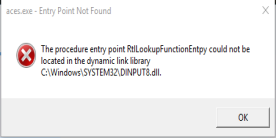
Evil Genius Entry Point Not Found? 7 Fixes That Actually Work
Struggling with the "Evil Genius Entry Point Not Found" error? Discover proven fixes, success rate analysis, and how PcGoGo Driver Sentry ensures smooth gameplay by updating drivers automatically. Get back to gaming fast!
02:05 AM, May 20, 2026
Violet
How to Fix Failed to Load xgameruntime.dll Error Code 126
xgameruntime.dll is part of Microsoft Gaming Runtime, not the game itself. Error 126 occurs when Windows can't load it because the component is missing, corrupted, or unregistered. This affects Xbox, Microsoft Store, and Steam games that rely on Gaming Services APIs.
02:52 AM, May 19, 2026
Hugo
How to Fix rune64.dll Error in GTA 5 Enhanced Edition PC
The rune64.dll error is a frequent problem for players attempting to launch GTA 5 Enhanced Edition on PC. It usually appears when important game files become missing, corrupted, or blocked by other software, preventing the game from loading properly. Common messages include: "rune64.dll is missing," "The program can't start because rune64.dll was not found," or "Error loading rune64.dll." When this issue occurs, the game may crash during startup or fail to launch at all. The good news is that several dependable solutions can resolve it. This guide will walk you through effective methods to fix the rune64.dll error and get GTA 5 Enhanced Edition working smoothly again.
00:36 AM, May 15, 2026
Hugo
Step-by-Step Guide Fix Steam Overlay Error 126
Steam Overlay error 126 occurs when Windows cannot load a required DLL for the overlay module. Unlike a missing file, the overlay binary usually exists — but one of its dependencies, such as a Visual C++ runtime, DirectX component, or system DLL, is missing, corrupted, or blocked. This prevents the overlay from injecting into the game process. Simply reinstalling Steam rarely resolves the problem on its own. The Steam Overlay relies on several system components: Visual C++ runtime libraries, DirectX components, Other system DLLs. If any of these fail to load, Windows returns error 126 and the overlay cannot function.
02:19 AM, May 14, 2026
Hugo

Top questions