





Others
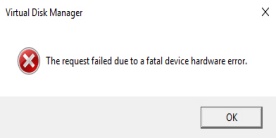
Fix "The Request Failed Due to a Fatal Device Hardware Error"
Seeing "The request failed due to a fatal device hardware error" when opening, copying, or transferring files usually means Windows is having trouble communicating with the affected storage device. The problem may involve a hard drive, SSD, external drive, or USB storage device and can be caused by bad sectors, connection problems, corrupted drivers, file system damage, or failing hardware. Because some causes can put your files at risk, important data should be backed up whenever the drive is still accessible. This guide explains how to diagnose the error and try several practical fixes before deciding whether the storage device needs to be replaced.

How to Fix Second Monitor Detection Issues
If your second monitor is connected but Windows 10 does not detect it, the problem does not necessarily mean the monitor is faulty. A loose HDMI or DisplayPort cable, incorrect display mode, disabled graphics adapter, or damaged display driver can all prevent Windows from recognizing an external screen. You may also notice that the monitor powers on but shows "No Signal," or that only one display appears in Windows settings. This guide covers several practical ways to fix a second monitor not detected on Windows 10 and restore your dual-monitor setup.

Random Computer Shutdowns? Try These Fixes
If your computer suddenly powers off without warning, especially during gaming, heavy workloads, or even normal browsing, it usually indicates a stability problem that should not be ignored. Unlike a normal Windows shutdown, the screen may instantly go black and the PC may restart or remain completely powered off. Overheating, an unstable power supply, faulty hardware, corrupted system files, malware, and problematic drivers are all possible causes. This guide explains how to troubleshoot a computer that shuts off randomly and identify whether the problem comes from Windows, drivers, power, temperature, or hardware.

Windows Device Manager Code 28 Troubleshooting Guide
Seeing "The drivers for this device are not installed. (Code 28)" in Windows Device Manager means Windows has detected the hardware but cannot find or load the driver it needs to work properly. The affected device may appear with a yellow warning icon and could be a network adapter, graphics card, audio device, USB controller, printer, or other hardware component. Code 28 commonly occurs after reinstalling Windows, connecting new hardware, removing a driver, or encountering a failed driver or Windows update. This guide explains several practical ways to fix the Code 28 error, install the missing driver, and restore normal device functionality.

Fix ntoskrnl.exe BSOD on Windows 11
Getting repeated ntoskrnl.exe blue screen crashes on Windows 11? Find and fix the real cause, including bad RAM, disk errors, corrupted files, unstable hardware, and faulty drivers.

Fix HP Printer Driver Error on Windows
HP printer showing "Driver is unavailable"? Learn how to repair missing or corrupted printer drivers, restore device detection, and get your HP printer working again on Windows.

Fix DirectX Encountered an Unrecoverable Error
DirectX encountered an unrecoverable error? Update graphics drivers and DirectX, switch the game’s graphics API, repair system files, and install Windows updates to restore stable gameplay.

Windows OpenCL.dll Error Fix
OpenCL.dll missing or not found on Windows? Update graphics drivers, run SFC and DISM, repair DLL files, install Windows updates, and restore system components to fix the error.
Resolve DIVER Error in MW3 and Warzone
MW3 or Warzone showing the Diver error? Update graphics drivers, verify game files, repair Windows system files, check firewall settings, test your network, and install system updates.

Windows 10 Arma 3 Crash Troubleshooting
Some Arma 3 players may encounter game crashes, especially when running the game on the Windows 10 operating system. This article provides several effective solutions to help resolve the issue and restore a smooth gaming experience.