





PC Help & How-To Articles

Data Recovery Tool for Windows PC
Recover deleted or lost files on Windows with PcGoGo Data Recovery. Scan hard drives, SSDs, USB drives, and SD cards, preview recoverable files, and restore data safely.

Restore Missing Drivers on Windows
Missing drivers on Windows 10 or 11? Find and install the correct drivers using Windows Update, Device Manager, manufacturer support, or Driver Sentry to restore hardware performance.

Fix Cursor Flashing Issue on Windows
Windows stuck on a blinking cursor? Fix boot order, repair startup files, disconnect USB devices, update graphics drivers, scan the disk, and disable Fast Startup.

HP Printer Blank Page Troubleshooting
Why is your HP printer printing blank pages? Check ink cartridges, clean the printhead, update printer drivers, review print settings, and reset the printer to restore clear output.

How to Fix Code 22 on Graphics Device
Graphics Device Driver Error Code 22 on Windows? Re-enable your NVIDIA, AMD, or Intel GPU, repair display drivers, fix system files, check BIOS settings, and resolve device conflicts.

Repair wilcomemul.dll Error 59
Wilcomemul.dll Error 59 preventing Wilcom from launching? Reinstall the software, repair system files, update Windows components, scan for malware, and restore missing DLL files safely.

Windows steam.dll Error Fix
Steam.dll missing or corrupted on Windows? Fix launch errors by verifying Steam files, reinstalling Steam, repairing system files, restoring quarantined DLLs, and updating Windows components.
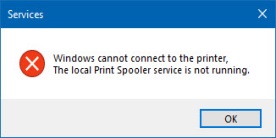
Fix Local Print Spooler Service Not Running
Fix the "local print spooler service is not running" error by restarting the spooler, clearing stuck print jobs, and updating printer drivers.

Fix Ready or Not Startup Crashes
Ready or Not keeps crashing on PC? Fix game crashes by updating graphics drivers, verifying game files, reducing background processes, adjusting settings, and checking system temperatures.

Fix SD Card Not Found on Windows
SD card not showing up in Windows 10 or 11? Fix detection issues by checking connections, updating drivers, assigning a new drive letter, enabling the card reader, or formatting the card.