





PC Help & How-To Articles

Fix Qualcomm Atheros QCA61x4A Driver Errors
A sudden Wi-Fi connection failure on your Windows PC may be linked to the Qualcomm Atheros QCA61x4A Wireless Network Adapter. You might notice that available wireless networks no longer appear, your connection drops unexpectedly, or Windows reports that the network adapter cannot start. These symptoms can occur after a Windows update, a driver installation, or changes to system power settings. Fortunately, the problem does not always indicate faulty hardware. This guide walks you through six troubleshooting methods to resolve Qualcomm Atheros QCA61x4A driver issues, from checking adapter settings and reinstalling drivers to using Driver Sentry for automatic driver detection and updates.
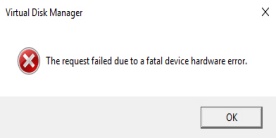
Fix "The Request Failed Due to a Fatal Device Hardware Error"
Seeing "The request failed due to a fatal device hardware error" when opening, copying, or transferring files usually means Windows is having trouble communicating with the affected storage device. The problem may involve a hard drive, SSD, external drive, or USB storage device and can be caused by bad sectors, connection problems, corrupted drivers, file system damage, or failing hardware. Because some causes can put your files at risk, important data should be backed up whenever the drive is still accessible. This guide explains how to diagnose the error and try several practical fixes before deciding whether the storage device needs to be replaced.

XINPUT1_3.dll Not Found? Try These Fixes
Trying to launch a game only to be stopped by an "XINPUT1_3.dll is missing" or "XINPUT1_3.dll was not found" message? This DLL is associated with older Microsoft DirectX components that many Windows games still rely on. When the required file is missing, corrupted, or unavailable to the program, the game may fail to start completely. Fortunately, you usually do not need to download individual DLL files from unknown websites. This guide explains several safer ways to fix XINPUT1_3.dll errors, including repairing DirectX and Windows system files, reinstalling the affected game, and using PcGoGo DLL Fixer to check for damaged or missing DLL components.

How to Fix Second Monitor Detection Issues
If your second monitor is connected but Windows 10 does not detect it, the problem does not necessarily mean the monitor is faulty. A loose HDMI or DisplayPort cable, incorrect display mode, disabled graphics adapter, or damaged display driver can all prevent Windows from recognizing an external screen. You may also notice that the monitor powers on but shows "No Signal," or that only one display appears in Windows settings. This guide covers several practical ways to fix a second monitor not detected on Windows 10 and restore your dual-monitor setup.

Random Computer Shutdowns? Try These Fixes
If your computer suddenly powers off without warning, especially during gaming, heavy workloads, or even normal browsing, it usually indicates a stability problem that should not be ignored. Unlike a normal Windows shutdown, the screen may instantly go black and the PC may restart or remain completely powered off. Overheating, an unstable power supply, faulty hardware, corrupted system files, malware, and problematic drivers are all possible causes. This guide explains how to troubleshoot a computer that shuts off randomly and identify whether the problem comes from Windows, drivers, power, temperature, or hardware.

Fix Mouse Right Click Not Working
When your mouse right click is not working on Windows, everyday tasks such as opening context menus, copying files, managing folders, or accessing application options can suddenly become difficult. The problem may affect only the right mouse button while the cursor and left click continue to work normally. Common causes include a worn or dirty mouse button, unstable USB or wireless connections, incorrect Windows mouse settings, outdated or corrupted drivers, power management settings, or system file problems. This guide covers practical troubleshooting methods to help identify the cause and restore the right-click function on your mouse.

Windows Device Manager Code 28 Troubleshooting Guide
Seeing "The drivers for this device are not installed. (Code 28)" in Windows Device Manager means Windows has detected the hardware but cannot find or load the driver it needs to work properly. The affected device may appear with a yellow warning icon and could be a network adapter, graphics card, audio device, USB controller, printer, or other hardware component. Code 28 commonly occurs after reinstalling Windows, connecting new hardware, removing a driver, or encountering a failed driver or Windows update. This guide explains several practical ways to fix the Code 28 error, install the missing driver, and restore normal device functionality.

Fix HP Laptop Power Light Blinking Issue
If your HP laptop is not turning on but the power light keeps blinking, the blinking indicator can provide an important clue about what is preventing the computer from starting. The problem may be related to the charger or battery, residual power, overheating, memory problems, display failure, BIOS corruption, or another internal hardware issue. In some cases, the laptop may actually be receiving power but cannot complete the startup process. This guide covers several practical troubleshooting methods to help diagnose the blinking power light and get your HP laptop working again.

Fix Mouse Lights On but Not Working
When your mouse lights up but does not work, it usually means the device is receiving power but Windows is not properly detecting or communicating with it. The cursor may remain frozen, clicks may not respond, or the mouse may disappear completely from Device Manager even though its LED stays on. This problem can be caused by a faulty USB connection, damaged or outdated mouse drivers, Windows power-saving settings, wireless connection issues, or hardware failure. This guide covers several practical solutions to help identify the cause and get your mouse working normally again.

WiFi Not Connecting on Laptop: Causes and Fixes
A laptop not connecting to WiFi can quickly interrupt work, gaming, streaming, or everyday browsing. You may find that your laptop cannot detect wireless networks, refuses to connect to a known WiFi network, repeatedly disconnects, or shows "No Internet" even when other devices work normally. These problems can be caused by router issues, incorrect Windows network settings, a disabled WiFi adapter, outdated or corrupted network drivers, or hardware problems. This guide explains the most common causes and provides practical troubleshooting methods to help restore your laptop’s WiFi connection and keep it stable.